
Convert Flash CS4 to HTML scalable using Animate CC 2017
I have this interactive animation .fla file that I created in Flash CS4 and loaded into animate CC 2017. It executes fine in CC 2017 and I can save the output as a .SWF if I want to. Since our target audience uses different platforms, ie: iphones, tablets,laptops etc. I want the output to be scalable. I tried publishing the output as an HTML wrapped file but all that did was create a HTML wrapped .swf file. Although it works on the internet the output is not scalable. I am sure there is a way to create a scalable output for this interaction/animation using animate but so far, haven't been able to find it. Note when I publish the output as an HTML file rather than create an HTML package folder with javascript and the other two files that are standard, it doesn't do that. What am I doing wrong? Is this even possible? Please help!!!
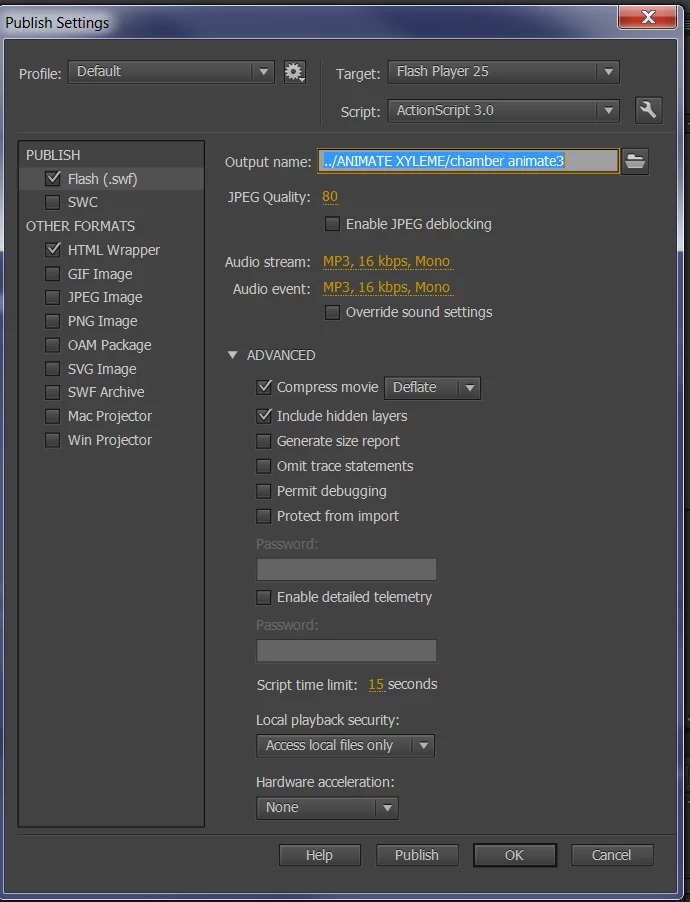
Note below are the options that I am presented with when I publish in animate. Note that it doesn't show a javascript option. The icon represents the file I end up with, (a .swf file wrapped I HTML)



 AdChoices