Participant
March 17, 2017
Answered

Converting to symbol messes up line order

  • March 17, 2017
  • 2 replies
  • 728 views

Hi everyone,

I'm very new to Flash and I am trying to make a character for an animation. I built the body and have it filled in. I want to convert it into a symbol for easy rigging.

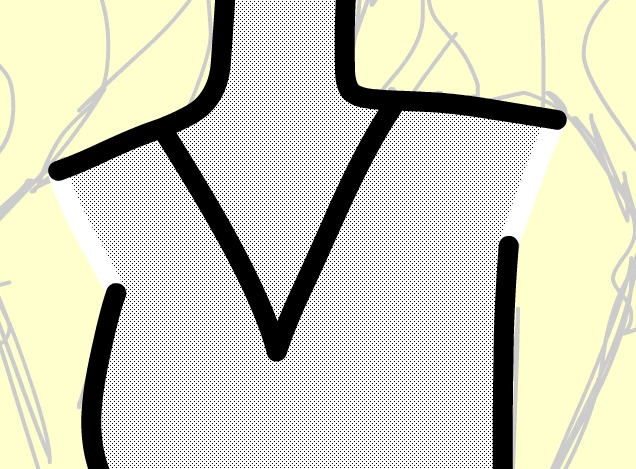
Here is a sample of the chest for my character (the inner part is selected just to show the white lines on the edges of the arms)
When I select everything and convert into a symbol, my line arrangement gets all messed up and the white border lines for the arms are moved to the front.
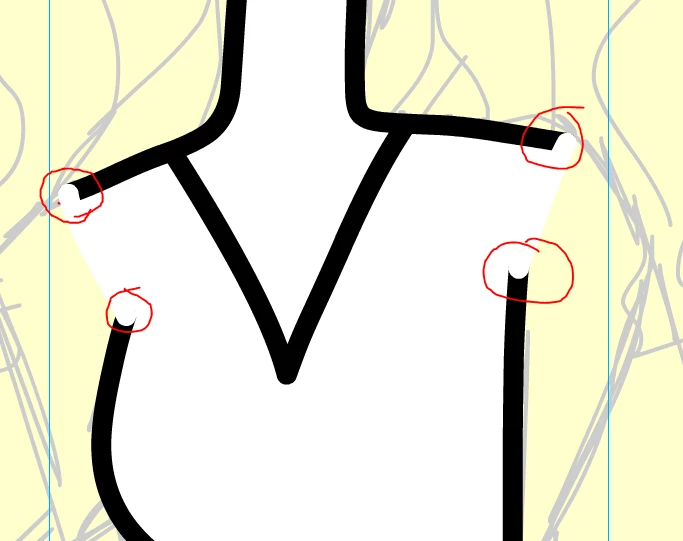
What am I doing wrong?

    This topic has been closed for replies.
    Correct answer kglad

    you probably didn't do anything wrong.  but to remedy, copy the frame/layers that contain your torso, click insert>new symbol>movieclip and paste the frame/layers.

    you'll now have a movieclip with all the graphics at the same depth as your original drawing.

    2 replies

    ashtonkAuthor
    Participant
    March 17, 2017

    Thank you so much! That fixed the issue!!!!

    kglad
    Community Expert
    Community Expert
    March 17, 2017

    you're welcome.

    kglad
    Community Expert
    kgladCommunity ExpertCorrect answer
    Community Expert
    March 17, 2017

    you probably didn't do anything wrong.  but to remedy, copy the frame/layers that contain your torso, click insert>new symbol>movieclip and paste the frame/layers.

    you'll now have a movieclip with all the graphics at the same depth as your original drawing.