


Known Participant
November 25, 2020
Question

copying text from Photoshop to Animate

  • November 25, 2020
  • 3 replies
  • 317 views

Getting a weird bug when coping text from Photoshop and pasting it into Animate on the Mac. It adds these rectangle characters. Tried different fonts too, same issue.and you can't delete them... it just pushes it out of the tet field...

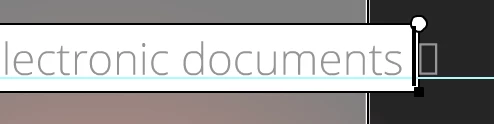
any ideas?


This topic is closed to new replies. Start a new post to keep the conversation going.

3 replies

kglad
Community Expert
Community Expert
November 25, 2020

don't copy and paste text from photoshop.


if you want to maintain ps's formatting, you should publish from ps and then import into animate, though this would be less satisfactory than using vector text (eg, illustrator) to publish and import, or if you don't care about the formatting, use a plain text editor (either pasting from ps or creating de novo) to copy and paste.

Known Participant
November 25, 2020

I'm purely wanting the text content to avoid errors or typos from re-typing (handy for other languages too), not to preserve format or anything. This is already set up in Animate. I did try using another word program and it does get around the bug, just this is another step, slowing the work flow. 

kglad
Community Expert
Community Expert
November 25, 2020

so copy from wherever (including ps) and paste into a plain text editor.  then copy from the text editor and paste into wherever (including animate).