Participant
March 8, 2018
Answered

Create containers with library movieclip using for loop.

  • March 8, 2018
  • 2 replies
  • 821 views

Hello,
I can create multiple shape using for loop, like this:-
for (var j = 0; j < 15; j++) {

grid = new createjs.Shape();

grid.graphics.beginStroke("#252525").beginFill("white").drawRect(0, 0, 50, 50).endFill();

grid.set({

x: 100,

y: j * 50

})

stage.addChild(grid);           

};

But when I tried to create container with library movieclip, it is not working.
I googled but didn't find solution. here is the code I am using:-

btnForward = new lib.btnForward(); // reference from library linkage element

for(var i = 0; i < 10; i++){

    var buttonF = new createjs.Container();

    buttonF.cursor = "pointer";

    buttonF.x = 513;

    buttonF.y = 82 + (i * 40);

    buttonF.addChild(btnForward);

     stage.addChild(buttonF);

}
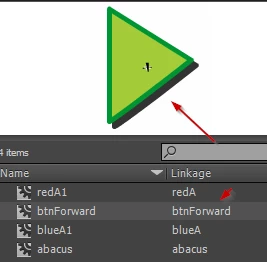
Thanks

This topic has been closed for replies.
Correct answer JoãoCésar17023019

Hi.

Try this:

for (var i = 0; i < 10; i++)

{

    var buttonF = new createjs.Container();

    var btnForward = new lib.btnForward();

    buttonF.cursor = "pointer";

    buttonF.x = 513;

    buttonF.y = 82 + (i * 40);

    this.addChild(buttonF);

    buttonF.addChild(btnForward);

}

Regards,

JC

2 replies

UDESCO
Participating Frequently
March 9, 2018

Yes, the main timeline on Canvas is not referred to as 'stage'. It's exportRoot or simply use this as described above.

JoãoCésar17023019
Community Expert
JoãoCésar17023019Community ExpertCorrect answer
Community Expert
March 8, 2018

Hi.

Try this:

for (var i = 0; i < 10; i++)

{

    var buttonF = new createjs.Container();

    var btnForward = new lib.btnForward();

    buttonF.cursor = "pointer";

    buttonF.x = 513;

    buttonF.y = 82 + (i * 40);

    this.addChild(buttonF);

    buttonF.addChild(btnForward);

}

Regards,

JC