



enicolle
Participant
November 6, 2020
Answered

Create keyframe when altered

  • November 6, 2020
  • 2 replies
  • 366 views

Hi all,

I recently switched to a new computer and a I have the most recent version of Animate and a feature that was an integral part of my work flow is missing... when I make an alteration to a frame, it does not automatically become a key frame. I cannot figure out how to turn this on. 


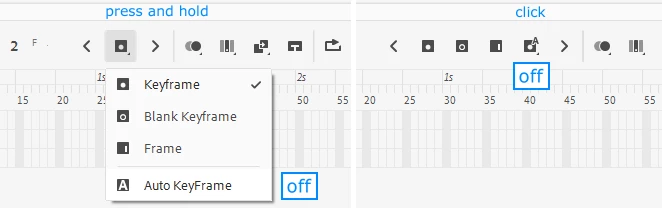
In the frame picker I see I can choose the option to create keyframe when I pick a frame, but not when I transform or move an item. 


Does anyone know how to turn this mode back on so that any alteration I make to a frame automatically turns it into a keyframe? I feel like I must be missing something directly in front of my face.

    This topic is closed to new replies. Start a new post to keep the conversation going.
    Correct answer n. tilcheff

    Hi mate,


    Just switch auto keyframe on from the timeline (opposite to what the picture shows):

    2 replies

    n. tilcheff
    n. tilcheffCorrect answer
    Legend
    November 6, 2020

    Hi mate,


    Just switch auto keyframe on from the timeline (opposite to what the picture shows):

    Nick - Character Designer and Animator, Flash user since 1998 | Member of the Flanimate Power Tools team - extensions for character animation
    enicolle
    enicolleAuthor
    Participant
    November 6, 2020

    Ahhhh I knew it would be so simple! Thanks!!!