


Participating Frequently
November 20, 2020
Question

create responsive layout

  • November 20, 2020
  • 2 replies
  • 329 views

Hello everybody.


I am new to animate cc. I wonder how I can control the responsive behaviour of my project.

I could not find anything in the animate help or tutorials.

1. Where can I get more information?


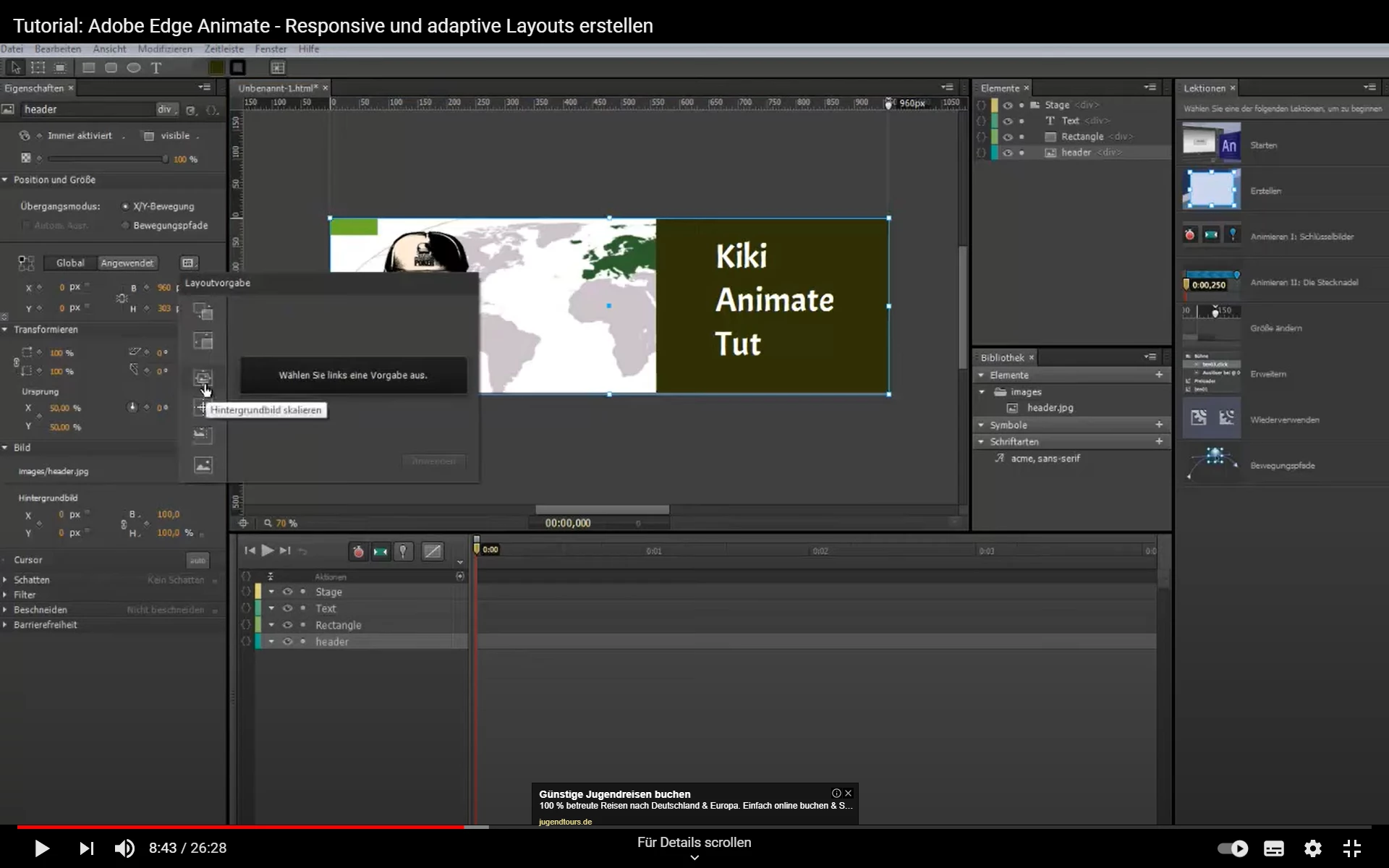
2. In this OLD Animate Edge tutorial (screenshot) there is a button in the horizontal ruler at 950px.

It  controls the width of the stage. How can I make this button appear?


3. How can I make different output sizes? For PC for example width 1024px  x  height 300px.

And for Smartphone widht 360px x  height 600px.


This topic is closed to new replies. Start a new post to keep the conversation going.

2 replies

Legend
November 21, 2020

Animate doesn't have any built-in functionality for responsive layout.

mike15A9Author
Participating Frequently
November 23, 2020

Wow. Ok.

But Animate ist for building web content. There must be any solution.

Plugins? Workaraounds?


And how can I activate the marker for resizing the stage width (see new sreenshot) that I saw in Animate Edge?

Or has it been removed in later Animate versions?