


Createjs - dragging an object within a bounding box
Hello,
I'm working in Adobe Animate CC and I'm trying to use javascript to create an interaction where the user drags an object along the Y axis, but the object remains within a certain area, or 'bounding box'. I was able to get the object (in this case, a movie clip with the instance name "handle") to be moved up and down with the mouse using this code:
this.handle.addEventListener("pressmove", fl_MouseClickHandler_2.bind(this));
function fl_MouseClickHandler_2(evt){
evt.currentTarget.y = evt.stageY;
}
I only want the object to move along the Y axis, so this worked really well. However, in my attempt to restrict how far the 'handle' will slide, I haven't been successful (I don't really know how to write code).
I found a good resource here: Text Drag (StackOverflow) - JSFiddle and have tried to adapt this code to meet my needs - this is how my code turned out -
var sliderBoundary = new createjs.Shape();
sliderBoundary.graphics.beginStroke("#999")
.setStrokeStyle(2)
.drawRect(623, 212, 143, 282.85);
var bounds = sliderBoundary.getBounds();
var handleBounds = this.handle.getBounds();
this.stage.addChild(sliderBoundary);
this.handle.addEventListener("pressmove", fl_MouseClickHandler_2.bind(this));
function fl_MouseClickHandler_2(evt){
evt.currentTarget.y = Math.max(bounds.y, Math.min(bounds.y+bounds.height-handleBounds.height, evt.stageY));
this.stage.update();
}
this.handleBounds.x = bounds.x, this.handleBounds.y = bounds.y;
this.stage.update();
When I test the project in Chrome - all the objects still show up, however the handle does not slide at all anymore.
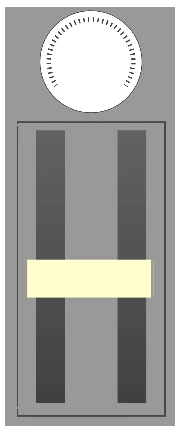
Here's an image to give a better idea of what I"m trying to achieve - The lighter colored rectangle I want to slide up and down along the Y axis by dragging/moving the mouse, but I'd like it to stay contained within the darker stroke rectangle. If you can offer any advice on how to achieve this it would be much appreciated!
 AdChoices