
Inspiring
November 5, 2018
Answered

createjs Tween Alpha issues

  • November 5, 2018
  • 1 reply
  • 981 views

Hey,

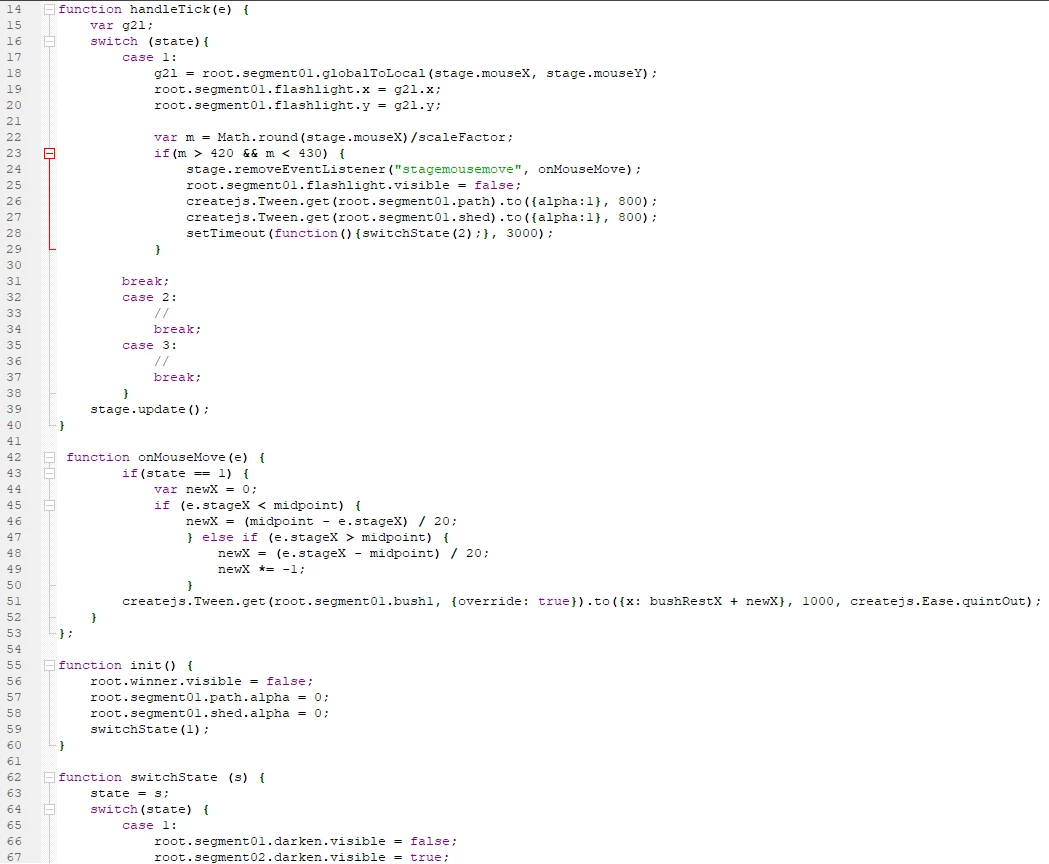
I'm been following a tutorial on lynda to learn html canvas but, I can't figure out what i'm doing wrong since I've gone through the video multiple times and I copied the code exactly the same as they had it.

Anything I hide with the root.segment01.shed.alpha = 0;  or  root.segment01.darken.visible = false;

doesn't come back when attempting to show them with again

createjs.Tween.get(root.segment01.path).to({alpha:1}, 800);  or  root.segment01.darken.visible = true;

Is there something special you need to do get something invisible to become visible again?

The only way i've been able to do it, is make a movie clip have a alpha of 0 in Animate instead of programming it. I feel like that's not how it's supposed to work
This topic has been closed for replies.
Correct answer darckraven

thanks,

but i tried that originally and it didn't work

I had to set the movieclips to alpha 0 or visible false manually  instead of having the javascript do it. It was literally the only way the layers would change alpha or visibility back to show.

1 reply

JoãoCésar17023019
Community Expert
Community Expert
November 6, 2018

Hi.

Make sure that the same instance has the alpha with a value bigger than 0 and that the visible property is set to true.

And you can set both properties at the same time with the to function.

createjs.Tween.get(target).to({alpha:1, visible:true}, 1000);

Regards,

JC

darckravenAuthorCorrect answer
Inspiring
November 7, 2018

thanks,

but i tried that originally and it didn't work

I had to set the movieclips to alpha 0 or visible false manually  instead of having the javascript do it. It was literally the only way the layers would change alpha or visibility back to show.