Inspiring
April 15, 2025
Answered

Creating a clickTag in Adobe Animate

  • April 15, 2025
  • 1 reply
  • 1823 views

Hey everyone. This seems to be a monumentally PIA that has been asked a bunch over the years, but I can't seem to get a straight answer. 

How do I add a clickTag to a single button in Adobe Animate? This button/layer is a graphic from an imported Adobe Illustrator stage.

I've seen the option to go in and edit the HTML manually after the fact but that seems to wrap the entire creative in a clickTag. I just want the button to accurately have a clickTag on it. 

    Correct answer Ben Fox

    Hi Zach, would be great to know if you were successful with this!


    Ok so to give a bit more clarity to the final answer:

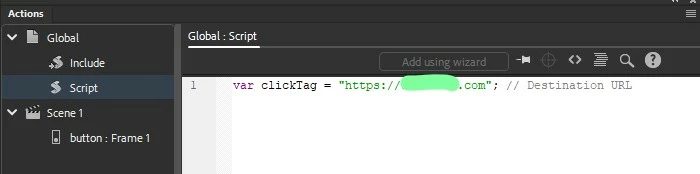
    • In the Actions window - on the "Global>Script" pane you want to define the clickTag variable by putting this code:
    var clickTag = "https://www.example.com"; // Destination URL​
    • Then:
      • Go to frame 1
      • select the button
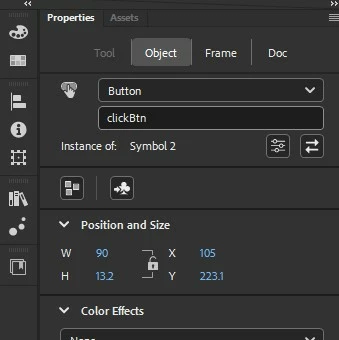
        • name the button clickBtn (or it can be whatever, just needs to be reflected in the code below)
        • select "Button" category from the dropdown menu in properties>object (see screenshot below)
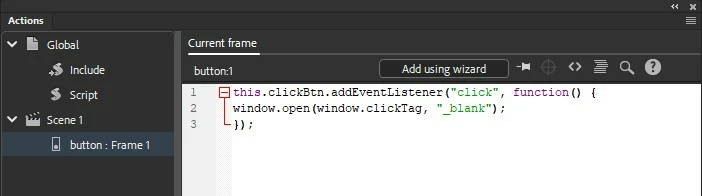
      • paste the following code on the button - once you select the button and paste the code in the actions window, it'll automaticallyh add a "Scene 1>button" field in the Actions panel (see screenshot below)
    this.clickBtn.addEventListener("click", function() {
    window.open(window.clickTag, "_blank");
    });


    And that should be it! Example images attached


    1 reply

    Mario_CR
    Community Expert
    Community Expert
    April 16, 2025

    Instead of a graphic, make it a button and add the clicktag with the Actions wizard

    (you may need to edit this in the HTML later if you want to make it Google compliant). 

    https://www.youtube.com/watch?v=pjajID8WvbI


    Ben FoxAuthor
    Inspiring
    April 16, 2025

    Yeah unfortunately that's not a "clickTag" setting as defined by Google. clickTags let you edit the variable after the fact via Google Ad Manager 360 - this method does not do that. 

    It might just not be possible in Animate natively as it's just an HTML file encapsulating a JS file. So manually editing it (or at least making a publishing template) might be the only way.

    Mario_CR
    Community Expert
    Community Expert
    April 16, 2025

    Yes, you need to manually edit the html and add a clicktag variable after the fact per Google's HTML5 guidelines:

    https://support.google.com/admanager/answer/7046799?hl=en#clicktag

    But the point is that with this method (and by adding the clicktag variable), the click area of the creative is limited to the button's dimensions.