
murkf81204167
Known Participant
April 1, 2019
Answered

Creating a simple wavy line in Animate CC

  • April 1, 2019
  • 10 replies
  • 6101 views

Hi,

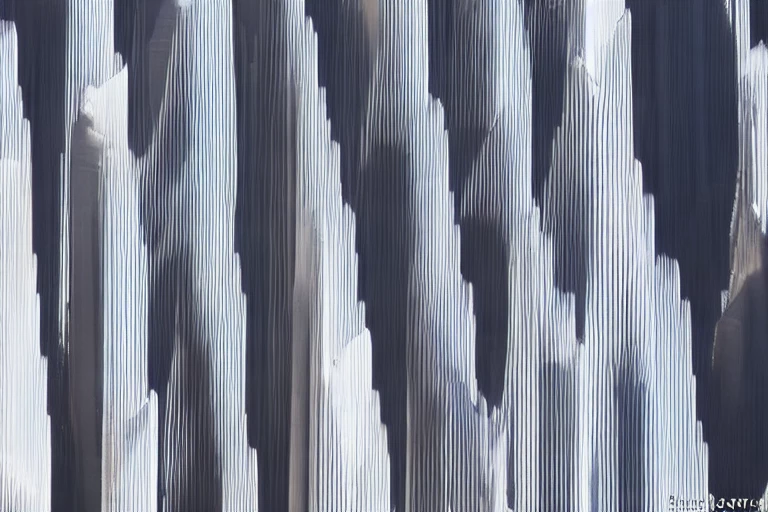
Is there a way to make this type of wavy line in Animate CC and do it as precise as possible?

So far the only way I can think of is to "click and drag" the wavy parts manually which doesn't sound accurate at all.

Thanks!

    This topic is closed to new replies. Start a new post to keep the conversation going.
    Correct answer ClayUUID

    Nowhere did he say that he wanted to animate it. My interpretation is that he wants to draw a wavy line like that.

    In the absence of importing from software with fancier drawing tools, I'd just draw a single satisfactory-looking curve, then duplicate and flip that curve to create the rest of the wave pattern.

    10 replies

    avid_body16B8
    Legend
    April 2, 2019

    OK. I quickly created a pattern brush for demo. not perfect but you can see the process:

    1- create the vertical lines at equal distance

    2- add a line (different color)

    3- drag the lines to make curves

    4- drag a copy and copy it again.

    5- right click and select make paint brush

    6- in panel  drop down select brush pattern

    avid_body16B8
    Legend
    April 2, 2019

    Another way would be to make a double line brush and then use it to make the curves and copy them.

    murkf81204167
    Known Participant
    April 25, 2019

    Your suggestions have been nothing but extraordinary. Thanks for the insights into Animate!

    Best regards,

    Murk

    _keyframer
    Community Expert
    Community Expert
    April 2, 2019

    There's a trick to this where you don't actually bend the line at all. In fact you are halfway there to animating this effect. What you want is to create a masked area that is shorter than this wavy line and simply tween this wavy line across it. Since the mask hides the left and right edges, our brains will think it's a wavy line. I recently animated exactly this to create the effect of liquid moving in a glass beaker.

    Here's a video that shows what I did and how it works (you may need to give it a little time to process)

    https://drive.google.com/open?id=1YZDI0kYmYKhSxx09w8vBFflHpMtKmzLM

    The source file is here if you want a closer look:

    Liquid.fla - Google Drive

    Animator and content creator for Animate CC
    ClayUUIDCorrect answer
    Legend
    April 2, 2019

    Nowhere did he say that he wanted to animate it. My interpretation is that he wants to draw a wavy line like that.

    In the absence of importing from software with fancier drawing tools, I'd just draw a single satisfactory-looking curve, then duplicate and flip that curve to create the rest of the wave pattern.

    avid_body16B8
    Legend
    April 2, 2019

    rather a pattern brush.

    Asymetrical
    Inspiring
    April 1, 2019

    Honestly the easiest way is to take that actual artwork and trace the bitmap. You can get there by going to Modify/Bitmap/Trace Bitmap

    Otherwise what I would do is take a pencil line and place points where it bends and make it manually.