K7S
Inspiring
October 18, 2022
Question

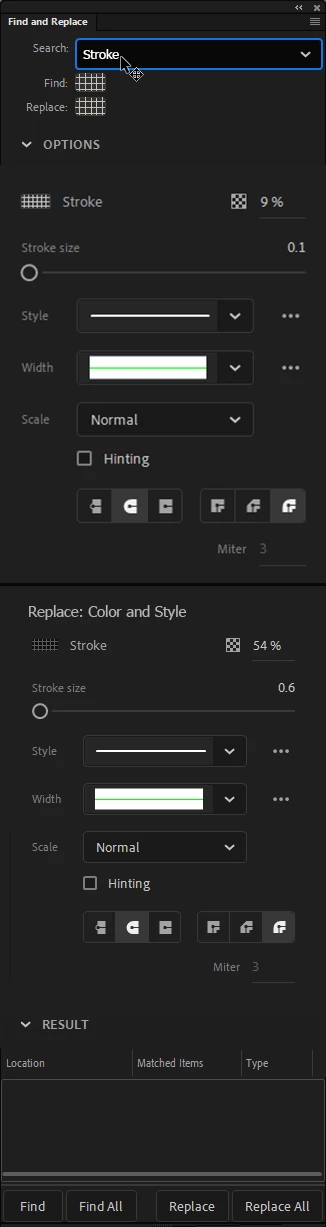
Ctrl + F : Find & Replace Stroke Width

  • October 18, 2022
  • 2 replies
  • 321 views

When using this tool is there a way to convert all the strokes on the canvas to smart objects?

    This topic has been closed for replies.

    2 replies

    Community Expert
    October 18, 2022

    You can select all strokes and group them into an object by going to modify and clicking group or the shortcut is cmd+G mac or clt+G windows. But there is no smart object in animate. That's only in photoshop.


    If that don't work you can always ask for smart object to be added to animate. 

    https://www.adobe.com/products/wishform.html


    K7S
    K7SAuthor
    Inspiring
    October 18, 2022

    Thank you, what I was asking for doesn't exist and grouping them is close to what I need but the ideal Animate canvas object for preserving editable attributes with quick access is the Union function. There is a bindable hotkey in this recent version of animate called "Union" that will convert shapes on the canvas into objects (smart?) I'm glad there is a hotkey for this now as I use this feature a lot for fast access while preserving the editable qualities of grouped-like objects such as my  strokes/fills. It's hard to manage my files when I have hundreds of these Union objects on the stage, performance takes a huge hit. I've found work arounds - grouped objects seem to perform much better and manually breaking down my strokes into fills performs even better. But it's always been a lot of manual labor.

    Community Expert
    October 18, 2022

    No prob. You should share your work around in case others want to do what your doing.

    kglad
    Community Expert
    Community Expert
    October 18, 2022

    is this a photoshop question?

    K7S
    K7SAuthor
    Inspiring
    October 18, 2022

    It is a photoshopped image... We like to have fun here... This thread is actually a veiled suggestion for a feature I thought would be useful. Is there a place on this forum I can submit a suggestion?

    kglad
    Community Expert
    Community Expert
    October 18, 2022