
desperate! need help with roll_over & roll_out functions
I desperately need help!!!
This is my very first game: http://www.newgrounds.com/portal/view/696943
It's a dark point 'n click game.
Unfortunately there's a problem with the roll_over and roll_out functions. I really hope someone is going to give me an easy solution. I am pretty new to coding and I seem to be pretty dumb, because I already finished the whole game with hundreds of complex movie clips...
The problem is this:
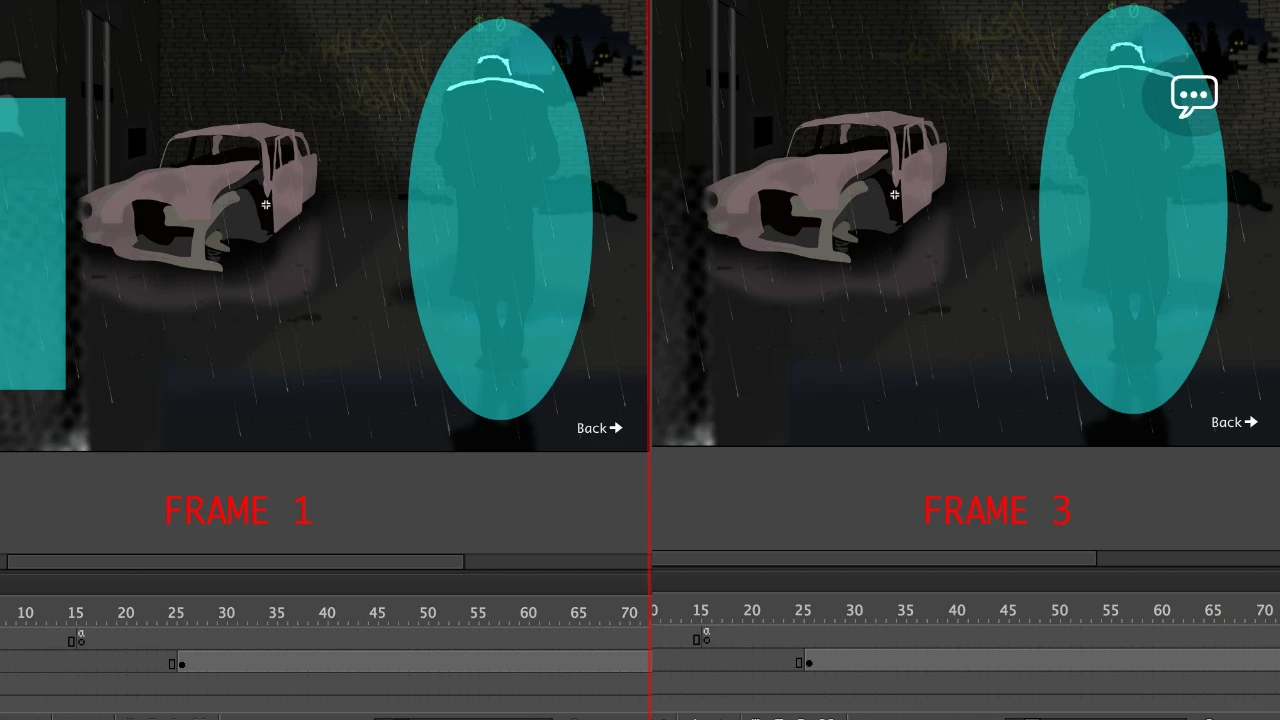
In many movie clips there's an invisible button, eg in frame 1: if you roll_over a man there's an invisible button that gets you to frame 3 where options appear, eg "talk". (see the attached pic)
In frame 3 there's the same invisible button. When you roll_out you go back to frame 1. Also there's the button "talk", when you roll_out you also get to frame 1. (see the attached pic)
Now, when people roll_out too quickly the whole thing stucks at frame 3 and you have to roll_over and _out again to get back to frame 1.
Here's the code in frame 1:
stop();
InvisibleMan.addEventListener(MouseEvent.ROLL_OVER,IMan);
function IMan(event:MouseEvent):void
{
gotoAndPlay(3);
}
And this is the code in frame 3:
stop();
InvisibleMan.addEventListener(MouseEvent.ROLL_OUT,OutMan);
function OutMan(event:MouseEvent):void
{
gotoAndPlay(1);
}
ManTalk.addEventListener(MouseEvent.ROLL_OUT,OutManTalk);
function OutManTalk(event:MouseEvent):void
{
gotoAndPlay(1);
}
And I have this code everywhere, so hundreds or even thousands of times...
I already tried to increase the fps. It helps a little but I can't increase it more because otherwise all the animations (txts, et cetera) would be too fast and it would take me weeks to make them slower...
The problem doesn't occur all the time, only when you roll_out very quickly.
Can someone pls help?


 AdChoices