
Participant
November 10, 2019
Answered

Disabling hidpi screens adn responsive scaling

  • November 10, 2019
  • 2 replies
  • 936 views

Hey there, 

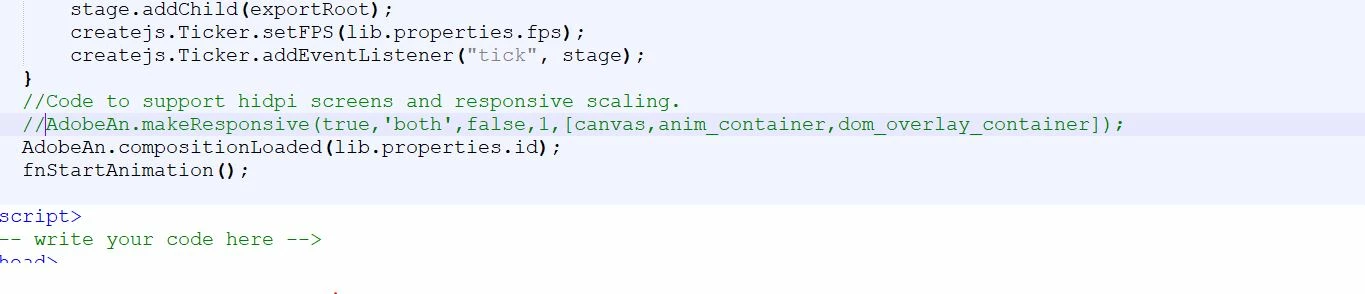
I am using Animatecc in a web app where I created an API that adds some DomElements to the animation and replace the dynamic texts initially inserted. the problem is that when zooming in or out, the transform matrix is being recalculated by the function

makeResponsive which tries to adjust the canvas width and height and all elements within the animation_container. 

My question is whether there is an option to disable this in Animate or should I comment this line of code each time I am generating an animation to make it work. 

thank you. I tried to disable the responsiveness in the publish options but it didn't work.
 

This topic has been closed for replies.
Correct answer FUNE78

You could go to publish settings, go to HTML/JS and export there the standard publishing template. There you can remove the following code:

//Code to support hidpi screens and responsive scaling.
$RESP_HIDPI

2 replies

FUNE78Correct answer
Inspiring
November 11, 2019

You could go to publish settings, go to HTML/JS and export there the standard publishing template. There you can remove the following code:

//Code to support hidpi screens and responsive scaling.
$RESP_HIDPI

Participant
November 13, 2019

Thank You. That what I was looking for.

Preran
Community Manager
Community Manager
November 11, 2019

I found a forum post with a solution https://community.adobe.com/t5/Animate/How-to-disable-High-DPI-scaling-in-Animate/td-p/9976467 Can you check and let me know? 

Inspiring
November 11, 2019

The piece of code should tell you it's a createjs canvas export and not a userinterface problem.