
Participating Frequently
May 10, 2019
Answered

displaced brush & pencil strokes & never-ending paint brush strokes
  • May 10, 2019
  • 3 replies
  • 973 views

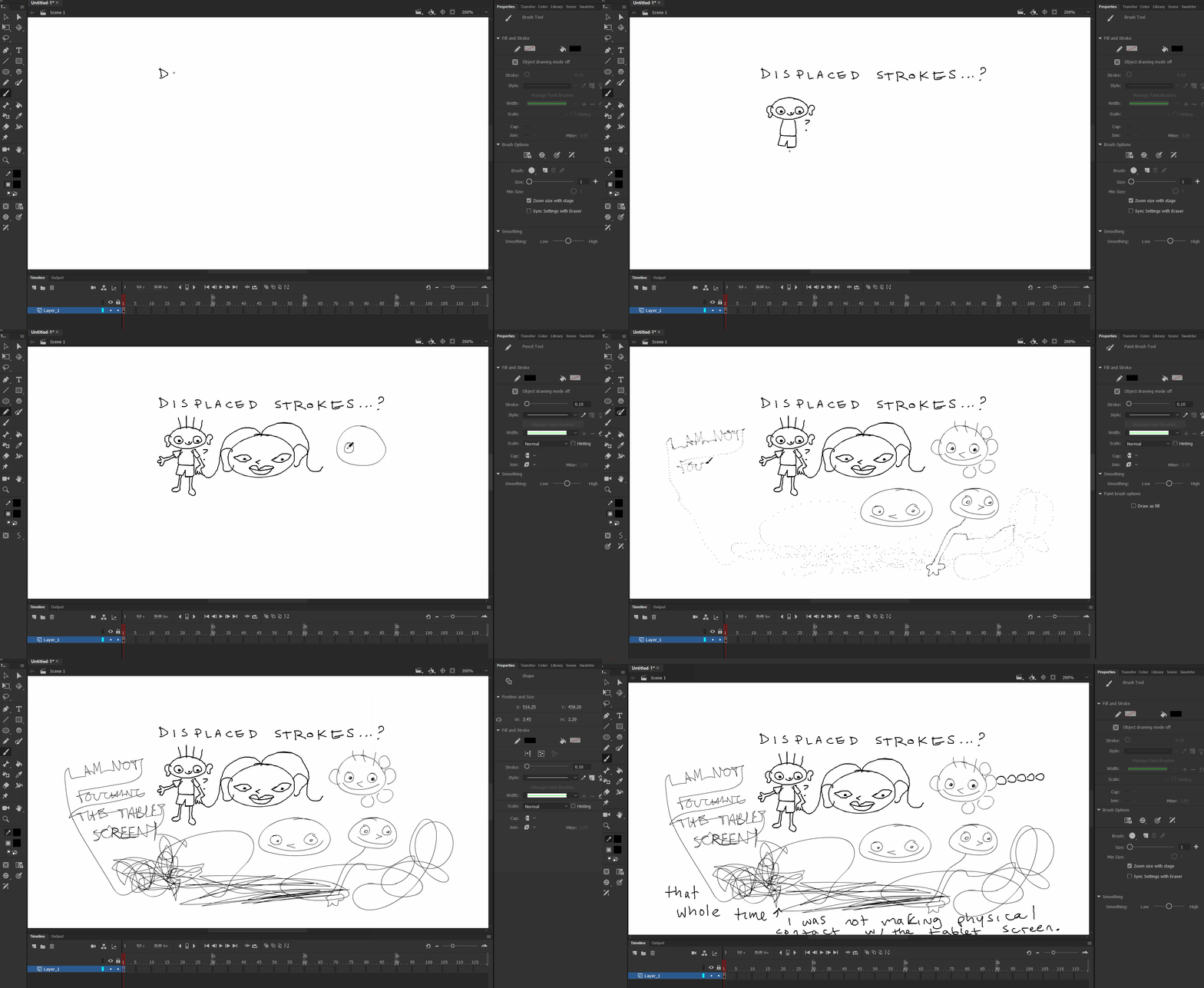
above gif shows issues i am having with all 3 drawing tools in aacc19.2:

displaced brush strokes, which may appear slight but are very hindering when animating characters.  also shows that the paint brush is creating endless strokes once tablet pen has lifted from screen.

Operating on a Cintiq Companion

Currently AnCC 19.2

19.1, 19.0, and have all shared the same issue.

Windows 10 Pro, 64-bit, OS 17763.437

Updated Wacom driver.  issue does not occur in any other cc program.  just changed my pen nib, too.

This topic has been closed for replies.
Correct answer n. tilcheff

As far as I know the solution is to keep your display scaling at 100%.

This is adjusted at OS level.


3 replies

Participant
May 15, 2023

It's been like 4 years, but have you found a solution to this? I'm going mad trying to figure out how to fix this.


n. tilcheff
n. tilcheffCorrect answer
Legend
May 15, 2023

As far as I know the solution is to keep your display scaling at 100%.

This is adjusted at OS level.


Nick - Character Designer and Animator, Flash user since 1998 | Member of the Flanimate Power Tools team - extensions for character animation
Participant
May 15, 2023

YOU BEAUTIFUL MAN!
Thank you for your service Nick I will forever appreciate you 🙂

Community Expert
May 10, 2019

Have you calibrated your Cintiq?

lelalu_Author
Participating Frequently
May 10, 2019

actually, something interesting about this that i found yesterday...

i can calibrate the pen screen through the Wacom Tablet settings fine, but if i set out to do it through the Windows settings, i cant even attempt to calibrate.  selecting both "Setup" and "Calibrate" here for "..."Pen" or "Touch" leads me to the crosshair calibration screen that prompts me to tap the screen, but does not respond to my touch input (pen tip or finger) despite my pen operating fine on the screen in every other application (besides AAnimate of course).  i cant even escape the crosshair calibration screen because the whole calibration window does not respond to touch input, so i have to turn the computer off.  would deleting something specific in the Device Manager window or other fix this?

lelalu_Author
Participating Frequently
May 12, 2019

if anyone browsing this thread has any suggestions please let me know, i need to be using Animate professionally right now.  thank you

n. tilcheff
Legend
May 10, 2019

Hi mate,

I remember your topic from a few days ago...

This looks terrible!

Must be maddening!

Try to also post in the Companion forums.

Have you tried different versions of Animate? Maybe even Flash CS6?

You can have multiple versions installed at the same time.

It will be good to be able to isolate the problem - whether it is all Flash / Animate versions or only the most recent ones, whether it's the Wacom driver and so on.

Anyway... you have my sympathy.

Unfortunately I'm worried that no one will be able to help you here

Nick - Character Designer and Animator, Flash user since 1998 | Member of the Flanimate Power Tools team - extensions for character animation
lelalu_Author
Participating Frequently
May 10, 2019

ill take your suggestion and see if its another version.  and thank you, you helped as you could before, no big deal