Answered

This topic is closed to new replies. Start a new post to keep the conversation going.
the shape you created either:
1. did not have a stroke when created, so when you return to edit it, you can't edit the stroke.
recreate the shape and you'll see a stroke option. eg, after selecting the rectangle tool (and before drawing), this could be in the properties panel
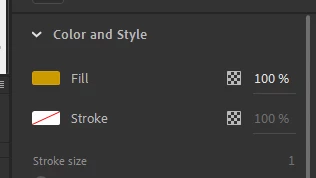
and shows no stroke is being created. if you change that before drawing, a stroke will be created which can then be later edited.
2. does have a stroke but you only clicked the fill when returning to edit. ie, double click that reactangle and you'll select both the fill and stroke, if there is one.


Sign up
Already have an account? Login
To post, reply, or follow discussions, please sign in with your Adobe ID.
Sign inSign in to Adobe Community
To post, reply, or follow discussions, please sign in with your Adobe ID.
Sign inEnter your E-mail address. We'll send you an e-mail with instructions to reset your password.
 AdChoices