Known Participant
February 21, 2023
Answered

Drag along the custom line (HTML5)

  • February 21, 2023
  • 3 replies
  • 2229 views

Hi,

How to make movieclip (red circle) drag along the path (black line), as shown in picture below? HTML5.

Need some help, please....
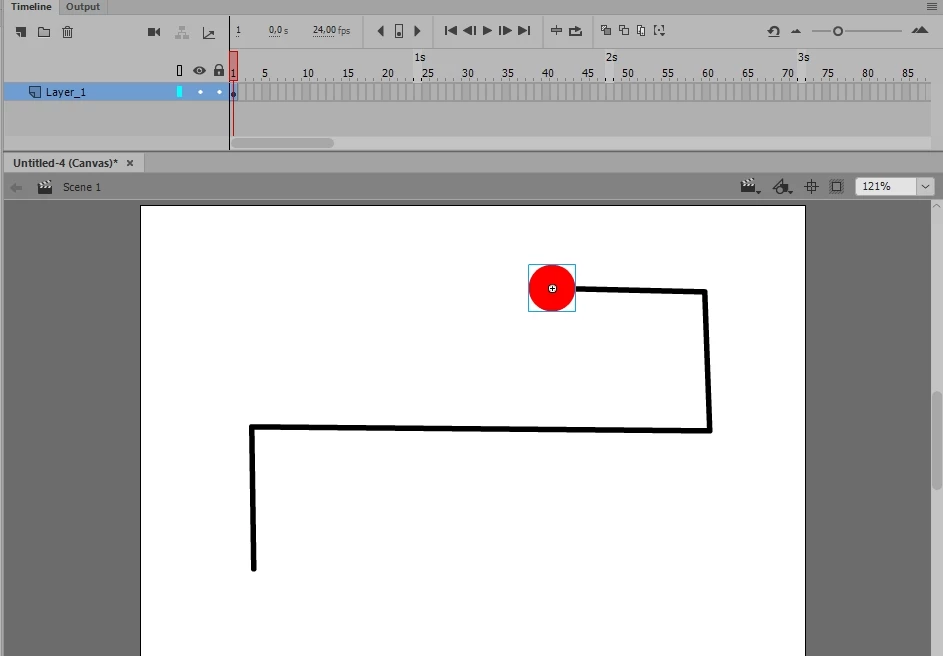
    This topic has been closed for replies.
    Correct answer Vladin M. Mitov

    Hi,

    Here is a ZIM tutorial about how to drag an object, restricted to an arbitrary Bezier spline.

    If you are not familiar with ZIM library, here is a tutorial how to start with Animate + ZIM.


    3 replies

    Vladin M. Mitov
    Vladin M. MitovCorrect answer
    Inspiring
    February 21, 2023

    Hi,

    Here is a ZIM tutorial about how to drag an object, restricted to an arbitrary Bezier spline.

    If you are not familiar with ZIM library, here is a tutorial how to start with Animate + ZIM.


    - Vlad: UX and graphic design, Flash user since 1998Member of Flanimate Power Tools team - extensions for character animation
    Known Participant
    February 22, 2023

    Wow, this is amazing...

    Dr Abstract
    Known Participant
    February 28, 2023

    ZIM has industry-leading drag along path.  See https://zimjs.com/nio for more features.  This was in ZIM NIO (version 9) we have now passed that by six versions so there are more features since then.  The general format is:

    new Circle().addTo().animate({
      props:{path:new Squiggle().center()},
      drag:true
    }
    Squiggle() can accept an SVG path or you can make one here https://zimjs.com/paths - note the docs on Squiggle https://zimjs.com/docs.html?item=Squiggle - for a closed loop you can use Blob.

    Here is an app that uses the dragging on path https://zimjs.com/groovity 

    Colin Holgate
    Inspiring
    February 21, 2023

    Select the line and do a Cut. Right-click on the layer that the circle is in, and choose Add Classic Motion Guide. The circle layer will then show indented. Click on the guide layer that was created, and Paste, to put the path line into that layer.

    Now create a later frame, say at frame 24, so that the two layers are one second long. Make the last frame of the circle layer be a keyframe, then right-click in the span for that layer and choose Create Classic Tween.

    Go to the first frame oc the circle layer, and move the circle until it snaps to the start end of the line. Go to the last keyframe of the circle layer, and drag the circle until it snaps to the other end of the line.

    The circle should now animate along that line.

    Known Participant
    February 21, 2023

    not with guide layer, I need the html5 code

    kglad
    Community Expert
    Community Expert
    February 21, 2023

    you want the user to drag the red disk and have its path restricted to the line?

    Known Participant
    February 21, 2023

    Yes, exactly.

    kglad
    Community Expert
    Community Expert
    February 21, 2023

    there, at least, 3 ways i can think of to do that, but none of them are easy.


    i think the easiest would be to create a movieclip with the disk animating across the timeline with its path restricted to that line.  there are several ways to do that, including one suggested by @Colin Holgate .


    once that's done, you could encode drag and drop for the disk based on the mouse distance from the red disk and determine red disk frame based on that distance.
