
Drag and Drop - change appearance of object when dropped
Hi everyone.
I'm making a game wherein the user has to drag the object to its correct position. Please check this screenshot of my game:
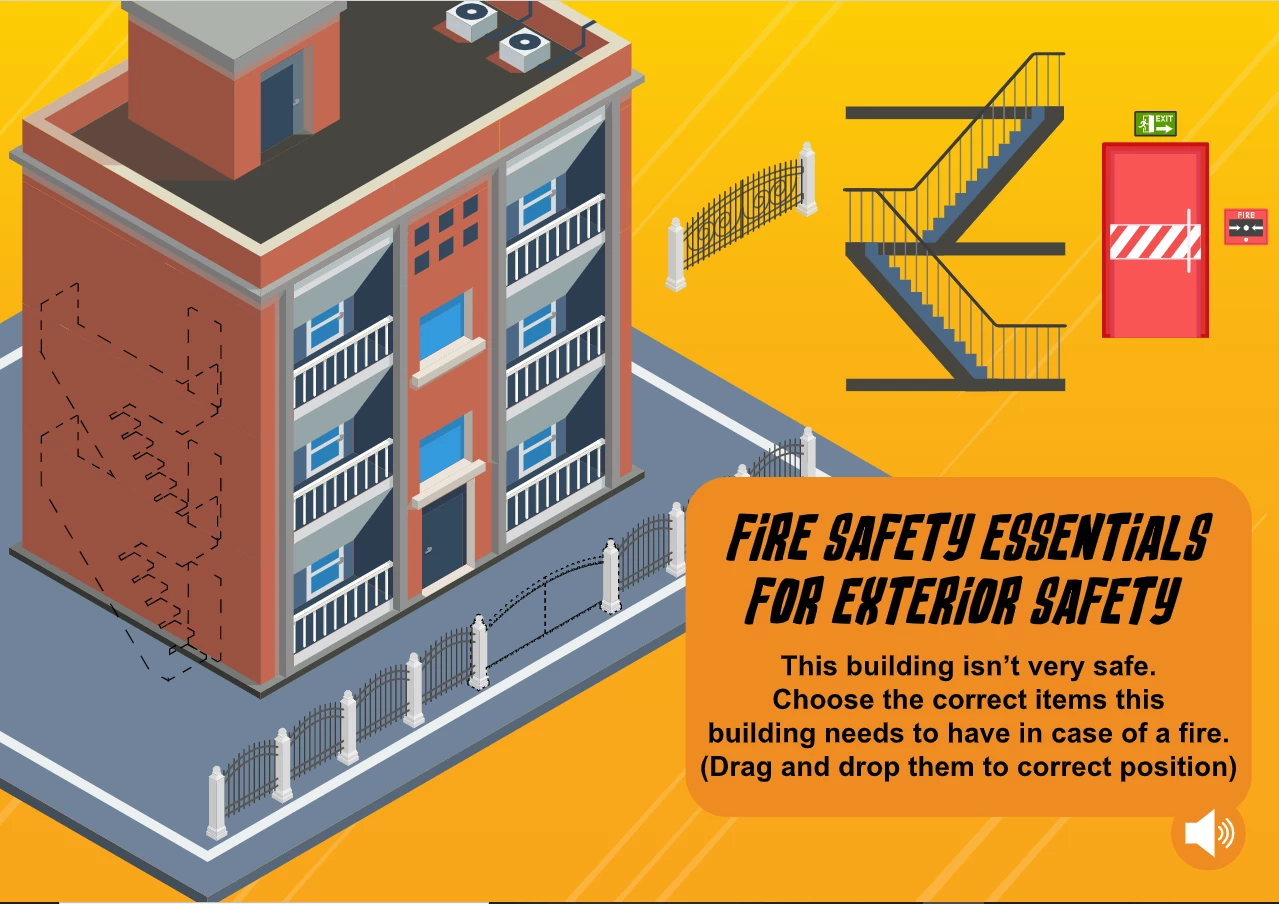
As you can see, the buttons on the right appear different than its placeholder. I want the placeholder or slot to change appearance when user dropped the correct item like this:
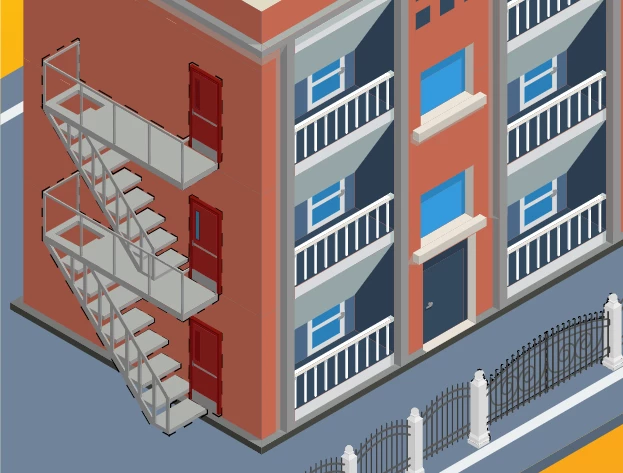
Here's my current situation:
I use root.s1Slots.visible=false; at the beginning to hide all placeholders/slots.
And when the objects match, I hide my button using Pieces1.target.visible = false;
Here's what it looks like:
https://html5-converted-ready.s3.amazonaws.com/Test/Game+5/Untitled-1.html
I'm stuck with making the target placeholder/slot visible. I use root.s1Slots.visible=true; but it shows all the placeholder/slots. I tried s1Slots.target.visible = true; but it doesn't work.
@JoãoCésar I learned drag and drop from you and I'm really grateful for your help. I was hoping you could help me in this one please?
Here's my code
this.stop();

var root = this;
var Pieces1 = root.Pieces1;
var s1Slots = root.s1Slots;
var restart = root.restart;
var positions = [];


root.setup = function()
{
	document.body.style.backgroundColor = lib.properties.color;
	createjs.Touch.enable(stage);
	stage.mouseMoveOutside = true;
	root.drawStart = stage.on("drawstart", root.start, null, true);
};

root.start = function(e)
{
	root.s1Slots.visible=false;

	stage.off("drawstart", root.drawStart);

	Pieces1.children.forEach(function(child, index)
	{
		positions[index] = {x:child.x, y:child.y};
	});

	s1Slots.children.forEach(function(child, index)
	{
		child.mouseChildren = false;
	});

	root.restartHandler(null);
	restart.on("click", root.restartHandler);
	Pieces1.on("mousedown", root.mouseDownHandler);
};

root.restartHandler = function(e)
{
	Pieces1.count = 0;
	root.shuffle();
};

root.mouseDownHandler = function(e)
{
	e.currentTarget.setChildIndex(e.target, e.currentTarget.children.length - 1);
	e.target.offsetX = (e.stageX / stage.scaleX) - e.target.x;
	e.target.offsetY = (e.stageY / stage.scaleY) - e.target.y;
	Pieces1.target = e.target;
	root.stageMouseMove = stage.on("stagemousemove", root.stageMouseMoveHandler);
	root.stageMouseUp = stage.on("stagemouseup", root.stageMouseUpHandler);
};

root.stageMouseMoveHandler = function(e)
{
	if (Pieces1.target)
	{
		Pieces1.target.x = (e.stageX / stage.scaleX) - Pieces1.target.offsetX;
		Pieces1.target.y = (e.stageY / stage.scaleY) - Pieces1.target.offsetY;
	}
};

root.stageMouseUpHandler = function(e)
{
	stage.off("stagemousemove", root.stageMouseMove);
	stage.off("stagemouseup", root.stageMouseUp);

	if (Pieces1.target)
	{
		root.check();
		Pieces1.target = null;
	}
};

root.shuffle = function()
{

	Pieces1.children.forEach(function(child, index)
	{
		child.originalX = positions[index].x;
		child.originalY = positions[index].y;
		child.mouseEnabled = true;
		createjs.Tween.get(child).to({x:child.originalX, y:child.originalY}, 350, createjs.Ease.backInOut);
	});
};

root.check = function()
{
	var spot = s1Slots.getObjectUnderPoint(Pieces1.target.x, Pieces1.target.y);

	if (!spot)
	{
		root.onMiss();
		return;
	}

	root.slot = spot.parent;

	if (root.slot)
	{
		if (Pieces1.target.name === root.slot.name)
		{
			root.onMatch();

			if (Pieces1.count === Pieces1.children.length)
				root.onWin();
		}
		else
			root.onMiss();

		root.slot = null;
	}
	else
		root.onMiss();
};

root.onMatch = function()
{
	createjs.Sound.play("match_sfx");
	Pieces1.target.mouseEnabled = false;
	Pieces1.count++;
	createjs.Tween.get(Pieces1.target).to({x:root.slot.x, y:root.slot.y}, 350, createjs.Ease.backInOut);
	Pieces1.target.visible = false;
	root.s1Slots.visible = true;
};

root.onWin = function()
{
	setTimeout(function(){(root.gotoAndStop(root.timeline.position + 1))}, 1000);
	createjs.Sound.play("correct_buzzer");
};

root.onMiss = function()
{
	createjs.Sound.play("miss_sfx");
	createjs.Tween.get(Pieces1.target).to({x:Pieces1.target.originalX, y:Pieces1.target.originalY}, 350, createjs.Ease.backInOut);
};


root.setup();
Thank you!


 AdChoices