

Drag in a limited zone
...
Hello there !...
After 10 days scratching my head, I manage to make my first drag an drop animation with animate cc !...
I used to work with Flash (AS2) and it was a real challenge for me...
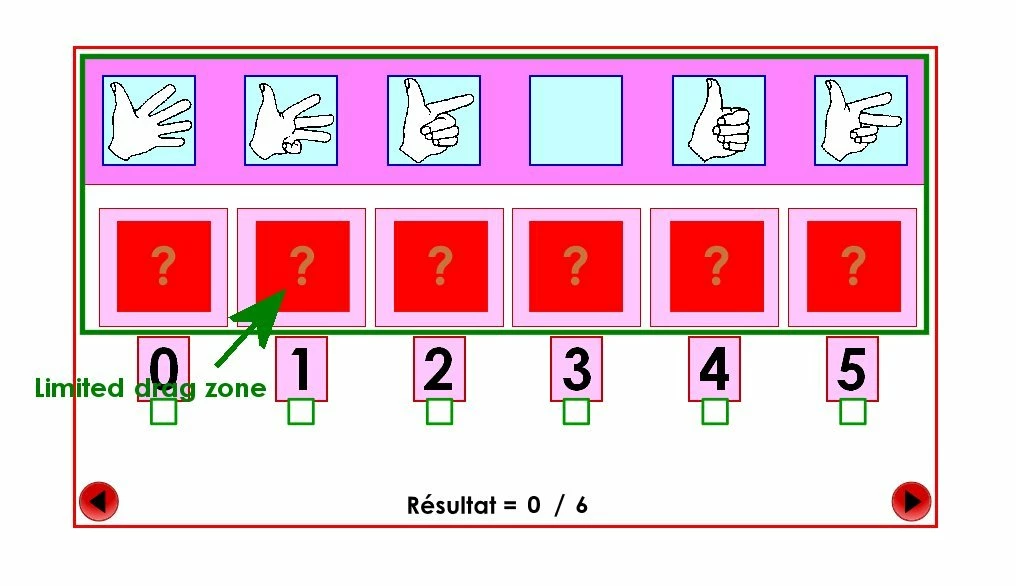
But I still have a big problem... I want to limit the drag zone in the upper zone of my stage... so that the draggables don't cover the buttons or the score / comments...
My stage is 865 x 482.
I have 6 draggables images : d_0, d_1,... d_5
I have 6 droppables zone : box_1, box_2, ... box_5
I also put a response for each draggables and a score field...
And there is my code for the drag and drop :
// Variables
var totalscore = 6;
this.totalscore.text=totalscore;
var count=0;
this['thecount'].text = '0';
var offset;
// ???
dragRadius = 40;
//Destination Size
destHeight = 100;
destWidth = 100;
//d_0
//d_0 reponse check box
var reponse_0 = this.reponse_0;
//d_0 drop_zone
var destination_0 = new createjs.Container();
destination_0.addChild(this.box_0);
destination_0.setBounds(31, 169, 40, 40);
//d_0 on top when dragged
this.d_0.on("mousedown", function (evt) {
this.parent.addChild(this);
this.offset = {x: this.x - evt.stageX, y: this.y - evt.stageY};
if (evt.currentTarget.x === 91 && evt.currentTarget.y === 221) {
evt.remove();
} else {
//evt.currentTarget.alpha = 1;
}
});
//d_0 draggable un less in droppable
this.d_0.on("pressmove", function (evt) {
if (evt.currentTarget.x === 91 && evt.currentTarget.y === 221) {
evt.remove();
} else {
evt.currentTarget.x = evt.stageX + this.offset.x;;
evt.currentTarget.y = evt.stageY + this.offset.y;;
stage.update(); //much smoother
}
});
var that = this;
//d_0 hittest drop_zone
this.d_0.on("pressup", function (evt) {
if (intersect(evt.currentTarget, destination_0)) {
destination_0.alpha = 0.5;
evt.currentTarget.alpha = 1;
evt.currentTarget.x = 91;
evt.currentTarget.y = 221;
reponse_0.gotoAndStop(1);
count++;
that['thecount'].text = count;
stage.update(evt);
evt.remove();
} else {
reponse_0.gotoAndStop(0);
that['thecount'].text = count;
evt.currentTarget.x = evt.currentTarget.x;
evt.currentTarget.y = evt.currentTarget.y;
}
});
//// (And I repeat this code 5 times for each draggables... I only change the x ans y coordinates...) ////
//Tests if two objects are intersecting
function intersect(obj1, obj2) {
var objBounds1 = obj1.getBounds().clone();
var objBounds2 = obj2.getBounds().clone();
var pt = obj1.globalToLocal(objBounds2.x, objBounds2.y);
var h1 = -(objBounds1.height / 2 + objBounds2.height);
var h2 = objBounds2.width / 2;
var w1 = -(objBounds1.width / 2 + objBounds2.width);
var w2 = objBounds2.width / 2;
if (pt.x > w2 || pt.x < w1) return false;
if (pt.y > h2 || pt.y < h1) return false;
return true;
}
...
I add an image !...
Big thanks !!...
...
Message was edited by: Ludovic Mercier
 AdChoices