CodeDeveloperOM
Inspiring
April 23, 2021
Answered

draw an A line By hand

  • April 23, 2021
  • 1 reply
  • 1215 views

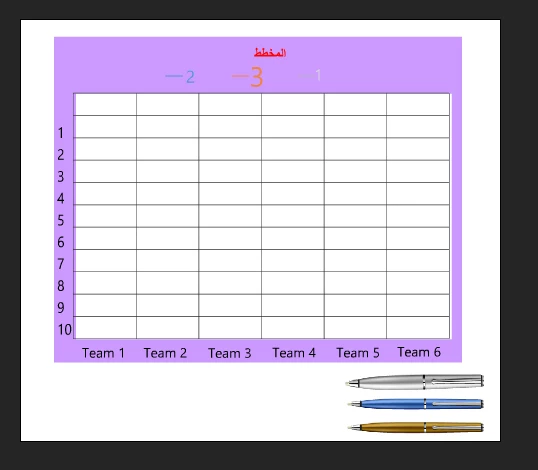
I have
3 pens
I want to draw an A line and a diagram in the scene
I got a bunch of codes, but they don't work
I want one that is easy and simple to draw lines by hand
In a scheme without what goes out of the frame
Does anyone have something like you?
many thanks


    This topic has been closed for replies.
    Correct answer kglad

    @Colin Holgate 

    thank you for your reply
    But I try to draw the line with the movement of the hand, it is like drawing 


    var s = new createjs.Shape();
    this.addChild(s);
    var g = s.graphics;
    styleF();

    var startF = start.bind(this);
    var drawF = draw.bind(this);
    var stopF= stop.bind(this);
    var initDrawF = initDraw.bind(this);


    // b is the instance name of the white drawing utensil

    this.b.addEventListener("click", initWhiteDrawF);


    // c is the instance name of the clear button.
    this.c.addEventListener("click", clear.bind(this));


    function initWhiteDraw() {
    whiteStyleF();
    this.b.removeEventListener("click", initDrawF);
    stage.addEventListener("stagemousedown",startF);
    }

    function start() {
    stage.removeEventListener("stagemousedown",startF);
    stage.addEventListener("stagemousemove",drawF);
    stage.addEventListener("stagemouseup",stopF);
    g.moveTo(stage.mouseX,stage.mouseY);
    }
    function draw(){
    g.lineTo(stage.mouseX,stage.mouseY)
    }

    function stop() {
    stage.removeEventListener("stagemousemove",drawF);
    stage.removeEventListener("stagemouseup",stopF);
    this.b.addEventListener("click", initDrawF);
    }

    function clear() {
    g.clear();
    }
    function whiteStyleF(){
    g.setStrokeStyle(1);
    g.beginStroke("#ffffff");
    }

    1 reply

    kglad
    Community Expert
    Community Expert
    April 23, 2021

    use the drawing api (as3 or createjs) lineto (in a loop) and moveto methods with mouse down and stage mouse up listeners.


    eg with createjs, EaselJS v1.0.0 API Documentation : Graphics (createjs.com)

    CodeDeveloperOM
    Inspiring
    April 23, 2021

    Why not work?

    https://drive.google.com/file/d/1jVCAs35ScEBB6mngqy7XfxI0jmHPukHJ/view?usp=sharing


    var clearButton = document.querySelector("clear");
    var stroke_weight = document.querySelector("stroke-weight");
    var canvas = document.querySelector("canvas");
    var ctx = canvas.getContext("2d");
    
    var isDrawing = false;
    
    canvas.addEventListener("mousedown", start);
    canvas.addEventListener("mousemove", draw);
    canvas.addEventListener("mouseup", stop);
    
    this.clearButton.addEventListener("click", clearCanvas.bind(this));
    
    function start(e) {
    	isDrawing = true;
    	draw(e);
    }
    
    function draw(x,y) {
    	if (!isDrawing) return;
    	ctx.lineWidth = 3;
    	ctx.lineCap = "round";
    	ctx.strokeStyle = "#FFFFFF";
    
    	ctx.lineTo(x, y);
    	ctx.stroke();
    	ctx.beginPath();
    	ctx.moveTo(x, y);
    }
    
    function stop() {
    	isDrawing = false;
    	ctx.beginPath();
    }
    
    function clearCanvas() {
    	ctx.clearRect(0, 0, canvas.width, canvas.height);
    }


    @kglad @JoãoCésar17023019 

    Colin Holgate
    Inspiring
    April 23, 2021

    There are various things wrong, but the first one is that you are taking a mouse event and putting it into the x variable. Try this instead:


    function draw(e) {
    	var x = e.x;
    	var y = e.y;
    

    After that you should start to see why it only draws a line from the corner, then fix those issues.