June 29, 2013
Answered

draw aplication

  • June 29, 2013
  • 5 replies
  • 1002 views

I create ​​a drawing application but ui have little problem, why when the mouse down and moving is not the same as the move draw

it's my code

var pencilDraw:Shape = new Shape();

var activeColor:uint = 0x000000;

board.addEventListener(MouseEvent.MOUSE_DOWN, startPencilTool);

board.addEventListener(MouseEvent.MOUSE_UP, stopPencilTool);

function startPencilTool(e:MouseEvent):void

{

          pencilDraw = new Shape();

          board.addChild(pencilDraw);

          pencilDraw.graphics.moveTo(mouseX, mouseY);

          pencilDraw.graphics.lineStyle(50, activeColor);

          board.addEventListener(MouseEvent.MOUSE_MOVE, drawPencilTool);

}

function drawPencilTool(e:MouseEvent):void

{

          pencilDraw.graphics.lineTo(mouseX, mouseY);

}

function stopPencilTool(e:MouseEvent):void

{

          board.removeEventListener(MouseEvent.MOUSE_MOVE, drawPencilTool);

}

This topic is closed to new replies. Start a new post to keep the conversation going.
Correct answer User Unknow

Try simply execute my code. It will works only if you don't change board x/y.

import flash.display.Sprite;

var pencilDraw:Shape = new Shape();

var activeColor:uint = 0x000000;

var board : Sprite = new Sprite();

addChild(board);

board.graphics.beginFill(0xccccc);

board.graphics.drawRect(0,0,stage.stageWidth,stage.stageHeight);

board.addEventListener(MouseEvent.MOUSE_DOWN, startPencilTool);

board.addEventListener(MouseEvent.MOUSE_UP, stopPencilTool);

function startPencilTool(e:MouseEvent):void

{

          pencilDraw = new Shape();

          board.addChild(pencilDraw);

          pencilDraw.graphics.moveTo(mouseX, mouseY);

          pencilDraw.graphics.lineStyle(50, activeColor);

          board.addEventListener(MouseEvent.MOUSE_MOVE, drawPencilTool);

}

function drawPencilTool(e:MouseEvent):void

{

          pencilDraw.graphics.lineTo(mouseX, mouseY);

}

function stopPencilTool(e:MouseEvent):void

{

          board.removeEventListener(MouseEvent.MOUSE_MOVE, drawPencilTool);

}

If you need to change - board coorinates update functions like this:

pencilDraw.graphics.moveTo(e.localX, e.localY);

and

pencilDraw.graphics.lineTo(e.localX, e.localY);

Firstly you need understand how to work with Display List object When A placed on the table with 0/0 coordinates and B placed in A with 50/50 coordinates. Than move A to 100 by X and your B still have x:50/y:50 because it's placed in A. So coordinates of parents and parents don't included

When you use localX and localY this mean you get coordinates only in parent space. But when you use mouseX and mouseY - this mean you use global coordinates.

So when you move your board x:50 your localX/localY will be 0,0 as top left corner and you will draw in that place where you press.

But when you draw with mouseX/mouseY - you draw with global mouseX/mouseY and this mean if you press on x:25 - you will see big offset 25 + 50

Sorry If I explain not clear

P.S. this also can be simple "Scaling issue". If your Flash Player was scaled - you can see similar offset.


5 replies

July 4, 2013

mr. anton azarov i have new problem

I build learning application using randomized sound,  but sometimes that comes out about the repeated.

how that problem is not repeated

my code

import flash.media.Sound;

import flash.events.MouseEvent;

import flash.media.SoundChannel;

stop();

var tanya:Array = [suara_a,suara_b,suara_c,suara_d,suara_e];

var jawab:Array = [["A", "D", "C", "B"], ["B", "G", "J", "P"], ["C", "J", "O", "E"], ["D", "V", "T", "Q"], ["E", "W", "M", "P"]];

var so:Sound;

var sc:SoundChannel = new SoundChannel();

b.visible = false;

s.visible = false;

var no = 0;

var acak1;

var acak2;

var jawab_benar = 0;

var jawab_salah = 0;

ganti();

function enable_disable(a)

{

          if (a == 0)

          {

                    pa.mouseEnabled = false;

                    pb.mouseEnabled = false;

                    pc.mouseEnabled = false;

                    pd.mouseEnabled = false;

                    n.mouseEnabled = true;

          }

          if (a == 1)

          {

                    pa.mouseEnabled = true;

                    pb.mouseEnabled = true;

                    pc.mouseEnabled = true;

                    pd.mouseEnabled = true;

                    n.mouseEnabled = false;

          }

}

n.addEventListener(MouseEvent.CLICK, hnex);

function hnex(Event:MouseEvent)

{

          no++;

          ganti();

}

function ganti()

{

          if (b.visible)

          {

                    jawab_benar++;

          }

          if (s.visible)

          {

                    jawab_salah++;

          }

          if (no == 5)

          {

                    gotoAndStop(2);

          }

          else

          {

                    acak1 = Math.ceil(Math.random() * 4);

                    acak2 = Math.ceil(Math.random() * tanya.length) - 1;

                    sc.stop();

                    b.visible = false;

                    s.visible = false;

                    so = new tanya[acak2]();

                    sc=so.play();

                    enable_disable(1);

                    if (acak1 == 1)

                    {

                              pa.text = jawab[acak2][0];

                              pb.text = jawab[acak2][1];

                              pc.text = jawab[acak2][2];

                              pd.text = jawab[acak2][3];

                    }

                    if (acak1 == 2)

                    {

                              pa.text = jawab[acak2][1];

                              pb.text = jawab[acak2][0];

                              pc.text = jawab[acak2][3];

                              pd.text = jawab[acak2][2];

                    }

                    if (acak1 == 3)

                    {

                              pa.text = jawab[acak2][2];

                              pb.text = jawab[acak2][3];

                              pc.text = jawab[acak2][0];

                              pd.text = jawab[acak2][1];

                    }

                    if (acak1 == 4)

                    {

                              pa.text = jawab[acak2][3];

                              pb.text = jawab[acak2][2];

                              pc.text = jawab[acak2][1];

                              pd.text = jawab[acak2][0];

                    }

          }

}

rep.addEventListener(MouseEvent.CLICK, hrep)

function hrep(e:MouseEvent):void

{

          sc=so.play();

}

pa.addEventListener(MouseEvent.CLICK, hpa);

pb.addEventListener(MouseEvent.CLICK, hpb);

pc.addEventListener(MouseEvent.CLICK, hpc);

pd.addEventListener(MouseEvent.CLICK, hpd);

function hpa(eventObject:MouseEvent)

{

          enable_disable(0);

          if (acak1 == 1)

          {

                    b.visible = true;

                    b.y = 200;

          }

          else

          {

                    s.visible = true;

                    s.y = 200;

          }

}

function hpb(eventObject:MouseEvent)

{

          enable_disable(0);

          if (acak1 == 2)

          {

                    b.visible = true;

                    b.y = 200;

          }

          else

          {

                    s.visible = true;

                    s.y = 200;

          }

}

function hpc(eventObject:MouseEvent)

{

          enable_disable(0);

          if (acak1 == 3)

          {

                    b.visible = true;

                    b.y = 200;

          }

          else

          {

                    s.visible = true;

                    s.y = 200;

          }

}

function hpd(eventObject:MouseEvent)

{

          enable_disable(0);

          if (acak1 == 4)

          {

                    b.visible = true;

                    b.y = 200;

          }

          else

          {

                    s.visible = true;

                    s.y = 200;

          }

}

User Unknow
User UnknowCorrect answer
Legend
June 29, 2013

Try simply execute my code. It will works only if you don't change board x/y.

import flash.display.Sprite;

var pencilDraw:Shape = new Shape();

var activeColor:uint = 0x000000;

var board : Sprite = new Sprite();

addChild(board);

board.graphics.beginFill(0xccccc);

board.graphics.drawRect(0,0,stage.stageWidth,stage.stageHeight);

board.addEventListener(MouseEvent.MOUSE_DOWN, startPencilTool);

board.addEventListener(MouseEvent.MOUSE_UP, stopPencilTool);

function startPencilTool(e:MouseEvent):void

{

          pencilDraw = new Shape();

          board.addChild(pencilDraw);

          pencilDraw.graphics.moveTo(mouseX, mouseY);

          pencilDraw.graphics.lineStyle(50, activeColor);

          board.addEventListener(MouseEvent.MOUSE_MOVE, drawPencilTool);

}

function drawPencilTool(e:MouseEvent):void

{

          pencilDraw.graphics.lineTo(mouseX, mouseY);

}

function stopPencilTool(e:MouseEvent):void

{

          board.removeEventListener(MouseEvent.MOUSE_MOVE, drawPencilTool);

}

If you need to change - board coorinates update functions like this:

pencilDraw.graphics.moveTo(e.localX, e.localY);

and

pencilDraw.graphics.lineTo(e.localX, e.localY);

Firstly you need understand how to work with Display List object When A placed on the table with 0/0 coordinates and B placed in A with 50/50 coordinates. Than move A to 100 by X and your B still have x:50/y:50 because it's placed in A. So coordinates of parents and parents don't included

When you use localX and localY this mean you get coordinates only in parent space. But when you use mouseX and mouseY - this mean you use global coordinates.

So when you move your board x:50 your localX/localY will be 0,0 as top left corner and you will draw in that place where you press.

But when you draw with mouseX/mouseY - you draw with global mouseX/mouseY and this mean if you press on x:25 - you will see big offset 25 + 50

Sorry If I explain not clear

P.S. this also can be simple "Scaling issue". If your Flash Player was scaled - you can see similar offset.

July 1, 2013

Anton Azarov wrote:

Try simply execute my code. It will works only if you don't change board x/y.

import flash.display.Sprite;
 
var pencilDraw:Shape = new Shape();
 
var activeColor:uint = 0x000000;
 
var board : Sprite = new Sprite();
addChild(board);
 
board.graphics.beginFill(0xccccc);
board.graphics.drawRect(0,0,stage.stageWidth,stage.stageHeight);
 
board.addEventListener(MouseEvent.MOUSE_DOWN, startPencilTool);
board.addEventListener(MouseEvent.MOUSE_UP, stopPencilTool);
 
function startPencilTool(e:MouseEvent):void
 
{
          pencilDraw = new Shape();
          board.addChild(pencilDraw);
          pencilDraw.graphics.moveTo(mouseX, mouseY);
          pencilDraw.graphics.lineStyle(50, activeColor);
          board.addEventListener(MouseEvent.MOUSE_MOVE, drawPencilTool);
}


function drawPencilTool(e:MouseEvent):void
 
{
          pencilDraw.graphics.lineTo(mouseX, mouseY);
}


function stopPencilTool(e:MouseEvent):void
 
{
 
          board.removeEventListener(MouseEvent.MOUSE_MOVE, drawPencilTool);
 
}

If you need to change - board coorinates update functions like this:

pencilDraw.graphics.moveTo(e.localX, e.localY);

and

 pencilDraw.graphics.lineTo(e.localX, e.localY);

Firstly you need understand how to work with Display List object When A placed on the table with 0/0 coordinates and B placed in A with 50/50 coordinates. Than move A to 100 by X and your B still have x:50/y:50 because it's placed in A. So coordinates of parents and parents don't included

When you use localX and localY this mean you get coordinates only in parent space. But when you use mouseX and mouseY - this mean you use global coordinates.

So when you move your board x:50 your localX/localY will be 0,0 as top left corner and you will draw in that place where you press.

But when you draw with mouseX/mouseY - you draw with global mouseX/mouseY and this mean if you press on x:25 - you will see big offset 25 + 50

Sorry If I explain not clear

P.S. this also can be simple "Scaling issue". If your Flash Player was scaled - you can see similar offset.
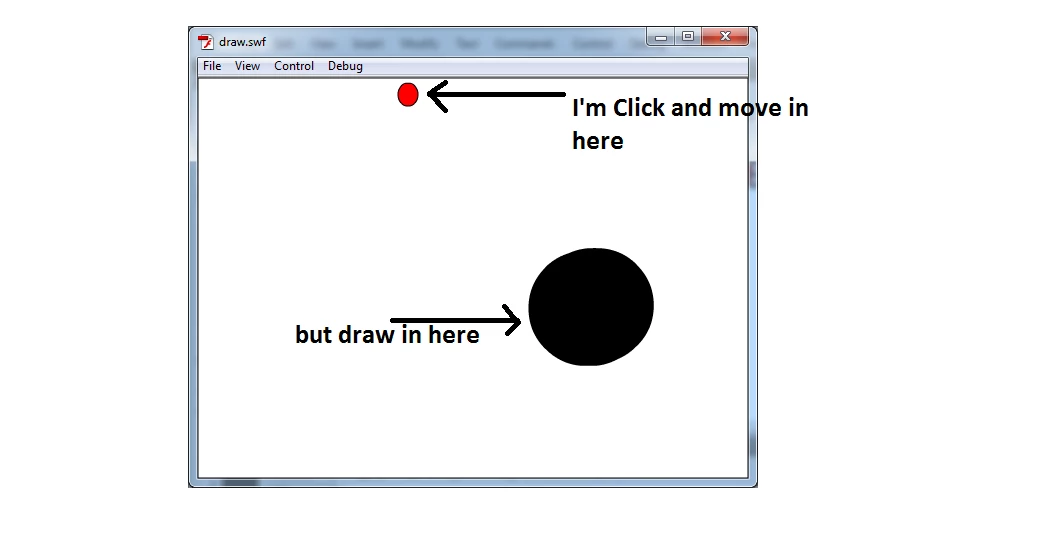
thanks for the answer, the explanation above is very helpful to me,

but I have a little problem when I add a Circle to the Stage and the circle to replace mouse events, so when the circle is pressed and moved it will draw the line, ...

you know what I mean

My code :

import flash.display.Sprite;

import flash.events.MouseEvent;

var pencilDraw:Shape = new Shape();

var activeColor:uint = 0x000000;

var board : Sprite = new Sprite();

addChild(board);

pencilDraw = new Shape();

board.addChild(pencilDraw);

var circle:Sprite = new Sprite();

addChild(circle);

board.graphics.beginFill(0xccccc);

board.graphics.drawRect(0,0,stage.stageWidth,stage.stageHeight);

circle.graphics.beginFill(0xfffff);

circle.graphics.drawCircle(20,20,10);

circleaddEventListener(MouseEvent.MOUSE_DOWN, startPencilTool);

circle.addEventListener(MouseEvent.MOUSE_UP, stopPencilTool);

function startPencilTool(e:MouseEvent):void

{

          e.target.startDrag();

          pencilDraw.graphics.moveTo(e.localX, e.localY);

          pencilDraw.graphics.lineStyle(10, activeColor);

          board.addEventListener(MouseEvent.MOUSE_MOVE, drawPencilTool);

}

function drawPencilTool(e:MouseEvent):void

{

          pencilDraw.graphics.lineTo(e.localX, e.localY);

}

function stopPencilTool(e:MouseEvent):void

{

     stopDrag();

     board.removeEventListener(MouseEvent.MOUSE_MOVE, drawPencilTool);

}

the above code is not working properly, please help me

User Unknow
Legend
July 1, 2013

You have there 4 issue.

1) You want move mouse and draw. You moving your mouse globally. But trying get mouse events from board. Above your board you have circle.

2) If you want use Circle as finger source - you don't need use it localX and localY because they always from 0 to 10 (your circle radius). Instead you need use circle.x and circle.y

3) you have mistake in circleaddEventListener(MouseEvent.MOUSE_DOWN, startPencilTool);. you forget at dot after circle

4) when you type circle.graphics.drawCircle(20,20,10); you don't move your circle to 20/20 coordinates. You simply fill your circle in 20/20 but it stay in 0/0. This will looks like:

So here is updates code. Try to compile it:

import flash.display.Sprite;

import flash.events.MouseEvent;

var pencilDraw:Shape = new Shape();

var activeColor:uint = 0x000000;

var board : Sprite = new Sprite();

addChild(board);

pencilDraw = new Shape();

board.addChild(pencilDraw);

var circle:Sprite = new Sprite();

addChild(circle);

board.graphics.beginFill(0xccccc);

board.graphics.drawRect(0,0,stage.stageWidth,stage.stageHeight);

circle.graphics.beginFill(0xfffff);

circle.graphics.drawCircle(0,0,10);

circle.x = 20;

circle.y = 20;

circle.addEventListener(MouseEvent.MOUSE_DOWN, startPencilTool);

circle.addEventListener(MouseEvent.MOUSE_UP, stopPencilTool);

function startPencilTool(e:MouseEvent):void

{

          e.target.startDrag();

          pencilDraw.graphics.moveTo(circle.x, circle.y);

          pencilDraw.graphics.lineStyle(10, activeColor);

          stage.addEventListener(MouseEvent.MOUSE_MOVE, drawPencilTool);

}

function drawPencilTool(e:MouseEvent):void

{

        pencilDraw.graphics.lineTo(circle.x, circle.y);

        e.updateAfterEvent(); // immediately re-draw display. This works only for MouseEvents

}

function stopPencilTool(e:MouseEvent):void

{

     stopDrag();

     stage.removeEventListener(MouseEvent.MOUSE_MOVE, drawPencilTool);

}
