



emtink
Participating Frequently
November 5, 2019
Answered

Drawing tools (brush, pencil, eraser) appearing not calibrated to mouse cursor

  • November 5, 2019
  • 9 replies
  • 12886 views

In the November 2019 release of Adobe Animate, all of my drawing related tools (brush, eraser, pencil) are drawing in the wrong spot on the canvas, after creating a straight line as if I'm pressing shift. Every other tool is calibrated to the position of the cursor except for drawing tools. The problem isn't tablet or mouse related - everything works fine in other adobe apps. I did not have this issue with the previous version of Animate. See below for example: 
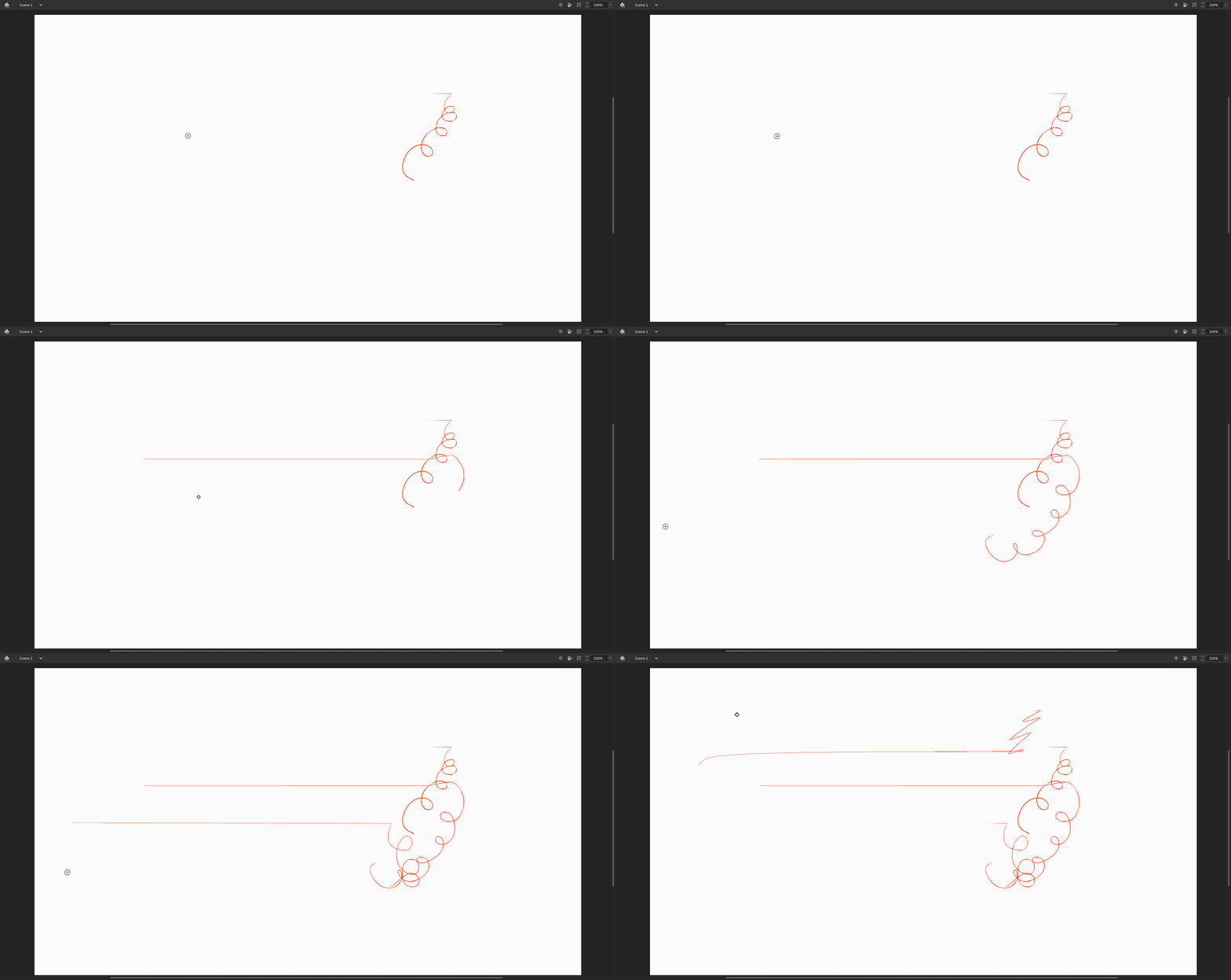


This topic has been closed for replies.
Correct answer arvind_bv

Hi,


There is a fix available for these mapping/drawing related issues in the <recent update (v20.0.3) animate releases starting with v20.0.3> available in Creative Cloud Desktop app. After installing <animate> please follow below steps.


  1. Edit-->Preferences-->Edit Preferences-->Drawing-->Tablet Input-->Windows Ink(Beta)-->Press OK
  2. Open a new/created document for the changes to take place.


Note: Please be aware this option is a beta version and let us know if you face any issues with the same.


You can also join our Animate Prerelease beta program where you will have an early access to our developmental builds, features and bug fixes. You can sign up to the program using http://adobe.ly/20AEkbJ


Thanks!


<kglad edits>

9 replies

Participant
January 13, 2021

Hey, in general, I start Adobe Animate and connect a graphic tablet but I can only draw with the mouse and the tablet can be used as an eraser, please help

Participant
June 10, 2020

v20.0.3 here and this is definitely not fixed. This answer should NOT be marked as solved! Shame.

n. tilcheff
Legend
June 10, 2020

Did you go to your Preferences and did you choose Windows Ink for your non-Wacom device?

Nick - Character Designer and Animator, Flash user since 1998 | Member of the Flanimate Power Tools team - extensions for character animation
Participant
June 11, 2020

I'm on a Wacom device (Wacom One) - I turned off windows ink to solve a separate issue in Photoshop. I'm not sure where the panel in your screenshot is located.


Anyway, the only workaround that temporarily works for me is to switch to duplicate displays (rather than extend). Afterwards if I switch back, it keeps working.


This is a very frustrating issue that makes Animate nigh unusable. If the workaround didn't exist, I wouldn't have any hair left by now. I can reproduce this extremely often, so let me know if you need help collecting logs etc.

johnh44297965
Participant
February 24, 2020

I'm on 20.0.2 and still experiencing this issue. Did it not get fixed?

Participant
February 18, 2020

I have a Huion pro and hp spectre x360 ... both work fine with all the other adobes (Illustrator, Photoshop ect). 

No problem with the huion on animate. My HP laptop with active pen never actually worked properly with Animate. Before the 2020 update at least you could draw with the same bug of the straight line

The latest update is even worse, as it does the same thing as the described here (drawing in the wrong spot).

Tried to do everything from changing drivers to change monitor resolution, resintall different animate version ect ...

I haven't gone so far as formatting windows and I won't do it.

I think that as a costumer and a professional is disappoiting to see that Adobe can't fix this thing, it doesn't seems to be that hard. I really miss Macromedia Flash ....


Anyway, my only solution ? Install Flash CS6. It works perfectly, to the point that I don't see much difference from the active pen to the Huion, when it comes to using the brush on Flash or Animate.


I keep open animate 2020 and flash cs6 at the same time and work with both, when I do frame by frame animation I use CS6, and to edit the layers and create effects before rendering, Animate 2020. Is actually great to render your scenes with both and save some time.. mind boggling how CS6 is faster than Animate when it comes to work and play the scene ...

Of course we should be able to just work on one software and not two.

But at this point I don't expect to ever be fixed.

So, while you wait for a better software, just use the CS 6 if you need to draw. 

Participant
January 11, 2020

Hello! I have this problem and I have that latest version of Animate. How do I still have it if it's the latest version?

samgheist
Participant
January 14, 2020

Same here! I'd really appreciate an update on this.

Mohanaraj
Adobe Employee
Adobe Employee
December 13, 2019

Hi,

Just want to let you all know that this issue has been addressed in the December update 20.0.1 we have released couple of days back. Please update your copy of Animate to the latest to avail the fix.

Thanks much for all your inputs and additional details that helped us resolve this issue.


Thanks!

Mohan

cindyb29425719
Participant
January 22, 2020

I have the latest adobe animate update. I had the problem as above where my pen was drawing elsewhere. Now with update, my pen draws only large diagonal lines when I touch my pen to the screen. The mouse draws correctly but not pen. All other adobe programs work correctly with my pen and previous version (19.2.1) works with my pen as well. 

Adobe Employee
January 23, 2020


Thanks for letting us know. We are working on a potential fix for this issue.

Meanwhile as a workaround you can try below options.


  • Update the latest available driver and check for this issue.


  • With non-Wacom tablets and


Single Display

Map the tablet to full portion of the screen and try using the drawing tools


Multiple Display

Map the tablet to primary display and try using the drawing tools

Or

Set different scaling for one of the displays(temporary workaround for drawing tools offset)


  •  If the issue still exists please share following details with us for investigating further on this issue.


  1. System and drawing tablet specification
  2. Display scaling factor of your monitors
  3. Screenshot of your drawing tablet driver with mapping settings


Dezzy1989
Participant
November 23, 2019

I'm currently experiencing the same issue. I have tried every method possible to fix this and I hope it's fixed soon because I have a project due in the next couple of weeks and don't have the spare time to go to school to do it. This is a huge problem and I really hope it's fixed asap. My tablet is a Gaomon 1560 and has had zero problems until this update. 

Participant
December 2, 2019

The same problem occurs when I´m using Animate 2020 with my XP-Pen Artist 12 is there a solution already?

Participant
November 5, 2019

I'm actually having the exact same problem in Animate 2020 using a Cintiq Pro 24 and Wacom Pen. I've updated drivers, reset preferences, uninstalled and reinstalled. And not only is the problem limited to Animate 2020 (2019 works fine, as do the rest of my Adobe apps and drawing apps), it is limited to the drawing tools (pencil, brush, eraser). Shapes and selection tools work fine with the Wacom Pen.


This problem exists only with my Cintiq Pro 24 and Windows 10 desktop -- I also have a Surface Book 2 which is not suffering from these issues.

Participant
November 5, 2019

im having the same issue 😞 i hope they fix it

n. tilcheff
Legend
November 6, 2019

If you have multi-monitor set ups and/or some OS display scaling it may be worth trying to run only one monitor with display scaling set to 100% to try to isolate the issue.


Nick - Character Designer and Animator, Flash user since 1998 | Member of the Flanimate Power Tools team - extensions for character animation
kglad
Community Expert
Community Expert
November 5, 2019

what happens if you use a mouse to draw?  if everything's normal/as expected, you probably need to update your drawing device's drivers.


if a mouse draws unexpectedly, reset your preferences -

https://helpx.adobe.com/animate/kb/animate-cc-crashes-on-launch-startup.html


(or remove Win:

C:\Users\\AppData\Local\Adobe\Animate CC \ and
C\Users\\AppData\Roaming\Adobe\Animate\\


Mac:

/Users//Library/Application Support/Adobe// and
/Users//Library/Preferences/Adobe/Animate//)

emtink
emtinkAuthor
Participating Frequently
November 5, 2019

you're right - it works just fine with a mouse. unfortunately i'm on an old tablet driver because i had issues in cinema 4d with the newest driver, so i'll just have to stick to the previous version of animate for now. 


thanks! 

kglad
Community Expert
Community Expert
November 5, 2019

you're welcome.