Participant
August 15, 2019
Answered

Dynamic text HTML5

  • August 15, 2019
  • 6 replies
  • 4325 views

Hi everyone,

I am slowly going from Flash/as3 to Canvas/Javascript and I have a newbie problem with dynamic texts.

I have a dynamic text on the stage instanced as T_Counter and I simply want to change its text property.

I tried the basic :

this.T_Counter.text = "This is a test"; and nothing shows

I tried with a variable :

var ceTexte = "This is a text";

this.T_Counter.text = ceTexte; and nothing shows

It's a bit frustrating to be unable to perform such a basic task !

Thanks in advance for any hint !

This topic is closed to new replies. Start a new post to keep the conversation going.
Correct answer Joseph Labrecque

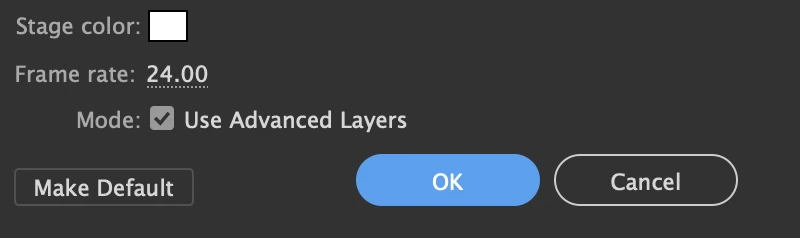
Is advanced layers enabled? Check your document settings:

If using advanced layers, each layer will be translated to a movieclip on publish, so you must be specific:

this.Later_Name.T_Counter.text = "new text";

6 replies

Participant
August 15, 2019

Thanks for your answer Joseph, it was the problem.
It seems that I have a lot to learn. The scope of the variables and the way you adress an object seems to be different enough from what I'm used to in as3.
Anyway, I found that event.currentTarget stands for event.target in as3 so I'll find my way out of this mess. lol.

Thanks again !

Participant
July 16, 2020

Sorry, but doesn't work for me. (HTML5 canvas in Animate (V 20.5))

While rotation of this text field works (regardless of  adding the layer or not) the text does not:


var _this = this;
_this.SwitchText.on('click', function(){
//_this.Label_Clearpoint.rotation+=45;
//_this.Partikel.Label_Clearpoint.text="ABC";
_this.Partikel.Label_Clearpoint.text="ABC";
});

Participant
July 16, 2020

Problem solved, I found the solution:
I had changed the dynamic text to a movieclip which was not necessary.
Dynamic text already has a label so it can be addressed directly.

Joseph Labrecque
Community Expert
Joseph LabrecqueCommunity ExpertCorrect answer
Community Expert
August 15, 2019

Is advanced layers enabled? Check your document settings:

If using advanced layers, each layer will be translated to a movieclip on publish, so you must be specific:

this.Later_Name.T_Counter.text = "new text";

pagios
Inspiring
August 15, 2019

Do you really mean "Layer_Name" instead of "Later_Name" ?

Joseph Labrecque
Community Expert
Community Expert
August 15, 2019

A true mystery!