
Participating Frequently
July 26, 2014
Answered

Error #1009 - stumped on what to do

  • July 26, 2014
  • 1 reply
  • 468 views

I need major help here. I have a script with a movieclip with a two buttons inside. These work so that it would look like it stayed pushed down until you clicked it again to simulate a multiple choice. Pressing the buttons sends the array a push. If the array reaches 4 it should stop and all that stuff. Problem is that it works pretty fine if you press it, but wont stay pressed anymore and drops me with the 1009 error.

Anyways, here's the code:
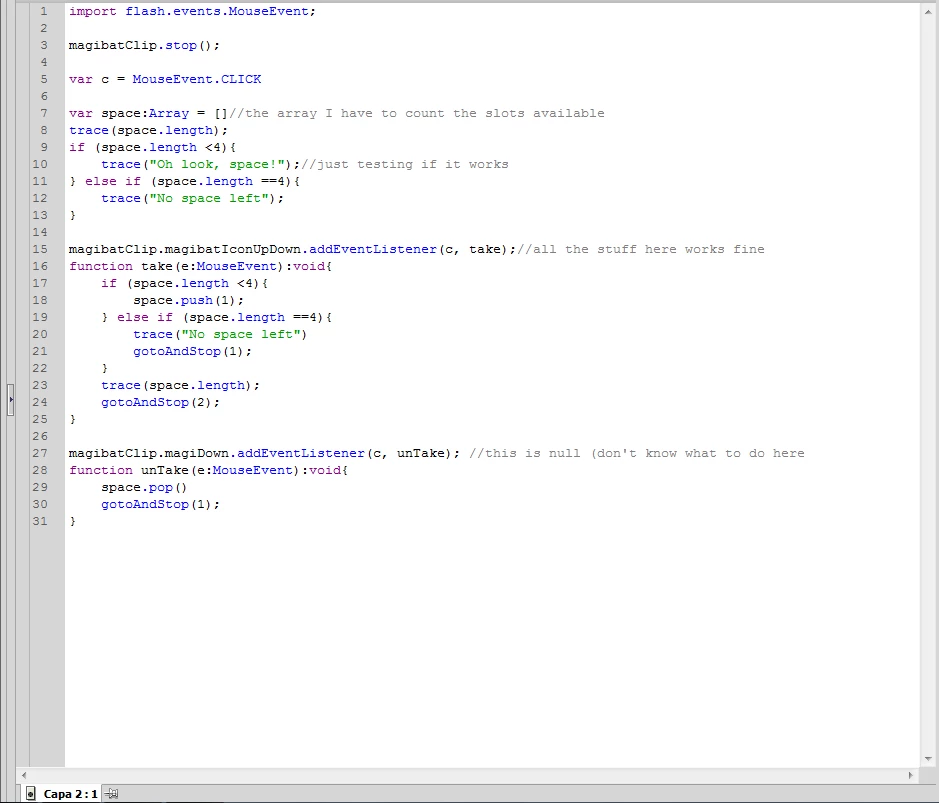
Any kind of help would be greatly appreciated as this is basically for my finals.

This topic has been closed for replies.
Correct answer Ned Murphy

The 1009 error indicates that one of the objects being targeted by your code is out of scope.  This could mean that the object....


- is declared but not instantiated

- doesn't have an instance name (or the instance name is mispelled)

- does not exist in the frame where that code is trying to talk to it

- is animated into place but is not assigned instance names in every keyframe for it

- is one of two or more consecutive keyframes of the same objects with no name assigned in the preceding frame(s).


If you go into your Publish Settings Flash section and select the option to Permit debugging, your error message should have a line number following the frame number which will help you isolate which object is involved.

1 reply

Ned Murphy
Ned MurphyCorrect answer
Legend
July 26, 2014

The 1009 error indicates that one of the objects being targeted by your code is out of scope.  This could mean that the object....


- is declared but not instantiated

- doesn't have an instance name (or the instance name is mispelled)

- does not exist in the frame where that code is trying to talk to it

- is animated into place but is not assigned instance names in every keyframe for it

- is one of two or more consecutive keyframes of the same objects with no name assigned in the preceding frame(s).


If you go into your Publish Settings Flash section and select the option to Permit debugging, your error message should have a line number following the frame number which will help you isolate which object is involved.

koldrageAuthor
Participating Frequently
July 26, 2014

Alright, I got the debugging on. It says:

"TypeError: Error #1009: Cannot access a property or method of a null object reference.

  at MagiTest_fla::MainTimeline/frame1()[MagiTest_fla.MainTimeline::frame1:27]"

frame1:27 is:

magibatClip.magiDown.addEventListener(c, unTake);

Most likely, it's the first mistake you pointed out (declared, but not instantiated). I read an older answer you gave to another user, and I speculated it is that, but I still don't understand that.

It went something like this from what I read:

var someMC:MovieClip = new MovieClip();

But I still don't seem to get it to work as I don't really understand it. (Sorry for my uselessness).

Ned Murphy
Legend
July 26, 2014

If those are objects that you manually placed on the stage then it will not be the first item in the list.

Before line 27 try adding a few traces and see where is comes up with a null (or errs again)

trace("magibatClip: ", magibatClip);

trace("magiDown: ", magibatClip.magiDown);

trace("c: ", c);