
T260G
Participant
March 2, 2014
Answered

Error 1010//Buttons Aren't Working

  • March 2, 2014
  • 1 reply
  • 713 views

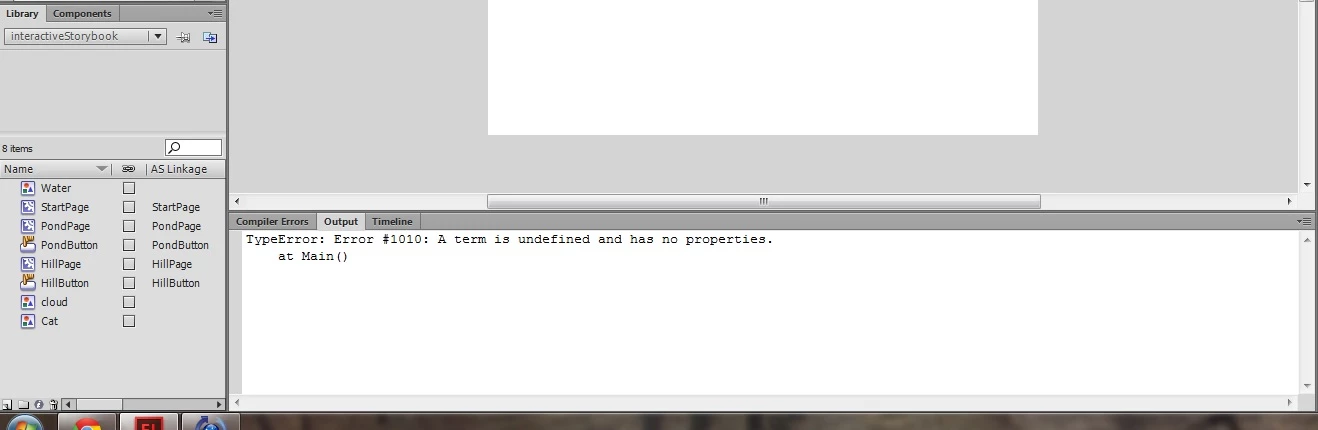
I know AS2 and am finally converting to AS3 now by following a book. My code is exactly the way it is in the book and everything in my library (the buttons, movieclips) are linked correctly, but I keep getting the same error 1010 that a term is undefined or has no properties. I want to know if I'm being dumb (I hope not), or if the book is outdated. Hopefully someone can help. I put in a picture of what my assets look like, as well as the code below it.
package  {

          import flash.display.MovieClip;

          import flash.events.MouseEvent;

          public class Main extends MovieClip{

                    var startPage:StartPage;

                    var hillPage:HillPage;

                    var pondPage:PondPage;

                    public function Main() {

                              startPage = new StartPage();

                              hillPage = new HillPage();

                              pondPage = new PondPage();

                              addChild(startPage);

                              startPage.HillButton.addEventListener(MouseEvent.CLICK, onHillButtonClick);

                              startPage.PondButton.addEventListener(MouseEvent.CLICK, onPondButtonClick);

                    }

                    function onHillButtonClick(event:MouseEvent):void{

                              addChild(hillPage);

                              removeChild(startPage);

                    }

                    function onPondButtonClick(event:MouseEvent):void{

                              addChild(pondPage);

                              removeChild(startPage);

                    }

          }

}

This topic has been closed for replies.
Correct answer Ned Murphy

You should go into your Flash Publish Settings and select the option to Permit Debugging.  That can enhance your error messages to include line numbers for the offending code.

From what I see I suspect you are miscoding the names of the buttons inside the StartPage instance.  The names HillButton and PondButton are the class names based on what your library image shows, they are not the instance names... at least hopefully they are not.

1 reply

Ned Murphy
Ned MurphyCorrect answer
Legend
March 2, 2014

You should go into your Flash Publish Settings and select the option to Permit Debugging.  That can enhance your error messages to include line numbers for the offending code.

From what I see I suspect you are miscoding the names of the buttons inside the StartPage instance.  The names HillButton and PondButton are the class names based on what your library image shows, they are not the instance names... at least hopefully they are not.

T260G
T260GAuthor
Participant
March 2, 2014

I did the Permit Debugging thing and the output error code became:

TypeError: Error #1010: A term is undefined and has no properties.

          at Main()

Which I can only assume means whats wrong is with line 19 (which would be the HillButton event listener line), but the problem isn't really obvious to me just by looking.

Also, when I tried adding instance names, it gave me this compiler error for both buttons.

Symbol 'StageOne'1046: Type was not found or was not a compile-time constant: HillButton.

I'm sure its just something really dumb on my part. I'm probably gonna keep trying out different little things to fix it but I'm not really sure whats wrong. Thanks for the help so far though!

Ned Murphy
Legend
March 2, 2014

I already indicated what the problem is with that line (and the one after it).  HillButton is the name you assigned as the class name... look at your library to see that.  You cannot use a class name as an instance name.  You will need to use maybe something like "hillButton"... so that it does not spell the same as the class name "HillButton", and you target it using the instance name, not the class name.