



Error when use the buttons to control MovieClip from the scene
Hello, I'm new to Adobe Animate CC. And I'm learning to use HTML5 Canvas.
I'm trying to add buttons to the scene to control a Movie Clip from outside. The thing is these buttons need a disabled state when it's reach the start/ end of the scene, and button play/pause change when playing Movie Clip.
So here is my idea:
I make 4 frames, each have their own active and disable buttons.

- Start: disabled prev and reload buttons

- Middle: enable every buttons

- Playing: change play button to pause and disable prev, next buttons

- End: disable play and next buttons

And inside the Movie Clip, I labeled every steps. When they reach the keyframe inside the Movie Clip, they will change its parent buttons like this.
var root = this;

root.stop();
root.parent.gotoAndStop('middle');
And in the main scene, I add event listener to every active buttons. Only the middle frame need more detail. Here is what I do in the middle frame.
var root = this;
var currentLabel = '';

root.stop();

root.btnPrev.on('click', function() {
     var destination = '';
     checkCurrentLabel();
     if (currentLabel == 'First state') {
          root.gotoAndStop('start');
          destination = 'Intial state';
     } else if (currentLabel == 'Second state') {
          destination = 'First state';
     } else if (currentLabel == 'Third state') {
          destination = 'Second state';
     } else if (currentLabel == 'End state') {
          destination = 'Third state';
     } else {
          return;
     }
     root.mcAnimate.gotoAndStop(destination);
     currentLabel = destination;
});

root.btnPlay.on('click', function(){
     root.gotoAndStop('playing');
     root.mcAnimate.play();
     currentLabel = '';
});

root.btnNext.on('click', function(event){
     var destination = '';
     checkCurrentLabel();
     if (currentLabel == 'Intial state') {
          destination = 'First state';
     } else if (currentLabel == 'First state') {
          destination = 'Second state';
     } else if (currentLabel == 'Second state') {
          destination = 'Third state';
     } else if (currentLabel == 'Third state') {
          root.gotoAndStop('end');
          destination = 'End state';
     } else return;
     root.mcAnimate.gotoAndStop(destination);
     currentLabel = destination;
});

root.btnReload.on('click', function(){
	root.gotoAndStop('start');
	root.mcAnimate.gotoAndStop('Intial state');
	currentLabel = '';
});

function checkCurrentLabel() {
     if (currentLabel == '') {
          currentLabel = root.mcAnimate.getCurrentLabel();
     }
}
I used getCurrentLabel() to decided the next/ prev frame to go. It's still worked but have errors. These next and prev buttons go to wrong step (when in step 3 back to step 1, etc...). And getCurrentLabel() sometimes show these notices.

That's not all, when I put a console.log inside prev/ next buttons. They return many logs in one click
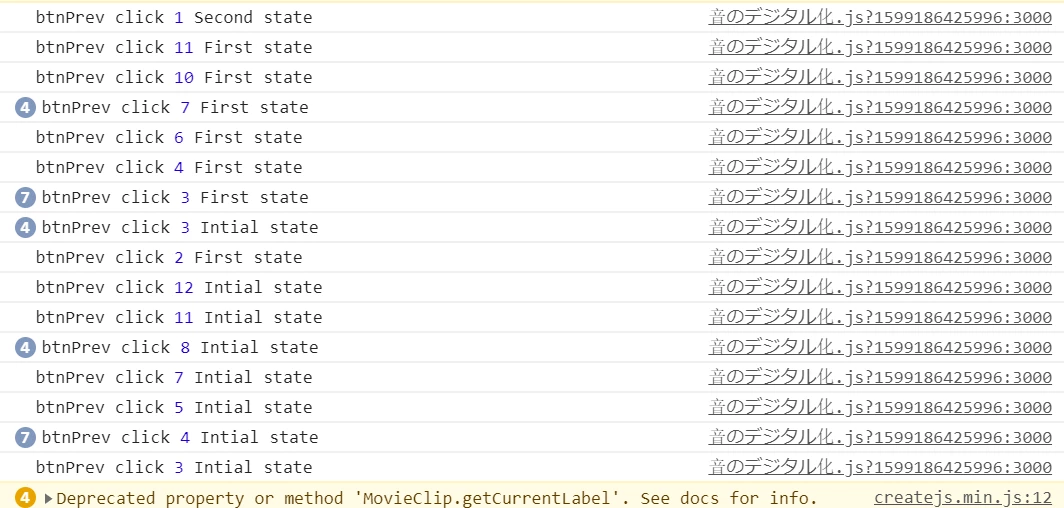
Please help me to find out what did I go wrong.
Step to show error:
1. Click play button and play the MovieClip til the end.
2. Click prev button to go back to the start of MovieClip --> you shall see they skip step at sometime
3. Click next button to go to the end of MovieClip --> they skip it again
p/s: buttons always show as hover in mobile and tablet, please help
 AdChoices