
Participating Frequently
August 27, 2014
Answered

Establishing a socket connection between a .swf file and a socket-test program (TCP/IP builder - Windows), in AS3.

  • August 27, 2014
  • 1 reply
  • 14550 views

I have an issue with a college project I'm working on.

Using Actionscript 3, I made a simple .swf program, an animated, interactive smiley, that 'reacts' to number inputs in a input-box.

For the sake of the project, I now need to make the framework for establishing a socket connection with the smiley .swf, and another program.

This is where I encounter issues. I have very little knowledge of AS3 programming, so I'm not certain how to establish the connection - what's required code-wise for it, that is.

To test the connection, I'm attempting to use the "TCP/IP builder" program from windows, which lets me set up a server socket. I need to program the .swf file into a client - to recognize it, connect to it, then be able to receive data (so that the data can then be used to have the smiley 'react' to it - like how it does now with the input-box, only 'automatically' as it gets the data rather than by manual input).

My attempts at coding it are as follows, using a tutorial (linked HERE😞

//SOCKET STUFF GOES HERE

//****************************************************************

    var socket:XMLSocket;        

    stage.addEventListener(MouseEvent.CLICK, doConnect)

// This one connects to local, port 9001, and applies event listeners

    function doConnect(evt:MouseEvent):void 

{ 

    stage.removeEventListener(MouseEvent.CLICK, doConnect)

    socket = new XMLSocket("127.0.0.1", 9001);   

    socket.addEventListener(Event.CONNECT, onConnect)

    socket.addEventListener(IOErrorEvent.IO_ERROR, onError)

}

// This traces the connection (lets us see it happened, or failed)

    function onConnect(evt:Event):void 

    { 

        trace("Connected")

        socket.removeEventListener(Event.CONNECT, onConnect)

        socket.removeEventListener(IOErrorEvent.IO_ERROR, onError)


        socket.addEventListener(DataEvent.DATA, onDataReceived)

        socket.addEventListener(Event.CLOSE, onSocketClose);             

        stage.addEventListener(KeyboardEvent.KEY_UP, keyUp)

    } 


    function onError(evt:IOErrorEvent):void 

    { 

        trace("Connect failed")

        socket.removeEventListener(Event.CONNECT, onConnect)

        socket.removeEventListener(IOErrorEvent.IO_ERROR, onError)

        stage.addEventListener(MouseEvent.CLICK, doConnect)

    } 


// Here, the flash tracks what keyboard button is pressed.

// If 'q' is pressed, the connection ends.

        function keyUp(evt:KeyboardEvent):void 

    { 

        if (evt.keyCode == 81) // the key code for q is 81 

        { 

            socket.send("exit")

        } 

        else 

        { 

            socket.send(evt.keyCode)

        } 

    } 

// This one should handle the data we get from the server.

        function onDataReceived(evt:DataEvent):void 

    { 

        try { 

            trace("From Server:",  evt.data )

        } 

        catch (e:Error) { 

            trace('error')

        } 

    } 


    function onSocketClose(evt:Event):void 

    { 

        trace("Connection Closed")

        stage.removeEventListener(KeyboardEvent.KEY_UP, keyUp)

        socket.removeEventListener(Event.CLOSE, onSocketClose)

        socket.removeEventListener(DataEvent.DATA, onDataReceived);

Trying to connect to the socket gives me either no result (other than a 'connection failed' message when I click the .swf), or the following error:

Error #2044: Unhandled securityError:. text=Error #2048: Security sandbox violation: file:///C|/Users/Marko/Desktop/Završni/Flash%20documents/Smiley%5FTCP%5FIP%5Fv4.swf cannot load data from 127.0.0.1:9001.
    at Smiley_TCP_IP_v4_fla::MainTimeline/doConnect()[Smiley_TCP_IP_v4_fla.MainTimeline::frame1:12]
This topic has been closed for replies.
Correct answer sinious

Thanks for the help so far! I modified the code of my stuff into the following:

//SOCKET STUFF GOES HERE

//****************************************************************

// Just import stuff

import flash.net.Socket;

import flash.events.Event;

import flash.events.IOErrorEvent;

import flash.events.SecurityErrorEvent;

import flash.events.ProgressEvent;

var sock:Socket = new Socket();

sock.addEventListener(Event.CONNECT, onConnect);

sock.addEventListener(Event.CLOSE, onClose);

sock.addEventListener(ProgressEvent.SOCKET_DATA, onSocketData);

sock.addEventListener(SecurityErrorEvent.SECURITY_ERROR, onSecErr);

sock.addEventListener(IOErrorEvent.IO_ERROR, onIOErr);

// Connect!

sock.connect('127.0.0.1',8910);

// play with bad connects

//sock.connect('127.0.0.1',21); // IOErrorEvent Error #2031: Socket Error. URL: 127.0.0.1

//sock.connect('192.168.1.1',80); // connected! (usually your routers HTTP admin)

//sock.connect('google.com',21); // SecurityErrorEvent Error #2048: Security sandbox violation

/////////////////////////////////////////////////////////////////////////////

// Receive data from socket...

function onSocketData(e:ProgressEvent):void

{

    trace(sock.bytesAvailable + ' byte(s) available');

    // Read the socket data...

    if (sock.bytesAvailable > 0)

    {

        // String...

        var msg:String = sock.readUTFBytes(sock.bytesAvailable);


        trace(msg);


        if (msg == 'Connected.')

        {

            // Send a message back to the server (which it will return confirm if it worked).

            sock.writeUTFBytes('Thanks for connecting!');

        }


        // Flush!

        sock.flush();


    }

}

// Connect socket...

function onConnect(e:Event):void

{

    trace('Connected! ' + e);

}

// Close socket...

function onClose(e:Event):void

{

    // Clean up...

    sock.flush();

    sock.close();

    sock = null;

}

// Error events...

function onSecErr(e:SecurityErrorEvent) { trace('SecurityErrorEvent: ' + e); }

function onIOErr(e:IOErrorEvent) { trace('IOErrorEvent: ' + e); }

function onError(evt:IOErrorEvent):void

    {

        trace("Connect failed");

        sock.removeEventListener(Event.CONNECT, onConnect);

        sock.removeEventListener(IOErrorEvent.IO_ERROR, onError);

        }


                function onDataReceived(evt:DataEvent):void

    {

        try {

            trace("From Server:",  evt.data );

        }

        catch (e:Error) {

            trace('error');

        }

    }


    function onSocketClose(evt:Event):void

    {

        trace("Connection Closed");

        sock.removeEventListener(Event.CLOSE, onSocketClose);

    }

Now, when I run the .swf, I get the following message, occurring every few seconds:

IOErrorEvent: [IOErrorEvent type="ioError" bubbles=false cancelable=false eventPhase=2 text="Error #2031: Socket Error. URL: 127.0.0.1"]

I also get this message again, seemingly randomly (possibly when I try to connect to the test app):

SecurityErrorEvent: [SecurityErrorEvent type="securityError" bubbles=false cancelable=false eventPhase=2 text="Error #2048: Security sandbox violation: file:///C|/Users/Marko/Desktop/Završni/Flash%20documents/Smiley%5FTCP%5FIP%5Fv4.swf cannot load data from 127.0.0.1:8910."]

Overall, still having issues with connecting, for some reason.
The TCP/IP builder's .exe and other relevant files are in a different folder than a .swf, but have been set to the same IP (127.0.0.1) and port (8910) as in the example.

What's going on? Security sandbox issue, or something else?

Edit: I tried to test-run the client/server files from .zip, but they don't seem to show or do anything.


127.0.0.1 might be taken over via your HTTP software, I'm not familiar with the tool you're using. It also might have been repointed in your hosts file (in Windows you'll find that here: C:\Windows\System32\drivers\etc). Check to see if anything is overriding 127.0.0.1 (local loopback).

Outside that, I gave you source to a quick AIR server that just opens a listener at 127.0.0.1:8910 so you'd need no other tools to test the client, even though you have one. I just include the source and a produced AIR installer so you can reproduce it to see I'm not doing anything malicious. The Server.air file should be "installed" to test it. When you double click it, it's an installer. It installs to C:\Program Files (x86)\Server (should have named it something less common hindsight). It also has a checkbox to run it after install. If you do you'll see the server pop up a standard 550x400 window with a textbox inside it letting you know it's listening. Any connects, messages (strings) and disconnects will be displayed in the server text box.

The client is the only SWF you should run, after you have "something" listening on the IP and port you configure it with.

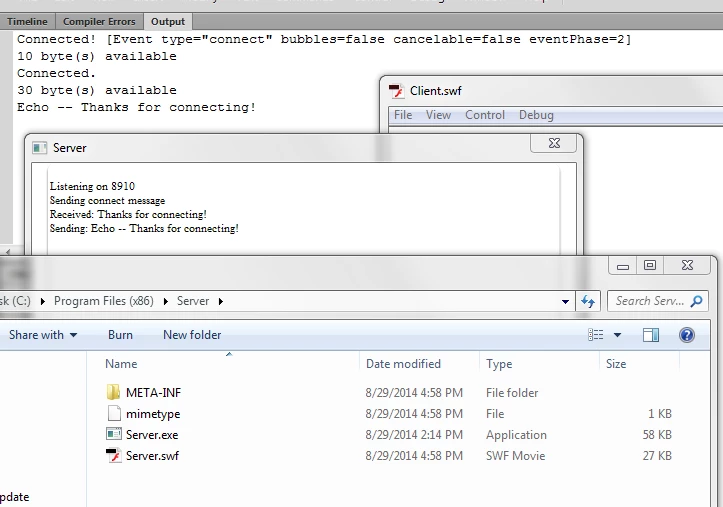
Here's a picture showing you the server is not running from the same folder the SWF is, what the server says and what just running the client exactly how I have it should look like all together:

I'm showing you that after the Server.air installer runs, here's the the file path the executable runs from and the client SWF isn't in there. No issues connecting despite being in different locations.

The server runs and states it's listening on 8910. Feel free to edit the source and reproduce for a different IP/port.

- I open the Client.FLA and just run it. It creates a new socket, adds listeners, connects to 127.0.0.1:8910.


- The server responds that it sees and accepts the client connection. The server sends a message 'Connected.' (10 bytes) to the client right away.

- The client receives the data (string) and traces it. The client sniffs for that specific message and then sends the server a string "Thanks for connecting!".

- The server receives it and is only coded to echo the string back "Echo -- Thanks for connecting!" to verify the string is correct.

- The client receives the servers echo (30 bytes) and traces it.

1 reply

sinious
Legend
August 28, 2014

You're on the right path with the essential way you think you need to set it up, but you're using the wrong class. Class names are pretty self descriptive in AS3. You're using an XMLSocket when you can simply use a basic Socket:

Socket - Adobe ActionScript® 3 (AS3 ) API Reference

You'd use it the same way you use XMLSocket, although it does require sending a request to receive a response from the server (unlike XMLSocket).

Follow the same process. Make a new Socket, connect to the host/port, then send any requests you want which will be received by the TCP/IP app you made. Anything sent back comes to the socketData event. Read the data using the method that matches the data type and do with it what you wish.

ZarhonAuthor
Participating Frequently
August 29, 2014

I tried fiddling around with those earlier, but I kept running into issues (most likely me doing something wrong out of lack of any experience). Classes wise, I've been having trouble getting most of those Adobe guide "examples" and constructor (which all those tutorials ask but don't really clarify) to work.

I've no idea what the procedure/steps for the 'constructor' to make said socket is, or what it is in relation to the .swf - is it it's own file/batch of code that has to be in same folder as the .swf, or can it be made as part of the .swf? How do I initiate/use the 'constructor' to make it, in AS3/Flash Professional?

Do I actually need to use class/package tags, for my example, if I code it directly into the .swf?

Cause, whenever I tried to put the adobe "example" packages in a layer/frame of the .swf (the method I used to program the .swf so far), I keep getting errors that require me to delete most of the class and package descriptors/brackets (first some vague bracket error, can't remember what anymore, that only goes away if I get rid of the 'package' part, then successive errors that insist 'class' & other related code stuff is only for packages...), and then it still doesn't work anyway. I assume I can't use classes in the .swf layers itself?

Note: For reference, most of the smiley I've constructed/coded, and the AS3 code stuff I know so far, has been done referencing this video, plus some basic knowledge/code of how input boxes work. Most of my code is in 'layers' like the video does. How would the socket need it coded? Externally, or within the .swf?

sinious
Legend
August 29, 2014

First to clear up using Flash and code together, there's 2 most common ways.

1) Writing code directly in a frame on the timeline is a "frame script". That's when you click in any frame, open the actions panel and start writing code in there. You do not specify classes and packages here because you are already inside one.

2) Writing code in external files with an .as file extension is the other way. You point your Flash projects ActionScript source path at the folder your code exists in (or you don't need to do that if the FLA and .as files are in the same folder). The AS3 code in that external .as file must be wrapped in a package and class. You can then import it into your FLA to use it.

The choice is yours on which method suits you best.

That said, if you are trying to communicate with a port below 1024 or cross domains, in FP v9.0.115.0 and above, the SWF expects a socket policy file to be sent when establishing a connection. This is explained in the relevant Socket class documentation. If you're not on the same domain or attempting a port below 1024 then this is a good reason any connection will fail. Flash is heavily sandboxed for security.

For the sake of simplicity, lets assume you have a server accepting TCP connections on port 8910 and you're running code from inside a frame script (no package or class needed). You could connect to it as simple as clicking in a frame and typing:

var sock:Socket = new Socket('127.0.0.1',8910);

Of course you'll want to pay attention to security errors, IO errors, connections, connection loss and actual data coming in. It's a bit too much to type here so I'll rip some simple AIR server code and make an AIR server listening on that local port that will just print text to the screen or echo back any strings written to it. Along with that a simple client example connecting to the server, receiving a connect string, sending back another string and receiving it back in echo. Saved down to CS5

Example Simple Socket Connect:

http://www.ertp.com/tmp/SocketExample.zip

You can just open the client and point it toward your HTTP app as well but the communication methods are very simple in Flash, as long as you know the sandbox limits. I included an example of that, trying to connect to google.com:21 (security error). Hope it helps you understand the simple socket class. Do keep in mind I should be removing listeners, etc etc but I know you know that from your code so I didn't bother.