Peaceful_Zest5E1B
Participating Frequently
January 5, 2021
Answered

Export Error

  • January 5, 2021
  • 1 reply
  • 511 views

Hello,

I recently started working with adobe animate. So its my first animation i will create. I have imported hand drawing sketches witch adobe capture. As a check i wanted to export my animation. The problem is my animated drawing was not exported, only a white surface appears. And the movie tester in animate does not work either. Has anyone already had similar experiences with this problem?


Thank you.

 

    This topic has been closed for replies.
    Correct answer kglad

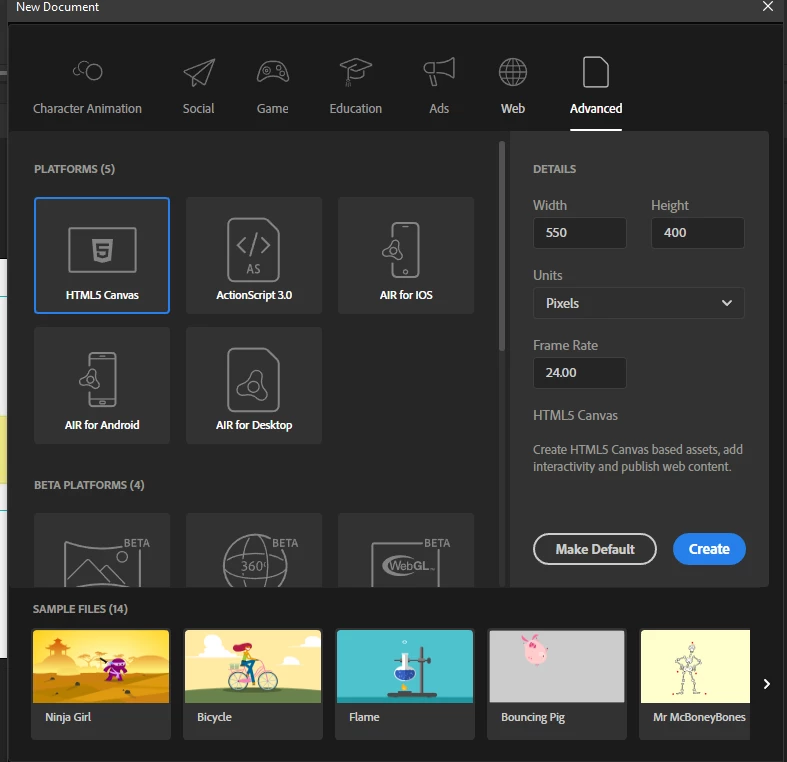
    when you start animate you have to select a project type.  it will look something like this (but will probably look different):


    and "control>test movie" gives you the option to test various ways (eg, in browser, in animate).  there is no "test movie".  there's control>test movie and that does nothing unless you continue to select a suboption.

    1 reply

    kglad
    Community Expert
    Community Expert
    January 5, 2021

    canvas/html5 or as3 project?

    do you use any code in the actions panel?

    what do you see when you test (control>test movie > in animate or in browser)?

    Peaceful_Zest5E1B
    Participating Frequently
    January 5, 2021

    Hy


    Thank you for your fast answer. What do you mean with canvas/html5 or as3? No i dindt use any code i havent changed anything in the default settings. But i have checked under control > test scene >in animate and that works. Only test movie doesnt work. Do i have to select the frames in the Timeline?


    kglad
    Community Expert
    kgladCommunity ExpertCorrect answer
    Community Expert
    January 5, 2021

    when you start animate you have to select a project type.  it will look something like this (but will probably look different):


    and "control>test movie" gives you the option to test various ways (eg, in browser, in animate).  there is no "test movie".  there's control>test movie and that does nothing unless you continue to select a suboption.