Twospirit_Trickster
Participating Frequently
April 1, 2024
Answered

Export > Video/Media

  • April 1, 2024
  • 2 replies
  • 862 views

Even though my project is 1920 x 1080, when I export it to Video/Media, the resulting AVI doesn't fully fill that width.  Instead, there are black margins on either side of the video.  Is this an encode setting?

    This topic has been closed for replies.
    Correct answer Mario_CR

    NTSC DV uses rectangular pixels, not square ones, this is why you see black bars on the sides of the video, the format is primarily used for broadcast tv and camcorders.


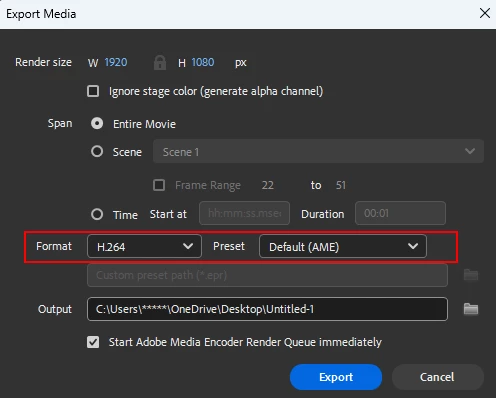
    Try using Format: H.264 / Preset: Default (AME) instead, this will give you a standard MP4 video that matches your document settings.
     

    2 replies

    Mario_CR
    Community Expert
    Mario_CRCommunity ExpertCorrect answer
    Community Expert
    April 1, 2024

    NTSC DV uses rectangular pixels, not square ones, this is why you see black bars on the sides of the video, the format is primarily used for broadcast tv and camcorders.


    Try using Format: H.264 / Preset: Default (AME) instead, this will give you a standard MP4 video that matches your document settings.


    Twospirit_Trickster
    Participating Frequently
    April 1, 2024

    This appears to have solved my issue, Mario.  Thank you.

    Thank you for the help as well, kglad.

    kglad
    Community Expert
    Community Expert
    April 1, 2024

    you're welcome.

    kglad
    Community Expert
    Community Expert
    April 1, 2024

    what are your ame video export settings?

    Twospirit_Trickster
    Participating Frequently
    April 1, 2024

    Shown are the couple of presets I have used.  Please instruct me on what to show if it's not available here.  (Menu option to tab to... etc)

    kglad
    Community Expert
    Community Expert
    April 1, 2024

    click ntsc dv widescreen 24p and check the width/height
