
Participating Frequently
February 13, 2019
Answered

Fade Away Gradient

  • February 13, 2019
  • 3 replies
  • 4900 views

Hello, I would would like to know how to make a fade away gradient using adobe animate CC

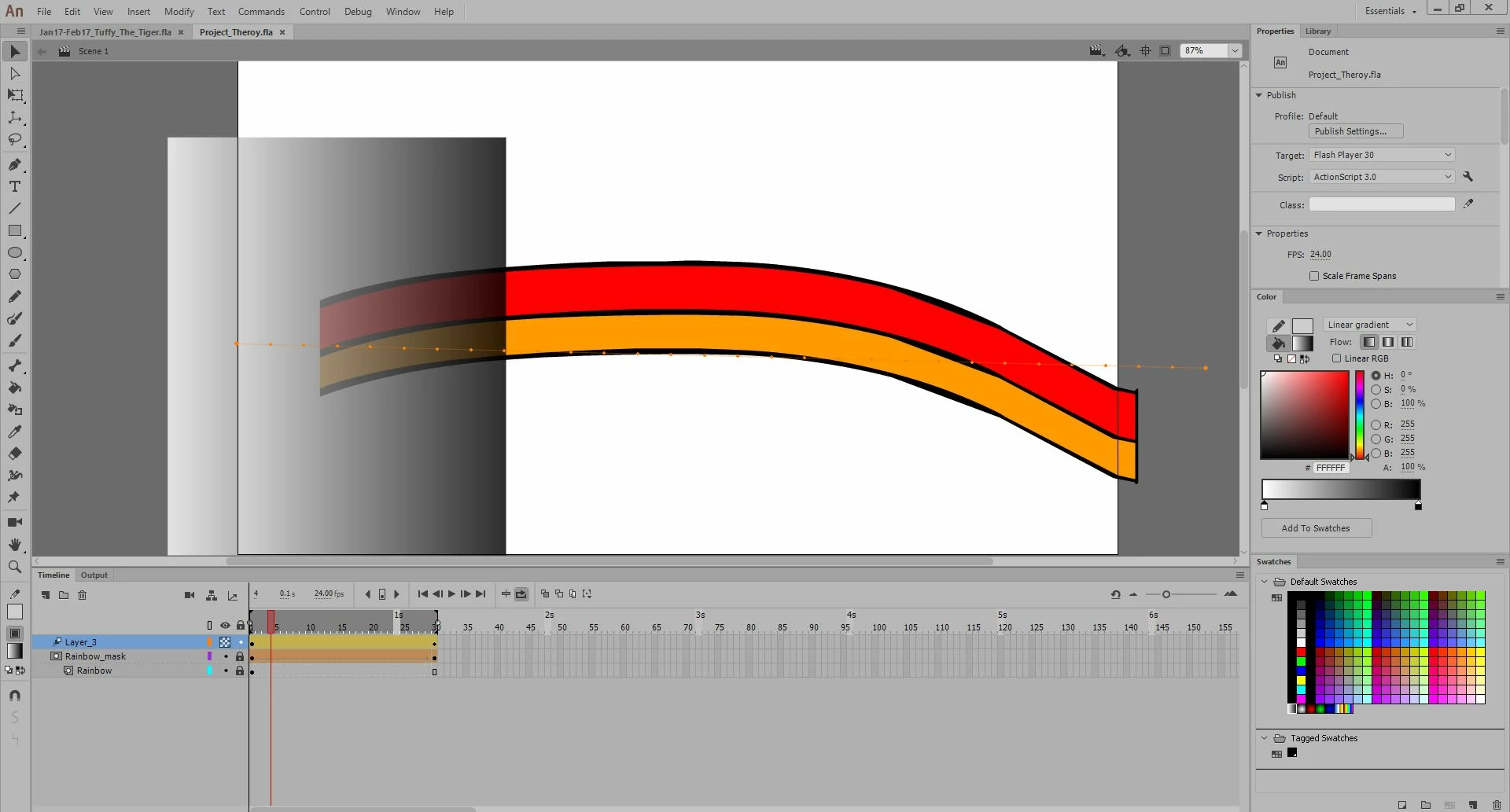
I've put together a simple shape-tweened mask to give the illusion of this rainbow example recessing.

Now I would like to Feather the tip of the mask. How would I go about doing that?

I've tried masking the mask with a gradient, but you can't do that it seems.

I've also tried colouring in the initial mask with alpha colour, doesn't work.

Take a look at my setup to this problem am i approaching it in the right way? What should I try differently?
This topic has been closed for replies.
Correct answer JoãoCésar17023019

Hi.

You can do what you want. But you're gonna need a bit of AS3.

Let's suppose you have your rainbow in one layer and the mask in the layer above. Your rainbow has a instance name of rainbow (instances names are set in the Properties Panel) and the mask has a instance name of mk.

Don't set the mask layer as an actual mask in the IDE. We're gonna do this with code.

Now, put this code in the first frame:

mk.cacheAsBitmap = true;

rainbow .cacheAsBitmap = true;

rainbow.mask = mk;

It should do the job.

FLA download:

animate_cc_mask_fading.zip - Google Drive

Regards,

JC

3 replies

sergiopop75
Inspiring
July 23, 2021
____2D vector animator since 2000 & PhD
JoãoCésar17023019
Community Expert
JoãoCésar17023019Community ExpertCorrect answer
Community Expert
February 13, 2019

Hi.

You can do what you want. But you're gonna need a bit of AS3.

Let's suppose you have your rainbow in one layer and the mask in the layer above. Your rainbow has a instance name of rainbow (instances names are set in the Properties Panel) and the mask has a instance name of mk.

Don't set the mask layer as an actual mask in the IDE. We're gonna do this with code.

Now, put this code in the first frame:

mk.cacheAsBitmap = true;

rainbow .cacheAsBitmap = true;

rainbow.mask = mk;

It should do the job.

FLA download:

animate_cc_mask_fading.zip - Google Drive

Regards,

JC

Participating Frequently
February 13, 2019

Interesting, thanks for the information and I didn't expect you to give a project file either, but it really helped. well done.

I can kind of see a little better how it's done now.

JoãoCésar17023019
Community Expert
Community Expert
February 13, 2019

You're welcome.

Legend
February 13, 2019

Animate doesn't support alpha masks. They're entirely binary. If the animation you're creating is an AS3 document, you can use blend modes to approximate an alpha mask. If not, you'll have to put your masked object against a solid-colored background and then use a gradient-filled shape to fake masking.

Participating Frequently
February 13, 2019

Sorry could you walk me through this a bit better? i don't quite know what you mean by using the gradient - filled shape to fake the masking. how? Is there a specific video tutorial you could link me to? or provide an image of the setup?

Frankly I don't even know if my animation's a AS3 document or what that is.. lol. did they take out blending modes with the newer default set?