
Participating Frequently
November 26, 2021
Answered

Faded past frames?

  • November 26, 2021
  • 1 reply
  • 517 views

Hey hey! I need help with Animate 2022. I am trying to figure out how, and if I can, dim the frame before? I don't know how else to say it. I have been animating for years, but on a CHILD APP- Flipaclip- and Procreate.  So this is completely different, and so much better, than what I am used to. what I am trying to do is when I move to the next frame, I want the past frames to be faded so I can draw over it! Sorry again, I do not know what this is called. Any help is appreciated! Thank you!!!

This topic has been closed for replies.
Correct answer n. tilcheff

Hey mate,


They call it Onion Skin.

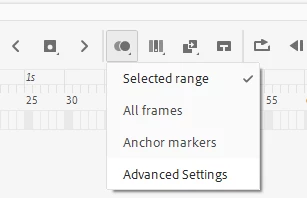
It's a button on the Timeline and if you press and hold you will have a drop-down with Advanced Settings to play with.

1 reply

n. tilcheff
n. tilcheffCorrect answer
Legend
November 26, 2021

Hey mate,


They call it Onion Skin.

It's a button on the Timeline and if you press and hold you will have a drop-down with Advanced Settings to play with.

Nick - Character Designer and Animator, Flash user since 1998 | Member of the Flanimate Power Tools team - extensions for character animation
CleorAuthor
Participating Frequently
November 26, 2021

I appreciate that so much! Thank you!!! How do I make it where its the past frames fading and not the future ones? This is probably one of the most simple things I am having an issue with! So sorry! 😅 

n. tilcheff
Legend
November 26, 2021

There should be a control bar at the top (where frame numbers are) that allows you to choose what to see.

Or if that is not enough check the advanced settings.


Search how to use Onion Skin in Animate. You will find some documentation and tutorials.


Nick - Character Designer and Animator, Flash user since 1998 | Member of the Flanimate Power Tools team - extensions for character animation