
Participant
August 27, 2024
Answered

Fastest way to add frames between each keyframes
  • August 27, 2024
  • 1 reply
  • 774 views

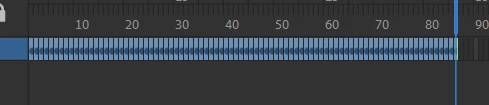
Hello everyone, I want to ask if there is a faster way than pressing F5 for each keyframe to add frames between the keyframes? I once saw an old video where someone selected all the keyframes and pressed a certain key to be able to enter the number of frames they wanted to add between the keyframes
-Thanks for reading, and sorry for my poor English.

 

    This topic has been closed for replies.
    Correct answer n. tilcheff

    Hover the cursor over the vertical yellow line at the end of your frame span.

    Drag it to the right and release.


    1 reply

    n. tilcheff
    n. tilcheffCorrect answer
    Legend
    August 27, 2024

    Hover the cursor over the vertical yellow line at the end of your frame span.

    Drag it to the right and release.


    Nick - Character Designer and Animator, Flash user since 1998 | Member of the Flanimate Power Tools team - extensions for character animation
    phi_0112Author
    Participant
    August 27, 2024

    Thank you very much, even though some frames have uneven spacing, it still works very well. Thank you for helping me

    n. tilcheff
    Legend
    August 27, 2024

    When you drag, look for the 'x2' marker.

    Try with 10 frames to see how it works.


    Nick - Character Designer and Animator, Flash user since 1998 | Member of the Flanimate Power Tools team - extensions for character animation