
konradartcore
Participant
February 1, 2017
Question

File menu hover opens wrong dropdown menu

  • February 1, 2017
  • 3 replies
  • 2459 views

Hi all,

I'm having this weird bug where my upper menu is acting wonky. So much that it makes it pretty much unusable. The strange thing is that I don't have this in any other Adobe CC package, which I would expect in a case like this. I did update the last version yesterday, but I hadn't worked on this system with Animate CC before so I can't say if it was present in the previous version of Animate.

So for example, if I hover over 'File', it will open the 'Control' dropdown menu. If I hover over it and DON'T move my cursor, it'll open the correct one. But as soon as I then move my cursor any direction, it will switch to the wrong menu.

It applies to the File, Edit, View, Insert, and Modify links. But everything after that works fine. Very odd.
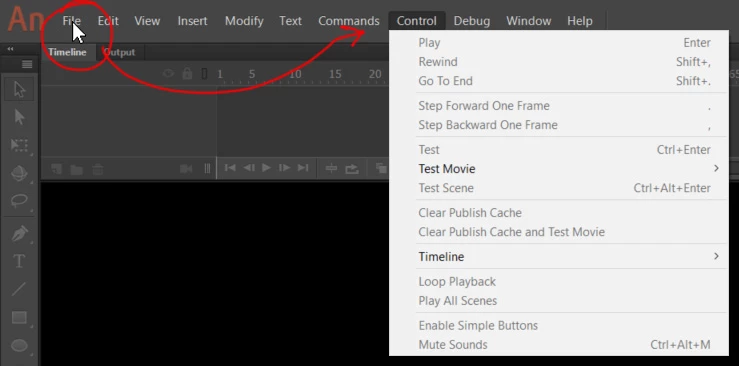

I did some googling but didn't find anything useful. The only thing that seemed to come close was the following, which didn't help me. The drop down sub menus display on the wrong side

    This topic has been closed for replies.

    3 replies

    Participant
    August 31, 2020

    Hey, this problem is still reoccurring. Are you guys going to fix this? 

    kglad
    Community Expert
    Community Expert
    August 31, 2020

    these are user-to-user forums.


    if you want to report a bug to adobe, https://www.adobe.com/products/wishform.html

    konradartcore
    Participant
    February 1, 2017

    A few updates after some testing:

    - If I move my Animate CC program to my primary screen (on the right side), it will work fine. When I move it to the left side, I get the bug. (resolution is the same on both screens)

    - When I make my left screen my primary monitor, it works fine on BOTH screens. But I can't physically switch my screens around here, so that's out of the question.

    kglad
    Community Expert
    Community Expert
    February 1, 2017

    this was supposed to be corrected with the latest version, but just in case, are your display settings 100%?

    konradartcore
    Participant
    February 1, 2017

    That seems to work, only my smaller screen now has tiny content Changing the resolution to compensate for that doesn't seem to be a good option. Any suggestions? And thanks for your time.

    kglad
    Community Expert
    Community Expert
    February 1, 2017

    no, that problem with screen resolution was solved (i thought) with this version:

    if you have that version installed, Feature Request/Bug Report Form