
Inspiring
January 5, 2018
Answered

File won't publish when using Google Font

  • January 5, 2018
  • 1 reply
  • 931 views

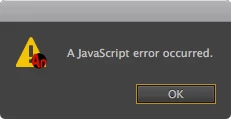
I've added a dynamic textfield, named it 'mytext' and as a font I selected added the Google Font Roboto through the Google Fonts webfonts section. When I publish or preview it however I get this 'javascript error' popup window. Which any regular font the error is gone. Why does it give such an error when I publish a file that uses a Google Font? I already reinstalled Animate but the same effect.
    This topic has been closed for replies.
    Correct answer kglad

    When the textfield is empty it publishes. When I name it (while still being empty) it doesn't.


    i can't duplicate your problem so i can't offer anything other than generalities to fix it.

    you could try resetting your preferences -

    http://helpx.adobe.com/flash/kb/re-create-preferences-flash-professional.html

        (or remove Win:  C:\Users\<username>\AppData\Local\Adobe\Animate CC 2018\ and

                                      C\Users\<username>\AppData\Roaming\Adobe\Animate\2018\

                            Mac:   /Users/<username>/Library/Application Support/Adobe/Animate CC 2018/ and

                                        /Users/<username>/Library/Preferences/Adobe/Animate/2018/)

    1 reply

    kglad
    Community Expert
    Community Expert
    January 5, 2018

    i don't see that problem.

    after you select roboto, do you see it in your properties panel:

    jiggy1965Author
    Inspiring
    January 6, 2018

    Yes I do. Judging by the parenthesis in your font family name you once had Roboto installed, but not it isn't anymore by the way. And do you use the latest Animate CC version? (or did you set it from default 'dark' to 'grey')?

    When I add Roboto through that globe icon it shows as 'Roboto' in the Family field and I can type a text in the dynamic text field should I want to. When I publish or preview it though I get this javascript error popup and a 'An unexpected error occurred during export. [JSX]' text in the Output window. This happens only when I name the textfield though. Like you did with 'tf'. When named I get the javascript error. 

    kglad
    Community Expert
    Community Expert
    January 6, 2018

    i tested with animate 18.0.1 and i use the 'light' interface.

    do you see that error no matter what textfield name you use?