Hi mate,
The mystery is solved!
Many of your colours have 99% alpha.
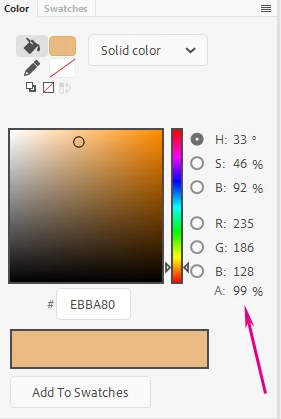
Symbol Palette Control has no difficulty identifying the correct colour and then replacing it, but by design it keeps the alpha value. In one of your keyframes the colour seems to have been changed to solid.
Still with these semi-transparent colours you run into a color picker limitation, where the picker always samples a colour that is a composite - a blend of the actual colour value and what is beneath the shape, so you can't really identify it in the Symbol Palette Control set using the SPC Picker tool, because it relies on sampling from the stage.
The default Find and Replace can only work with solid colours (100% alpha) as source, i.e. you cannot search for a colour that is not solid.
So...
To fix your file you need to identify all the shapes that don't have a solid colour (100% alpha) and manually re-color them.
Also make sure you delete the 99% swatches and create new ones that are 100%.
After that both Find and Replace and Symbol Palette Control will work as they should.
As a general advice that has nothing to do with the current colour issue, I would suggest that you rethink your file and start using Symbols, rig the head with mouth and eyes on separate layers and so on.
I have written a lot about this and would like to offer you these two articles which should be very beneficial in long term:
http://flash-powertools.com/workflow/
http://flash-powertools.com/character-rigging-for-flash-animation/
Finally, I wanted to say that I love the designs and your animation!
My criticism is only in regards to structure. A better structure will give you better editability and flexibility.
Hope this helps!




 AdChoices