Participant
September 7, 2020
Answered

FIT WEBPAGE WITH SCREEN SIZE

  • September 7, 2020
  • 1 reply
  • 1127 views

After converting FLA to HTML5 and publishing.Our html5 content is displaying beyond screen size.

It means in order to see whole content we need to scroll down.

Is there any workaround or code fix so that content matches with screen size and need not use scrolling?


Note:Document size is width:1000; and height:750px;

 

    This topic has been closed for replies.
    Correct answer kglad

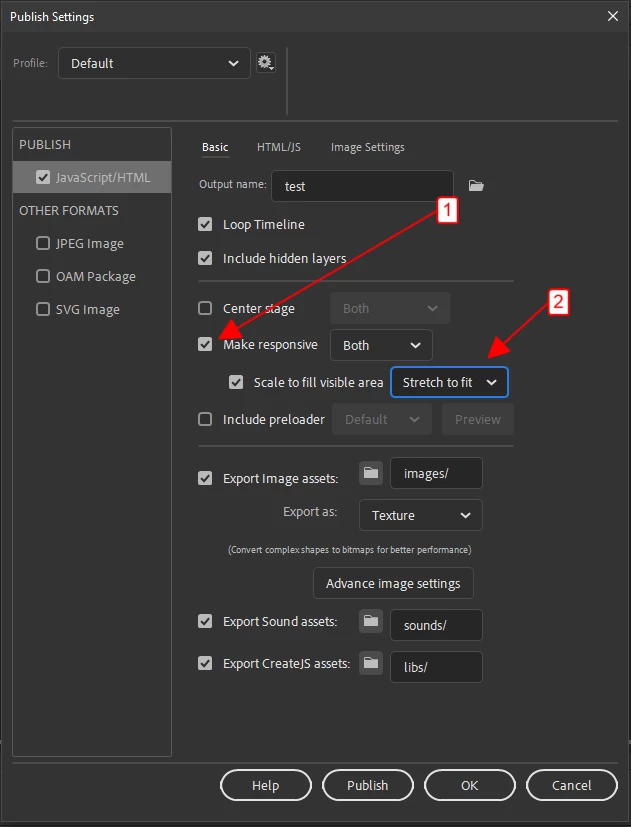
    click file>publish settings:


    1 reply

    kglad
    Community Expert
    Community Expert
    September 7, 2020

    in your publish settings > basic you can tick make responsive and then set scaling. 


    if you don't like either scaling option (eg, you don't want to maintain aspect ratio), you'll need to edit your html file yourself.

    Participant
    September 7, 2020

    I didn't find any responsive option in my animate tool

    Our Animate version is :Adobe Animate 20.5.1


    Can you tell me which Animate version contains responsive option? and also can you provide  html5 code to be

    added so that  problem can be solved

    kglad
    Community Expert
    kgladCommunity ExpertCorrect answer
    Community Expert
    September 7, 2020

    click file>publish settings: