
Participant
June 19, 2013
Answered

Flash CC - Drawing Tablets slow response

  • June 19, 2013
  • 28 replies
  • 87240 views

In this new version of flash, When I drew quick strokes with a curve they convert into a single line as seen below.
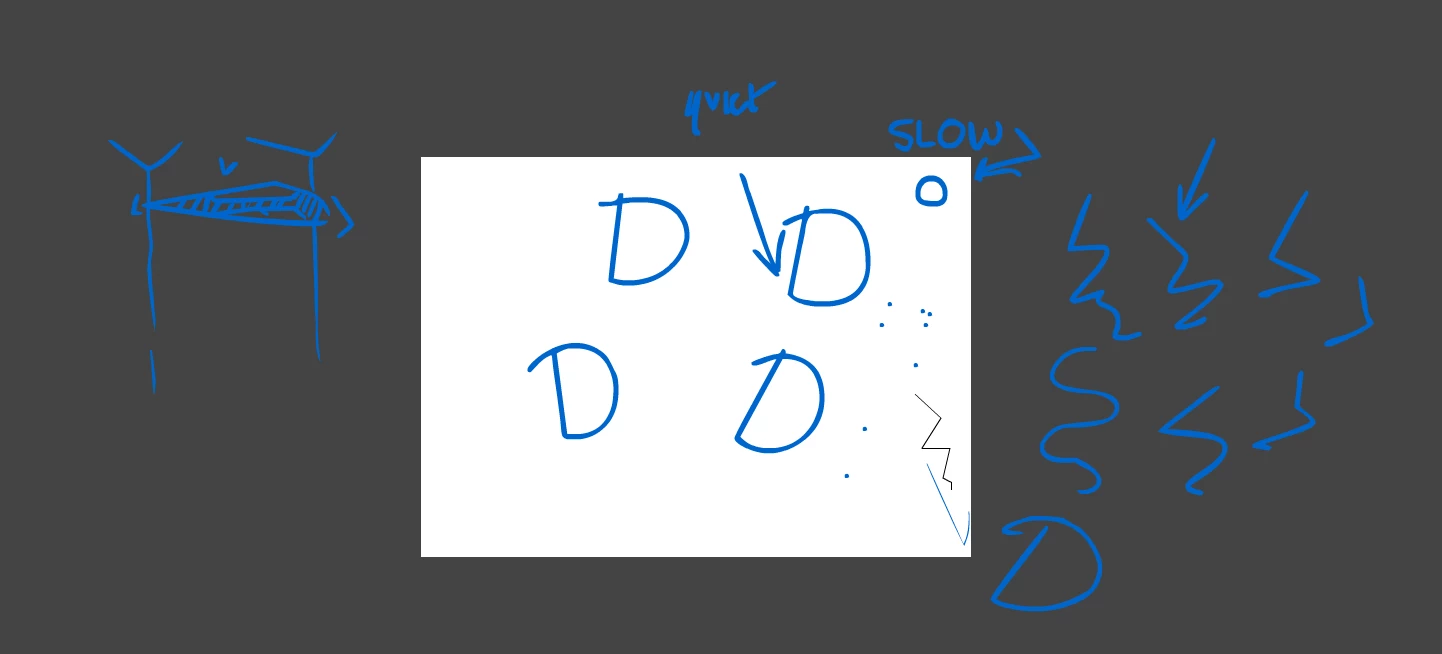
I have tried a reset with having no other programs open and setting the priority higher.

It's a cintiq13HD and I didnt have this problem with CS6.

The things on the stage are meant to be circles.

This topic has been closed for replies.
Correct answer SujaiS

"asap"


The update that contains fix for this bug is now available.

Please refer to the release notes for details on bugs fixed.

http://helpx.adobe.com/flash/release-note/release-notes-flash-pro-cc.html#Flash%20Professional%20CC%20Update%201%20%2813.0.1%29

-Sujai

28 replies

dexterk23745095
Participant
June 13, 2015

HELP!!! URGENT

My Flash CC brush tool pen pressure function is not working...

I have the pen pressure icon showing in the tool panel, but unable to get any tapering stroke but just flat weight lines.

I'm using:

Window 7

Flash CC Version 2.1.0.108

Wacom Intous 5

Wacom driver 6.3.11-4a

Participating Frequently
June 22, 2015

Hi,

This might happen due to corrupted wacom drivers. Please quit flash, re-install wacom drivers(restart as required) and launch flash.

Let us know if you still face any issues.

Thanks

Akshatha

Participating Frequently
January 11, 2015

Has anyone heard of a fix for this issue? (see below)  Basically pen and pencil tools just create a straight line. a link maybe? I've reinstalled FL with all new updates etc.

Participating Frequently
January 22, 2015

Hi,

Could you please give us some details about the drawing tablet that you are using and the installed driver version.

Thanks

Akshatha

Participating Frequently
January 23, 2015

Monoprice.  Using Current driver from their website. Works great on every program except for flash pro cc

khammy
Participant
November 30, 2014

Hi !

I can't install the patch for this problem, I think its not compatible with win 8.1


Some one can help me ?

Thanks

Participating Frequently
July 1, 2014

ok guys i have the solution!

The problem is concerning video driver.
You have to uninstall and restore the original driver of your computer (Vaio,Hp ecc..)
Download the original driver from the producer's web site (poducer of your computer not of the video board)
Also it's important to disable automatic driver update (for example windows do it as default)

I hope this make sense for you ... because this problem was very irritating for me and i wanted to help
In conclusion video driver is the matter!!!!

Participant
March 11, 2014

Does anyone have a solution for my problem in Flash CS6? Serious lag when using pressure with brush. I'm using a Wacom Intuos Pen and Touch.

Participating Frequently
August 25, 2013

I have to say, I'm extremely irritated with this issue. I'm still having the problem on my Flash Pro CC and I need to be able to sketch and draw. Not only can I not find a place to alter the size of my brush, but I also have Flash constantly 'correcting' my lines and snapping them (not always into perfectly straight lines, but still straignening them so that they just don't even look like my art style any more.) into lines. It also barely responds when I draw now and I can barely do anything sketch wise on the program. I'm using Windows 7 - 64 bit and a Wacom Bamboo Pen and Touch tablet. It works fine on Paint tool Sai and it's driving me up a wall that i can't use Flash. Is there a certain thing that I'm just missing, or what?

Participating Frequently
August 26, 2013

MomoSpectator wrote:

I have to say, I'm extremely irritated with this issue. I'm still having the problem on my Flash Pro CC and I need to be able to sketch and draw. Not only can I not find a place to alter the size of my brush, but I also have Flash constantly 'correcting' my lines and snapping them (not always into perfectly straight lines, but still straignening them so that they just don't even look like my art style any more.) into lines. It also barely responds when I draw now and I can barely do anything sketch wise on the program. I'm using Windows 7 - 64 bit and a Wacom Bamboo Pen and Touch tablet. It works fine on Paint tool Sai and it's driving me up a wall that i can't use Flash. Is there a certain thing that I'm just missing, or what?

In a recent patch, the issue of auto-straightening of a curve when drawing using a tablet device was fixed. Have you applied the latest Flash CC update?

The brush size button is located on the toolbar between the "Brush Modes" and "Brush Shape" buttons. Ref the attached image.

http://i.imgur.com/ZeKm7wC.png

Participating Frequently
August 27, 2013

Thank you with the brush issue. Apparently the whole toolbar wasn't showing which is why I couldn't find it.

Regarding the patch, though, I have installed the latest patch and I've still been getting the issue. Getting this thing to work is top priority for me, as it need it to do my graduation project for school.  I can make it so that it draws without creating a different shape and without straightening the lines (MOST of the time) however it still 'corrects my lines so that they are smoother and even when I turn smoothing down it still appears to look corrected by the program. Also, I have to draw EXTREMELY slow on my tablet to get it not to straighten my lines and I also have NO pressure to be founds from my tablet either, so it's very hard to draw like I want to.

Participating Frequently
July 19, 2013

GRRRR!

We're currently testing Flash CC as a possible upgrade for our 2D animation team  currently using CS5.0, CS5.5 or CS6.0 (various versions) of Flash. We downloaded the trial of CC Flash onto a Lenovo laptop runing Windows 8 with a Wacom Intuos 4 tablet.

We experienced the same as all the above posters...

1) The pencil tool defaulting to annoying straight line mode.

2) Laggy performance with the pen and brush tool: When sketching, many of the artists strokes are lost.

The 'workaround' of unticking the 'Windows Ink' function helps users of the pencil tool, but as stated before, all tablet pressure sensitivity is lost, so the brush tool just can't make nice thick and thin lines.

Hardly a fix really.

We've been using Flash for drawn animation work for years now, and I've come to not be very surprised when new versions come out and turn out to be buggy. Now this! The drawing and painting tools don't even work.

I would currently rate this a really serious problem and some artists will certainly find the CC version of Flash unusable.

I look forward to hearing of any update of this just as soon as possible.

Participating Frequently
July 20, 2013

Your frustration is justified, but I assure you this is a high priority issue for us and are we're working with Wacom and Microsoft to figure out the best way to fix it. You will hear from us soon, hopefully with some good news.

Participant
July 24, 2013

I seem to be having the exact same problem as the ones listed above but with my Wacom 12WX Cintiq. I know it was mentioned that the issue is currnelty being worked on but there hasn't been any new news in the last three days.

Is it possible to get an update on how this problem is currently being solved?

Participating Frequently
July 18, 2013

hi,

i had the same problem.today i solved it.under wacom tablet properties go to mapping and untick " use windows ink". this solved my problem.

Participating Frequently
July 18, 2013

@muratyazarcizer Thanks for sharing your solution. While this will fix the "lag", you will probably lose some data like pen pressure, tilt and eraser.

Participating Frequently
July 18, 2013

what did you mean by losing pen pressure,tilt and erase?i tried the pen,pressure,tilt and eraser works fine.did i miss something?

edit : ok.i get it.in photoshop everything seems fine but in flash the pressure and tilt dissapair.

July 15, 2013

I have the same problem.

I understand the software gets tested before it'll be published, but this is just plain bad.

The majority of flash animators use the brush tool for frame-by-frame animation so it is kinda big deal when the brush tool is'nt working properly. Please try to keep us updated about fixing this issue.

I am using the brush tool with pressure on. Pressure on/off does not make a difference, it still lags for about 1 second.

Workaround of 'uncheck ' enable press and hold for right button'' did not work.

Also, what is important to know that the pencil does the same thing. I think it is related to the way flash responds to tablet pressure.

Details:

Windows 8 64-bit

Asus N53-sv i7

Adobe Flash CC version 13.0.0.759

Adobe CS6 still installed, along with CC

I am using a Wacom Bamboo CTH-470 Driver Version 5.3.0-3