
Participant
June 19, 2013
Answered

Flash CC - Drawing Tablets slow response

  • June 19, 2013
  • 28 replies
  • 87240 views

In this new version of flash, When I drew quick strokes with a curve they convert into a single line as seen below.
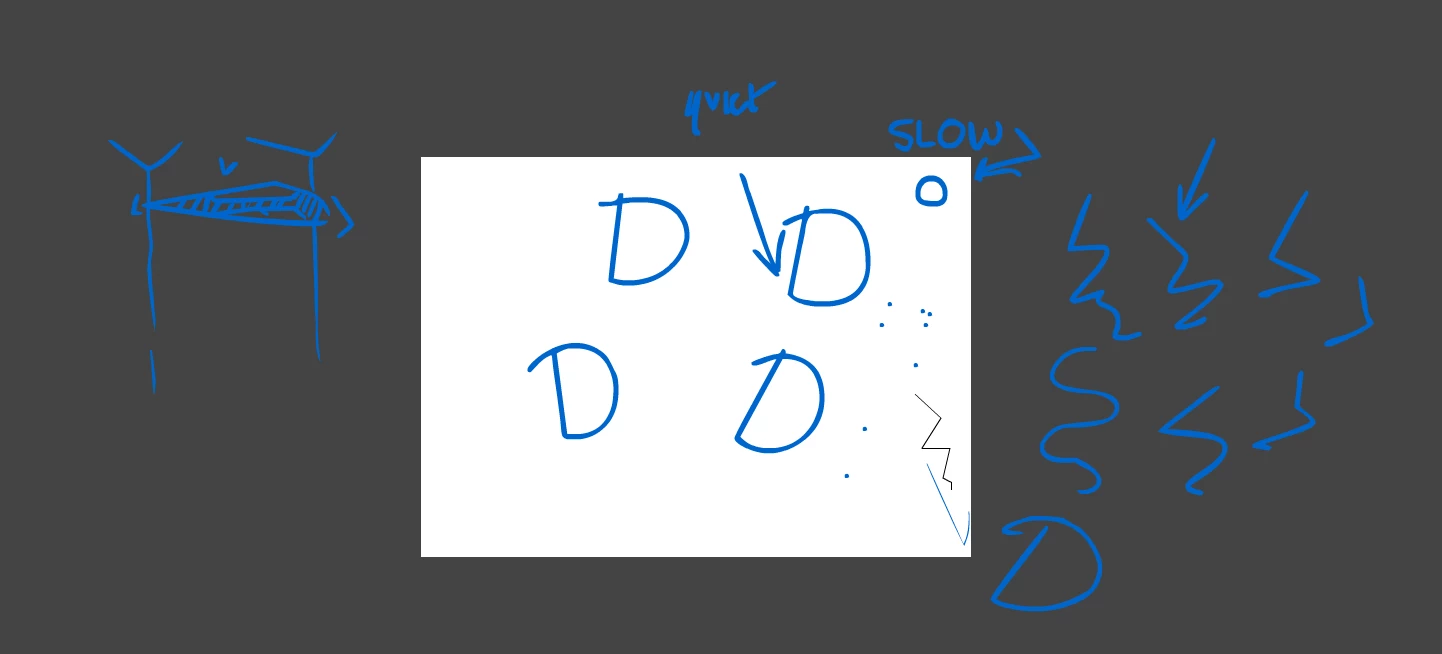
I have tried a reset with having no other programs open and setting the priority higher.

It's a cintiq13HD and I didnt have this problem with CS6.

The things on the stage are meant to be circles.

This topic has been closed for replies.
Correct answer SujaiS

"asap"


The update that contains fix for this bug is now available.

Please refer to the release notes for details on bugs fixed.

http://helpx.adobe.com/flash/release-note/release-notes-flash-pro-cc.html#Flash%20Professional%20CC%20Update%201%20%2813.0.1%29

-Sujai

28 replies

Participating Frequently
July 10, 2013

Sweet, a new update! after the many complains, adobe finally cared about us!

The finally, which we all were waiting for, has finally fixed the....alright, maybe they will fix the bug next year.

Participant
July 11, 2013

Yeah, How dissapointing got excited when I saw it.. This seems like a priority to fix above other things..

Participating Frequently
July 12, 2013

We've identified the cause of the issue and are working on a fix. In the meantime, you could use a workaround by disabling the "Flicks" and "Press and hold" gesture features in Windows. To do so, follow the stpes described below:

Open Control Panel > Pen and Touch.

1. To disable the "Pen and hold" pen action:

          a. Under Pen Options, select the "Press and hold" action.

          b. Click on Settings.

          c. In the Press and Hold Settings dialog, ensure the "Enable press and hold for right-clicking" is unchecked.

          d. Click OK to dismiss the Press and Hold Settings dialog.

2. To disable "Flicks"

          a. Go to the Flicks panel on the Pen and Touch settings dialog.

          b. Ensure the "Use flicks to perform common actions quickly and easily" is unchecked.

Please let us know if this workaround resolves the issue.

Participant
July 8, 2013

C'mon why hasn't this been fixed yet, the only reason I bought CC was for flash.

Participant
July 9, 2013

it feels worse because this is the only version of Flash that was worth upgrading to in 4 years. This one is legitimately faster and more stable. But of course the main tool I use is busted

Participant
July 3, 2013

This is really frustrating,

I noticed this issue as soon as i installed Flash CC.

I have now reverted to using CS6 but the keyboard shorcuts have never properly worked in that version!

I am now stuck with two versions of this program that both hinder my productivity.

NOTE: This issue is with the BRUSH tool, and pen tool for me. I don't see how they can repro the pen issue and it be fine for brush.

Also, i disabled all pen/touch setting in windows to ensure it wasn't interferring but still had the same issue.

cheers.

Participating Frequently
July 2, 2013

Adobe's support abandoned us,

No hope is left for the CC users.

Participating Frequently
June 26, 2013

Same issue here.

All of my tools are on default, and I am using a Wacom Intuos 5 tablet and my driver is updated to the lastest driver that was released on march.

My conclusion is that there is a problem with flash's connection with the wacom drivers.

If you notice, you can try using your pen to long-click on the Flash's workspace, and a blank circle will appear, not such as he previous versions of Flash.

Flash's driver recocnizer might be corrputed, for example, a coupl,e of comments above me complained about not having tlit and pressure working, even tho I got it working exellent except the annoying issue with the lining lag.

Participating Frequently
June 27, 2013

We were able to reproduce the issue with pencil tool when set to smooth mode. We will try resolve the issue asap. Thank you for your patience.

-Sangeeta

Participating Frequently
July 10, 2013

I'm having the same issue.  Flash CC, Windows 7, Wacom Bamboo with the latest drivers (contacted Wacom and they told me to uninstall and reinstall drivers).  This didn't fix the issue.  Also, it took a few tries (going from pencil to paintbrush) for the options for pressure sensitive buttons to display.

Participant
June 22, 2013

I have the same problem with my wacom tablet. I even tried reinstalling the entire program but it didn't fix anything. I hope someone figures out how to fix this soon.

Solved it (at least for me)

It seems that I figured out one way to solve the issue. I switched my tablet to mouse mode and now I can draw without the line, but now I need to draw on mouse mode which is kinda bad on my tablet. I hope this issue gets fixed soon.

Participating Frequently
June 24, 2013

Can you please provide us with the exact repro steps so that can we track it better .Also let us what is the:

1)Preference set for drawing

2)Tool used for drawing(brush,pencil etc)

3)If it is Pencil,what is the mode and if it is brush ,is pressure and tilt enabled

4)What are the setting of the tablet (ex:mapping etc)

It would be great if you could give the details and repro steps aso that we will be able to reproduce at our end and fix the issue.

-Sangeeta

Participant
June 24, 2013

It just bugs up when your draw something, it started the second I drew my first line in the program. All my tools are at their default, 50 smoothing, this bug is present in all drawing tools; the brush, pencil, and even the lasso. The brush is affected in all modes, with pressure, no pressure, tilt, etc. The Pencil as well; in straight, smooth, ink, is bugged.

Participant
June 21, 2013

http://25.media.tumblr.com/98b33134be52725ac8459b75f9741e38/tumblr_mooavhvUTg1qk8bc7o1_500.png

i got the same thing going on, it's really frustrating

Participating Frequently
June 20, 2013

If you are using pencil tool, please set the mode to smooth or ink mode which is at the bottom of the toolbar.By default it is set to straighten mode.If the problem still exists please revert back with the exact repro steps.Thanks!