
Flash Video Player Need Help
Hello everyone I am hoping someone here can help me. I am going to school and I have an action scripting class. For my final project we have to make a flash video player with a custom skin to upload to our websites. We did something similar to this with our first project which we made a player where the movies where embedded in the file itself but this is supposed to be a youtube like flash player where we can call in the files from another source.
We kind of got pressed for time and were not able to go into detail with this project so the teacher gave us the code and I put it in exactly how it should be but im pretty sure i have something misplaced or I am missing a step. I get 8 different errors when I go to test the movie. and nothing works. Can someone please tell me what I am doing wrong or can you point me in the direction of a tutorial on this as I have been searching for tutorials on this with no luck.
Here is my Action Script 3.0 CODE:
import fl.video.FLVPlayback;
import fl.controls.List;
var vid:FLVPlayback = new FLVPlayback();
vid.source= "fashion.flv";
addChild(vid);
vid.skin="SkinOverPlayStopSeekMuteVol.swf";
vid.x=100;
vid.y=300;
vid.skinAutoHide="true";
vid.width=500;
vid.height=280;
var vidList:List = new List();
vidList.x= vid.x+10;
vidList.y= 200;
vidList.width=200;
vidList.height=100;
vidList.addItem({label:"Bathroom Behavior",data: "bathroom.flv"});
vidList.addItem({label:"Chase Scene",data: "chase.flv"});
vidList.addItem({label:"VMCAD Fashion Design Commercial",data: "fashion.flv"});
addChild(vidList);
vidList.addEventListener(Event.CHANGE,playVid);
function playVid(e:Event):void{
vid.source=e.target.selectedItem.data;
}
Here is a screenshot of the errors I am receiving.
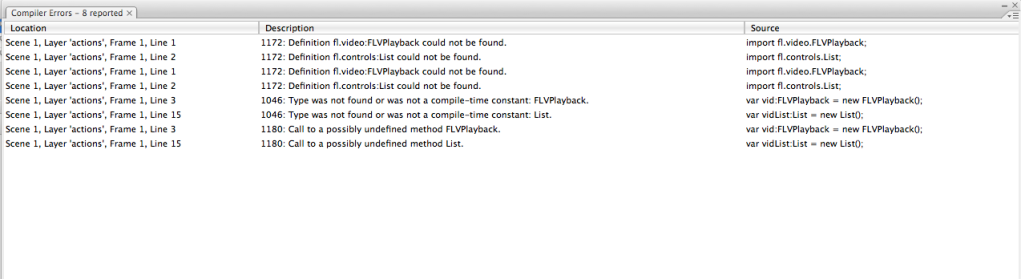 Please help me
thanks
Message was edited by: BTwardy
 AdChoices