Known Participant
December 20, 2009
Answered

Flash Video Player with thumbs

  • December 20, 2009
  • 1 reply
  • 448 views

i

Hi,

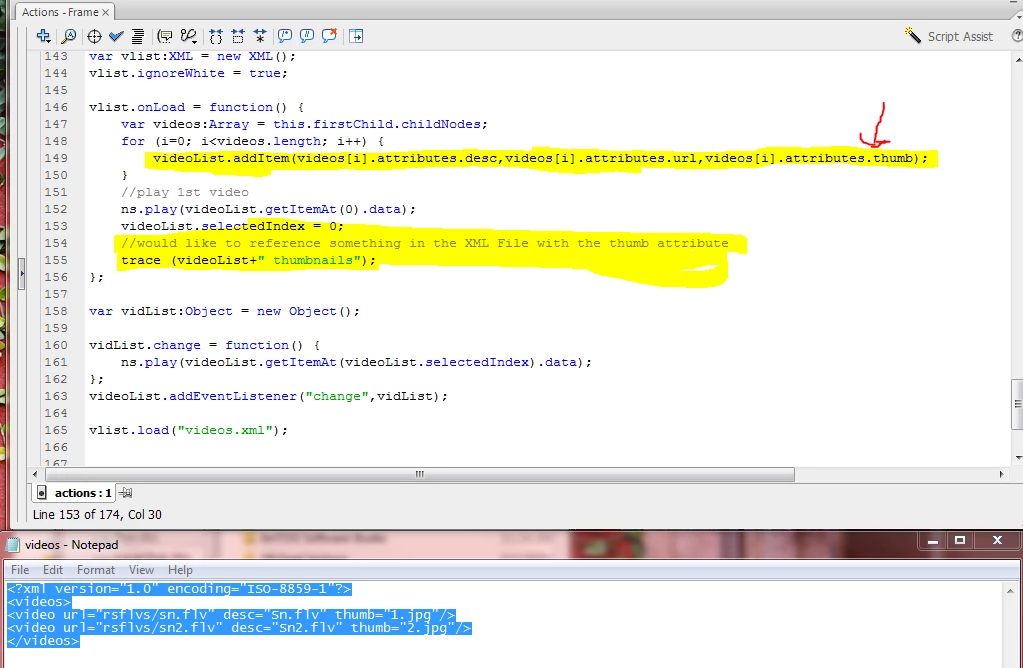
I would like to know how to reference something in my xml. Im adding thumbnails and would like to know how to get the file name in from the xml using the attributes method. The videos are loaded in an list component I want to use "trace" to get an property or attibute from the xml file. I tried trace(videos.attributes.thumb+"thumbnail"); but it didnt work. The XML file is also posted

Actionscript 2.0

var vlist:XML = new XML();
vlist.ignoreWhite = true;

vlist.onLoad = function() {
var videos:Array = this.firstChild.childNodes;
for (i=0; i<videos.length; i++) {
  videoList.addItem(videos.attributes.desc,videos.attributes.url,videos.attributes.thumb);
}
//play 1st video
ns.play(videoList.getItemAt(0).data);
videoList.selectedIndex = 0;
//would like to reference something in the XML File with the thumb attribute
trace (videoList+" thumbnails");
};

var vidList:Object = new Object();

vidList.change = function() {
ns.play(videoList.getItemAt(videoList.selectedIndex).data);
};
videoList.addEventListener("change",vidList);

vlist.load("videos.xml");

XML

<?xml version="1.0" encoding="ISO-8859-1"?>
<videos>
<video url="rsflvs/sn.flv" desc="Sn.flv" thumb="1.jpg"/>
<video url="rsflvs/sn2.flv" desc="Sn2.flv" thumb="2.jpg"/>
</videos>
This topic has been closed for replies.
Correct answer

Hi Samuel,

Here is the code helps U,

Code:

var vlist:XML = new XML();

vlist.ignoreWhite = true;

vlist.onLoad = function() {

var videos:Array = this.firstChild.childNodes;

for (i=0; i<videos.length; i++) {

videoList.addItem({label:videos.attributes.desc,data:videos.attributes.url,image:videos.attributes.thumb});

trace(videos.attributes.thumb);

}

//play 1st video

ns.play(videoList.getItemAt(0).data);

trace(videoList.getItemAt(0).image);

videoList.selectedIndex = 0;

//would like to reference something in the XML File with the thumb attribute

trace(videoList+" thumbnails");

};

var vidList:Object = new Object();

vidList.change = function() {

ns.play(videoList.getItemAt(videoList.selectedIndex).data);

trace(videoList.getItemAt(videoList.selectedIndex).data);

};

videoList.addEventListener("change",vidList);

vlist.load("videos.xml");

The Red colored state the value for the thumb

If U find difficult, get back to me.

Saransoft

1 reply

Correct answer
December 21, 2009

Hi Samuel,

Here is the code helps U,

Code:

var vlist:XML = new XML();

vlist.ignoreWhite = true;

vlist.onLoad = function() {

var videos:Array = this.firstChild.childNodes;

for (i=0; i<videos.length; i++) {

videoList.addItem({label:videos.attributes.desc,data:videos.attributes.url,image:videos.attributes.thumb});

trace(videos.attributes.thumb);

}

//play 1st video

ns.play(videoList.getItemAt(0).data);

trace(videoList.getItemAt(0).image);

videoList.selectedIndex = 0;

//would like to reference something in the XML File with the thumb attribute

trace(videoList+" thumbnails");

};

var vidList:Object = new Object();

vidList.change = function() {

ns.play(videoList.getItemAt(videoList.selectedIndex).data);

trace(videoList.getItemAt(videoList.selectedIndex).data);

};

videoList.addEventListener("change",vidList);

vlist.load("videos.xml");

The Red colored state the value for the thumb

If U find difficult, get back to me.

Saransoft