Participant
May 6, 2021
Answered

Fluid Brush Tool grayed out, cannot be clicked

  • May 6, 2021
  • 2 replies
  • 4273 views

In Adobe Animate CC 2021, My GPU and display are all updated, and my DirectX Version is 12, but the fluid brush tool seemed to grayed out and cannot be selected. Please help as I see a lot of post on this, but I have tried and all seemed to fail.




This topic has been closed for replies.
Correct answer Mario_CR

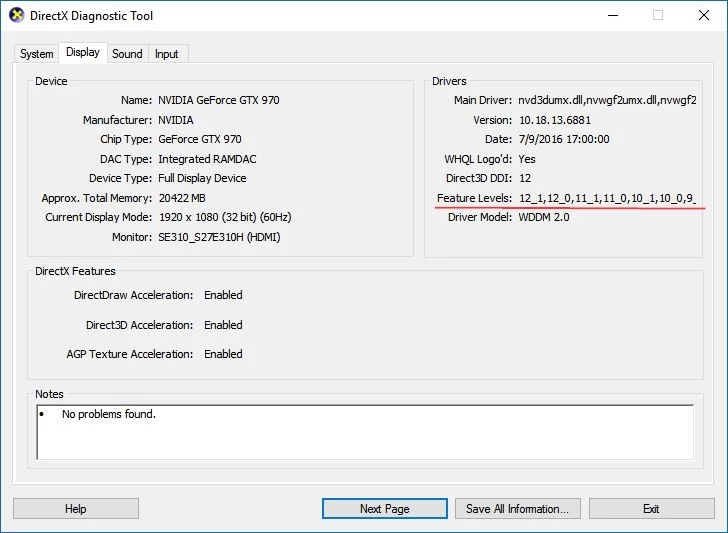
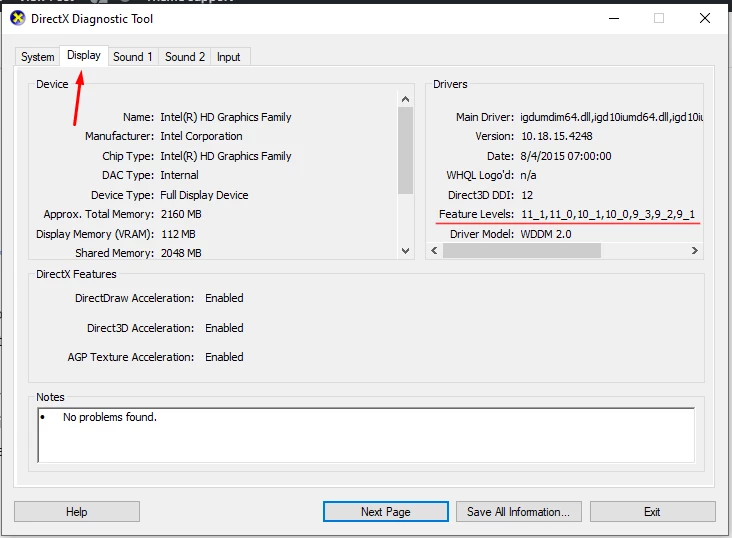
Intel(R) HD graphics Family is an entry level gpu. It has to support DirectX12 with feature level 12.0 at minimum.  Click on the display tab and look at the feature level, is 12_0 included? If not then you're out of luck.

Examples:

This card here does have feature level 12:

 This one does not:

2 replies

Community Expert
May 7, 2021

Make sure you have the latest version of Adobe Animate. 21.0.5

Participant
May 7, 2021

It is the latest version


Mario_CR
Community Expert
Mario_CRCommunity ExpertCorrect answer
Community Expert
May 7, 2021

Intel(R) HD graphics Family is an entry level gpu. It has to support DirectX12 with feature level 12.0 at minimum.  Click on the display tab and look at the feature level, is 12_0 included? If not then you're out of luck.

Examples:

This card here does have feature level 12:

 This one does not:

_keyframer
Community Expert
Community Expert
May 6, 2021

Make sure you have updated your video card driver - what kind of video card are you running?

Animator and content creator for Animate CC
Participant
May 7, 2021

I have updated my display and video card, and my display adapter is Intel(R) HD graphics family...