
bpk_t
Participant
July 3, 2019
Answered

folder in library disappeared after paste

  • July 3, 2019
  • 1 reply
  • 312 views

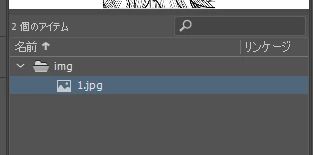
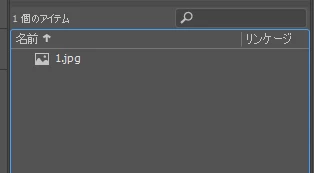
I copy a layer from one fla file, and past it to other fla file, then, folder in library disappeared.

Is there a way to paste the folder so it won't disappear?

library (copy source fla)
library (copy destination fla). img folder disappeared.
version : Adobe Animate 19.2.1 (build 408)
    This topic has been closed for replies.
    Correct answer n. tilcheff

    Hi mate,

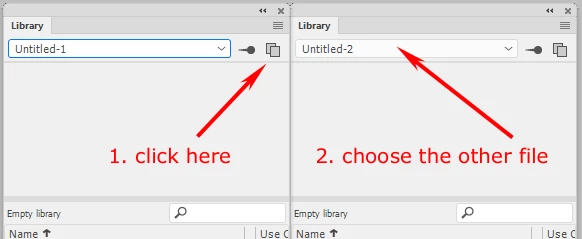
    Have you tried to open two Library panels and drag the folder from one file to the other.

    I believe that it will copy it with the contents so you will have both the folder and what is inside.

    Hope this helps!

    1 reply

    n. tilcheff
    n. tilcheffCorrect answer
    Legend
    July 3, 2019

    Hi mate,

    Have you tried to open two Library panels and drag the folder from one file to the other.

    I believe that it will copy it with the contents so you will have both the folder and what is inside.

    Hope this helps!

    Nick - Character Designer and Animator, Flash user since 1998 | Member of the Flanimate Power Tools team - extensions for character animation