
Pouradam
Inspiring
January 20, 2015
Answered

fontFamily name is not in English. what should I do?

  • January 20, 2015
  • 3 replies
  • 889 views

Hi there all,

In TextLayoutFormat, I need to use "Adobe Naskh Medium" Font, as my fontFamily.

(This name is the Font name I see in Fonts folder in windows)

But inside Adobe Flash, I see the font name as "Adobe نسخ Medium"

(the middle part is in Persian language, means Naskh)

If I use this code it doesn't work:

tlf.fontFamily = "Adobe Naskh Medium";


If I use this code, it works fine:

tlf.fontFamily = "Adobe نسخ Medium";

But for Packaging the file I need to use an English name. Right?

So what should I do to rename the Font in English??

By the way, I also tried to name the font to another name like below (i.e AdobeNaskh):
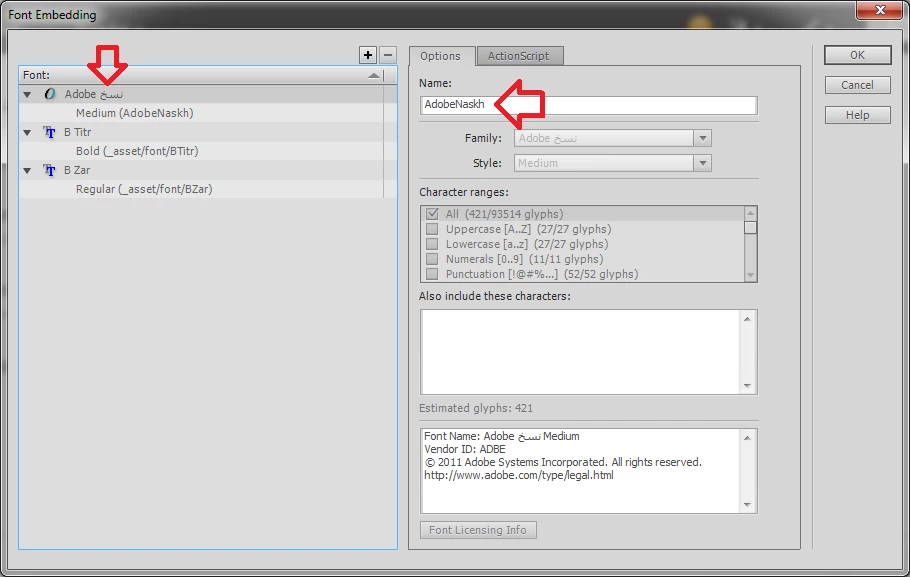
But again this code doesn't work:

tlf.fontFamily = "AdobeNaskh";


What should I do please??

This topic has been closed for replies.
Correct answer Pouradam

This is a LONG workaround, i wish there was a shortcut but I couldn't find any...


Let me share the crazy method:

- You can not rename the fonts regularly, so i was forced to use a 3rd party Font Rename tool (Typograf).

- It did not work with otf fonts, only ttf fonts, so I converted that Font online from otf to ttf.

- Then I renamed the Font from "Adobe نسخ Medium" to "Adobe Naskh" in above app.

- Then I converted that Back to otf online and installed it, It was installed but not listed in Adobe Flash Fonts!

- I realized the file names must match the size in bytes! (Oops)

so I needed to find an English String(anything) equal to character code of that Persian String (نسخ).

- Using an online UTF-8 calculator, I found a match string for نسخ (that was F3.) !

- So I renamed "Adobe نسخ Medium" to "Adobe F3. Medium" and it worked AFTER ALL!! lol

Don't tell me now that there was an easier method!!

The moral of story is that if I am going to make a Font in future, I keep in mind to name it in English Characters!

All the best.

3 replies

Pouradam
PouradamAuthorCorrect answer
Inspiring
January 22, 2015

This is a LONG workaround, i wish there was a shortcut but I couldn't find any...


Let me share the crazy method:

- You can not rename the fonts regularly, so i was forced to use a 3rd party Font Rename tool (Typograf).

- It did not work with otf fonts, only ttf fonts, so I converted that Font online from otf to ttf.

- Then I renamed the Font from "Adobe نسخ Medium" to "Adobe Naskh" in above app.

- Then I converted that Back to otf online and installed it, It was installed but not listed in Adobe Flash Fonts!

- I realized the file names must match the size in bytes! (Oops)

so I needed to find an English String(anything) equal to character code of that Persian String (نسخ).

- Using an online UTF-8 calculator, I found a match string for نسخ (that was F3.) !

- So I renamed "Adobe نسخ Medium" to "Adobe F3. Medium" and it worked AFTER ALL!! lol

Don't tell me now that there was an easier method!!

The moral of story is that if I am going to make a Font in future, I keep in mind to name it in English Characters!

All the best.

Inspiring
January 21, 2015

Hi dear;

To change the name of the font I'd suggest you to do it from C:\Windows\Fonts

Just find your font and right-click then rename it.

You must see the change in your Adobe products instantly as you search for the font.

Btw, Are you from Iran? I am

Pouradam
PouradamAuthor
Inspiring
January 22, 2015

Hi and thanks for the reply,

Renaming a Font is not possible! Did you check yourself please? even if you rename the English Name there, you can no more view the Font. Also it makes sense, as indeed we should not be able to change the Font name.

So this was not working for me...but thanks anyway.

(Yes I am from Iran but not living in Iran )

Pouradam
PouradamAuthor
Inspiring
January 21, 2015

Any ideas please?