
Inspiring
April 20, 2024
Question

Free transform tool selecting objects diagonally?

  • April 20, 2024
  • 2 replies
  • 222 views

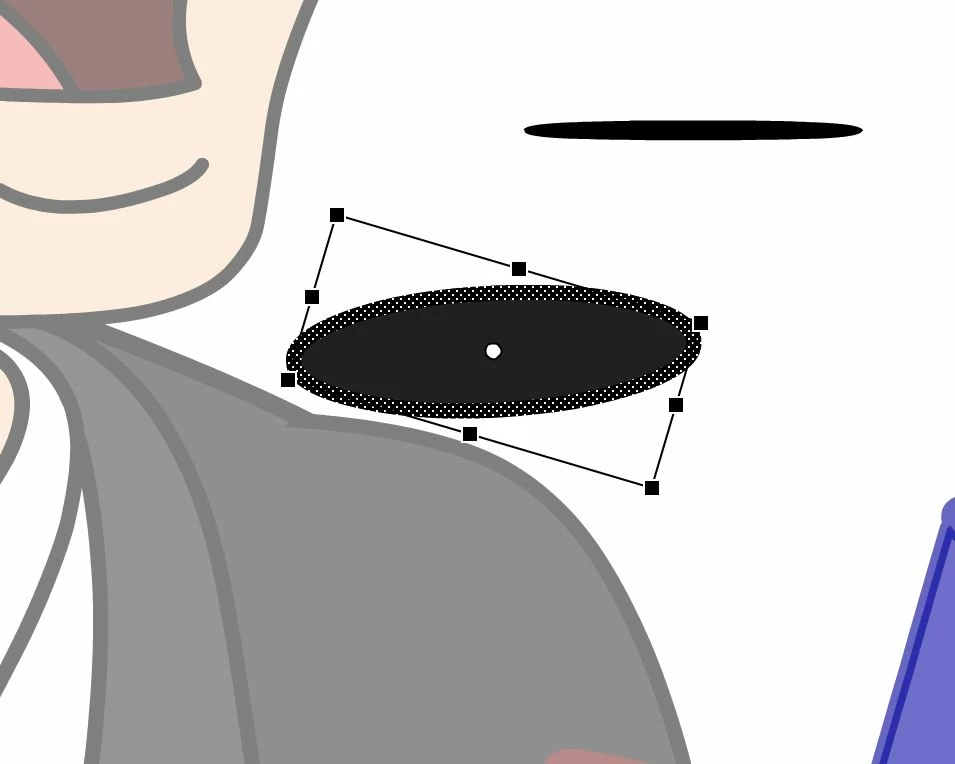
Hey, not sure if this is a bug or if i've changed something, but I was trying to rearange some simple shapes in a document today only to find that the free transform tool was selecting my ovals diagonally making the task of manipulating the size and width awkward. 


Any Ideas on whats causing this? I'm sure its something simple ive missed but cant seem to find a solution? 
    This topic has been closed for replies.

    2 replies

    Vladin M. Mitov
    Inspiring
    April 20, 2024

    It looks like you are trying to transform a shape that belongs to a timeline of a symbol, that you edit "in place". Perhaps the symbol's instance on the stage is transformed, causing this unwanted transformations. Open the symbol directly from the library or use "edit" (not "edit in place") from the context menu.


    - Vlad: UX and graphic design, Flash user since 1998Member of Flanimate Power Tools team - extensions for character animation
    kglad
    Community Expert
    Community Expert
    April 20, 2024

    that object's been rotated?  but i don't know a horizontally positioned oval would be rotated ~30 degrees.


    restart animate if selecting that oval shows its rotation is zero in the transform panel