
Inspiring
September 12, 2012
Answered

fullScreen problem

  • September 12, 2012
  • 2 replies
  • 1859 views

I'm calling swf file (video player) through URL Loader. all controls are fine.

but i facing problem at fullscreen mode.

*my player is into a movieClip called as content_mc .

*that movieClip registration point is middle.

how can i solve this problem without changing registration point?

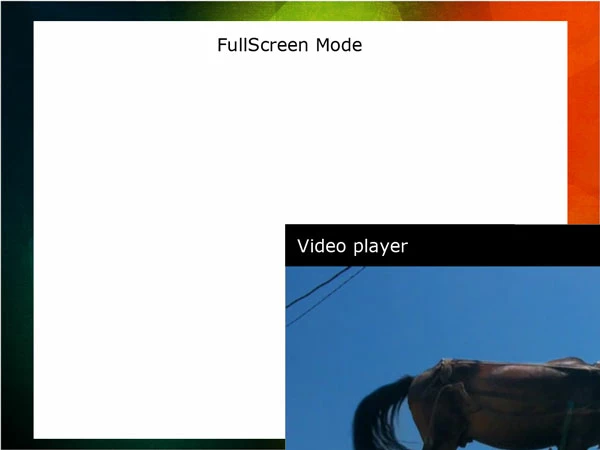
problem:
This topic has been closed for replies.
Correct answer sinious

On your first frame script update the y position of the contentBox like you are the x position:

function updateSize(e:Event)

{

    //Set background's size

    backgroundMC.width = stage.stageWidth;

    backgroundMC.height = stage.stageHeight;

    contentBox.x = stage.stageWidth/2;

    contentBox.y = stage.stageHeight/2;

}

Inside the contentBox frame script you use the stage's dimensions rather than the videos:

if (e.fullScreen)

{

    pLoader.x = int(stage.stageWidth/2)*-1;

    pLoader.y = int(stage.stageHeight/2)*-1;


    // rest...

}

2 replies

Ned Murphy
Legend
September 12, 2012

What code are you using for the x/y placement of the video player?

sinious
Legend
September 12, 2012

Center registration often requires positioning with negative x/y values.

Just calculate the size of the video player and divide its height and width by 2 (half). The number you get is the amount you need to move into the negative. To negate the number just multiply it by -1.

e.g.

videoPlayerMC.x = int(videoPlayerMC.width / 2) * -1;

videoPlayerMC.y = int(videoPlayerMC.height / 2) * -1;

If your videoPlayerMC was 640 width, 480 height then the numbers returned would be x = -320, y = -240. I wrapped it in int() casting to make sure it's a whole pixel with no fraction.

There's other ways but this is most verbose and easiest to understand.

Inspiring
September 12, 2012

Above method not working for my code.

my player is 4:3 .

*player is in a movieClip (white box in above image)*

Video Player swf code:

//==================FullScreen SetUp ========================

stage.scaleMode = StageScaleMode.NO_SCALE;

stage.align = StageAlign.TOP_LEFT;

function onFullscreen(e:FullScreenEvent):void

{

          if (e.fullScreen)

          {

                    controlBar.fullscreen_btn.visible = false;

                    controlBar.normal_btn.visible = true;

                    controlBar.x = (Capabilities.screenResolutionX - 480) / 2;

                    controlBar.y = (Capabilities.screenResolutionY - 116);

                    mid_play.x = stage.stageWidth / 2;

                    mid_play.y = stage.stageHeight / 2;

                    vidDisplay.height = (Capabilities.screenResolutionY);

                    vidDisplay.width = vidDisplay.height * 4 / 3;

                    vidDisplay.x= (Capabilities.screenResolutionX - vidDisplay.width) / 2;

          }

          else

          {

                    controlBar.fullscreen_btn.visible = true;

                    controlBar.normal_btn.visible = false;

                    controlBar.x = 0;

                    controlBar.y = 244;

                    vidDisplay.y = 0;

                    vidDisplay.x = 0;

                    vidDisplay.width = 480;

                    vidDisplay.height = 360;

          }

}

This is present working file code:

var eventPlayer:String = "videoplayer.swf";

var pLoader:Loader = new Loader();

var pRequest:URLRequest = new URLRequest(eventPlayer);

pLoader.load(pRequest);

addChild(pLoader);

pLoader.x = -405;

pLoader.y = -78;

stage.addEventListener(FullScreenEvent.FULL_SCREEN, onFullscreen);

function onFullscreen(e:FullScreenEvent):void

{

          if (e.fullScreen)

          {

                    //pLoader.x = 0;

                    //pLoader.y = 0;

                    pLoader.x = int(pLoader.width/2)*-1;

                    pLoader.y = int(pLoader.height/2)*-1;

          }

          else

          {

                    pLoader.x = -405;

                    pLoader.y = -78;

          }

}