


Participating Frequently
October 10, 2014
Answered

Fullscreen problem with blank space

  • October 10, 2014
  • 1 reply
  • 1200 views

the problem is when I clicked on the button to play the swf on larger size.

it shows up like this
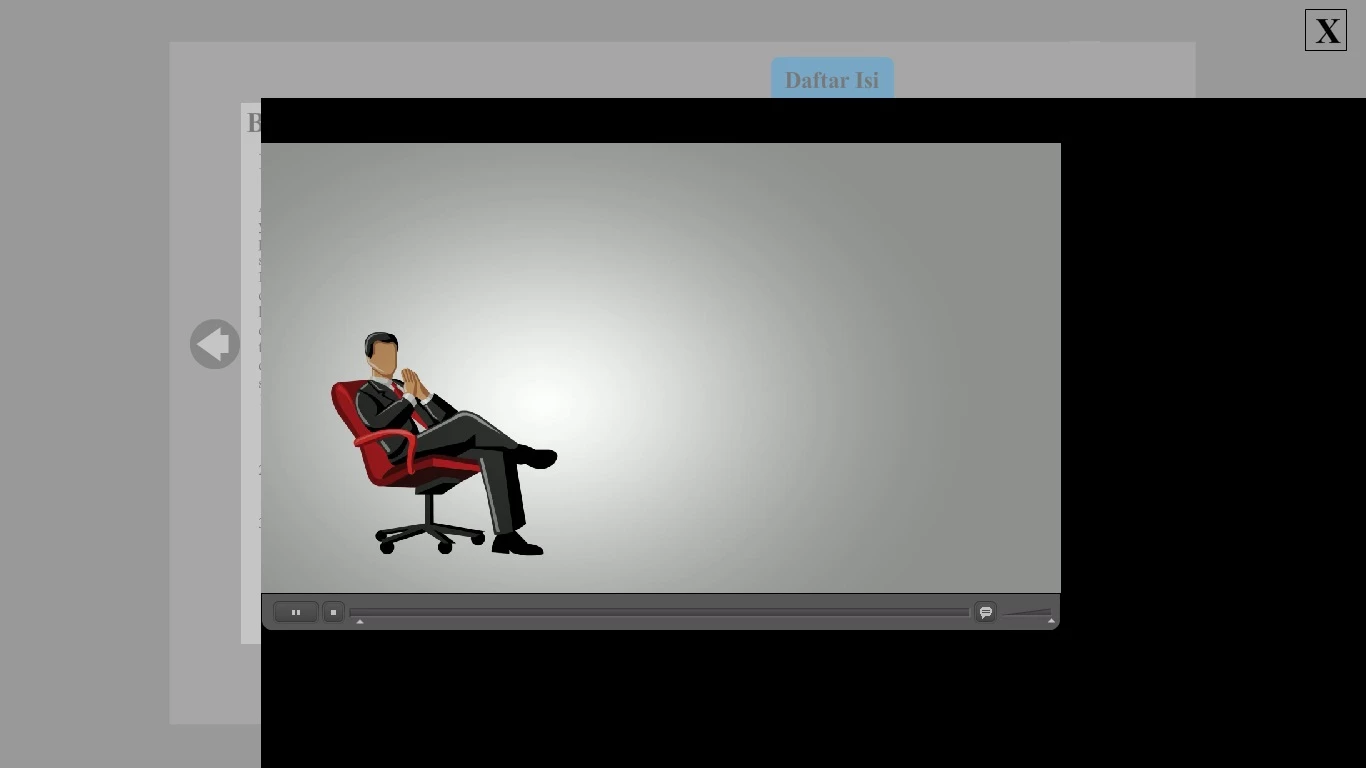
How can i get rid of the blank space there?

this is the script i write on the first frame of timeline to play fullscreen:

---------------------------------------------------------------------------------------------------------


import flash.system.fscommand;

fscommand("fullscreen", "true");

fscommand("allowscale", "false");

stage.addEventListener(Event.ADDED, FLVAdded, true);

function FLVAdded(e:Event):void

{

if (e.target is FLVPlayback)

{

e.target.fullScreenTakeOver = false;

}

}

---------------------------------------------------------------------------------------------------------

and this is the script i write on frame 310 that contain the button for viewing larger size of the swf.

---------------------------------------------------------------------------------------------------------

ekonomi_1_button.addEventListener(MouseEvent.CLICK, fl_ClickToLoadUnloadSWF_20);

import fl.display.ProLoader;

import flash.display.Loader;

var fl_ProLoader_20:ProLoader;

//This variable keeps track of whether you want to load or unload the SWF

var fl_ToLoad_20:Boolean = true;

function fl_ClickToLoadUnloadSWF_20(event:MouseEvent):void

{

  if (fl_ToLoad_20)

  {

  fl_ProLoader_20 = new ProLoader();

  fl_ProLoader_20.load(new URLRequest("swf/Ekonomi_1_1.swf"));

  addChild(fl_ProLoader_20);

  }

  else

  {

  fl_ProLoader_20.unload();

  removeChild(fl_ProLoader_20);

  fl_ProLoader_20 = null;

  SoundMixer.stopAll();

  }

  // Toggle whether you want to load or unload the SWF

  fl_ToLoad_20 = ! fl_ToLoad_20;

  Ekonomi_1_1.stop();

}

---------------------------------------------------------------------------------------------------------

anyone help me please..

This topic has been closed for replies.
Correct answer kglad

again, that line makes no sense because the stage has no such property.

if your flvplayback component has instance name, flv_pb replace:

////////////////////////////////

stage.addEventListener(Event.ADDED, FLVAdded, true);

function FLVAdded(e:Event):void

{

if (e.target is FLVPlayback)

{

e.target.fullScreenTakeOver = false;

}

}

//////////////////////////////////////

with

//////////////////////////////////////

flv_pb.addEventListener(Event.ADDED_TO_STAGE, FLVAdded, true);

function FLVAdded(e:Event):void{

flv_pb.fullScreenTakeOver = true;  // if you want your flv_pb to fill the screen.  otherwise, use false

}

///////////////////////////////////////////////////

1 reply

kglad
Community Expert
Community Expert
October 10, 2014

assign the fullScrenTakeOver property of your flvplayback component to be true if you want it to fill the screen.

the stage has no such property.

Participating Frequently
October 10, 2014

do you mean that i have to change my first frame script from:

e.target.fullScreenTakeOver = false;           ----->      e.target.fullScreenTakeOver = true;     ?


i changed it, the screen goes blank when i entered frame 310

kglad
Community Expert
kgladCommunity ExpertCorrect answer
Community Expert
October 10, 2014

again, that line makes no sense because the stage has no such property.

if your flvplayback component has instance name, flv_pb replace:

////////////////////////////////

stage.addEventListener(Event.ADDED, FLVAdded, true);

function FLVAdded(e:Event):void

{

if (e.target is FLVPlayback)

{

e.target.fullScreenTakeOver = false;

}

}

//////////////////////////////////////

with

//////////////////////////////////////

flv_pb.addEventListener(Event.ADDED_TO_STAGE, FLVAdded, true);

function FLVAdded(e:Event):void{

flv_pb.fullScreenTakeOver = true;  // if you want your flv_pb to fill the screen.  otherwise, use false

}

///////////////////////////////////////////////////