Known Participant
November 5, 2021
Answered

Get X,Y of a symbol inside another! (harder than it seems)

  • November 5, 2021
  • 3 replies
  • 1783 views

Hello, everybody!
I would like to know if anyone has a solution to get an element's coordinates on another symbol, but with the parent's coordinate system. let me explain:

I have a symbol called "arm" (x,y = 500,500). Inside this "arm" i have another symbol called "peg" x,y =(100, 100). If my arm is not rotated/scaled/skewed a simple sum solves my problem (x,y = 600,600), BUT when i start moving/rotating/scaling my "arm" my "peg" position is very hard to calculate. 

I've tried advanced math skills (using sin/cos to adjust the angle position) but i was not able to solve this. Does anyone have an idea? 

Thanks in advance!

This topic has been closed for replies.
Correct answer Vladin M. Mitov

@tiagosaad 

Hi,

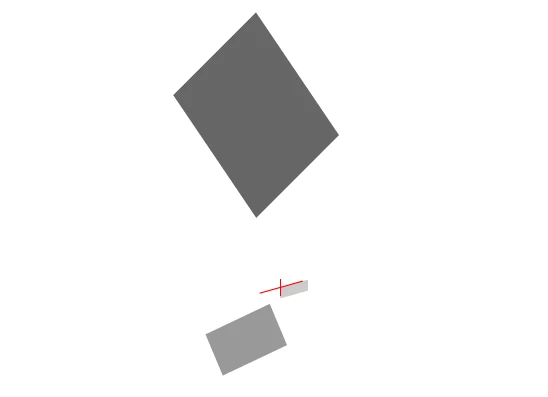
If you interested to get the coordinates of the inner element, you need to use matrix multiplication in order to take in consideration all random transformations over the outer containers. (rotation, scale, skew, etc). In the example below:

if you want to calculate the position of the red cross ( the registration point of the symbol at third level ), you should use the following:

var A = fl.getDocumentDOM().selection[0];                       // the element of the stage (selected)
var B = A.libraryItem.timeline.layers[0].frames[0].elements[0]; // element at the second level (hard coded)
var C = B.libraryItem.timeline.layers[0].frames[0].elements[0]; // element at the third level (hard coded)

var compMatrix = fl.Math.concatMatrix( C.matrix, B.matrix );
    compMatrix = fl.Math.concatMatrix( compMatrix, A.matrix );

fl.trace( "x:" + compMatrix.tx + ", y:" + compMatrix.ty  );


Try this code with the example file. Select the element on the stage and run the command - you should see printed out the coordinates of the red cross, translated to screen coordinates as they displayed in the "info" palette.

Here is the sample .FLA file


Cheers!


3 replies

Vladin M. Mitov
Vladin M. MitovCorrect answer
Inspiring
November 10, 2021

@tiagosaad 

Hi,

If you interested to get the coordinates of the inner element, you need to use matrix multiplication in order to take in consideration all random transformations over the outer containers. (rotation, scale, skew, etc). In the example below:

if you want to calculate the position of the red cross ( the registration point of the symbol at third level ), you should use the following:

var A = fl.getDocumentDOM().selection[0];                       // the element of the stage (selected)
var B = A.libraryItem.timeline.layers[0].frames[0].elements[0]; // element at the second level (hard coded)
var C = B.libraryItem.timeline.layers[0].frames[0].elements[0]; // element at the third level (hard coded)

var compMatrix = fl.Math.concatMatrix( C.matrix, B.matrix );
    compMatrix = fl.Math.concatMatrix( compMatrix, A.matrix );

fl.trace( "x:" + compMatrix.tx + ", y:" + compMatrix.ty  );


Try this code with the example file. Select the element on the stage and run the command - you should see printed out the coordinates of the red cross, translated to screen coordinates as they displayed in the "info" palette.

Here is the sample .FLA file


Cheers!


- Vlad: UX and graphic design, Flash user since 1998Member of Flanimate Power Tools team - extensions for character animation
tiagosaadAuthor
Known Participant
November 11, 2021

Wow, Vlad, you nailed it! This worked perfectly!
Thanks a lot!!!

Vladin M. Mitov
Inspiring
November 9, 2021

Hi,

In order to get the coordinates of an internal element that lies within another element, the best way is to use matrix multiplication. See the documentation about:

fl.Math.concatMatrix();


- Vlad: UX and graphic design, Flash user since 1998Member of Flanimate Power Tools team - extensions for character animation
tiagosaadAuthor
Known Participant
November 9, 2021

Thanks, Vladin.
I've read the matrix info and didn't understand much, i assume.
But now it seems that i made it work!
I put my symbol using the sum (X  = parentX+pegX) and then i changed the transformation point to match the parents transformation point. I applied the same parameters as the parent (x,y,skew, rotation) and then returned the transformation point and transformations to it's original state.

PHEW! 😄

Thanks, everybody! 

JoãoCésar17023019
Community Expert
Community Expert
November 5, 2021

Hi.


Have you tried the localToGlobal and globalToLocal methods?


Please let us know.


Regards,

JC

tiagosaadAuthor
Known Participant
November 5, 2021

Hello, João César! 
I am trying to use this, but i have not been able to make it work.
I was not using movieclips, but graphics (better for animation). Nevertheless i 'll try a little later, but i don't think it's gonna solve my problem...
Anyway: i make my scripts in a .jsfl file and i couldn't reference the right movieclip yet. I had a grip of this element using the an.getDocument().getTimeline().layers[l].frames[f].element[0] reference and if i try to use the "localToGlobal" with it i receive a javascript error, saying "localToGlobal" is not a function. Any idea?
Thanks again.
ps: Brazilian too?

JoãoCésar17023019
Community Expert
Community Expert
November 7, 2021

Olá, Tiago!


Sou do Brasil sim. o/


Anyway, if you're coding in JSFL, then I'm afraid you're gonna have to figure it out the calculations...


But I guess if you look for similar cases in the JavaScript world (with or without libraries) you may find the answer you're looking for.


Please let us know.


Regards,

JC