
Participant
December 24, 2019
Answered

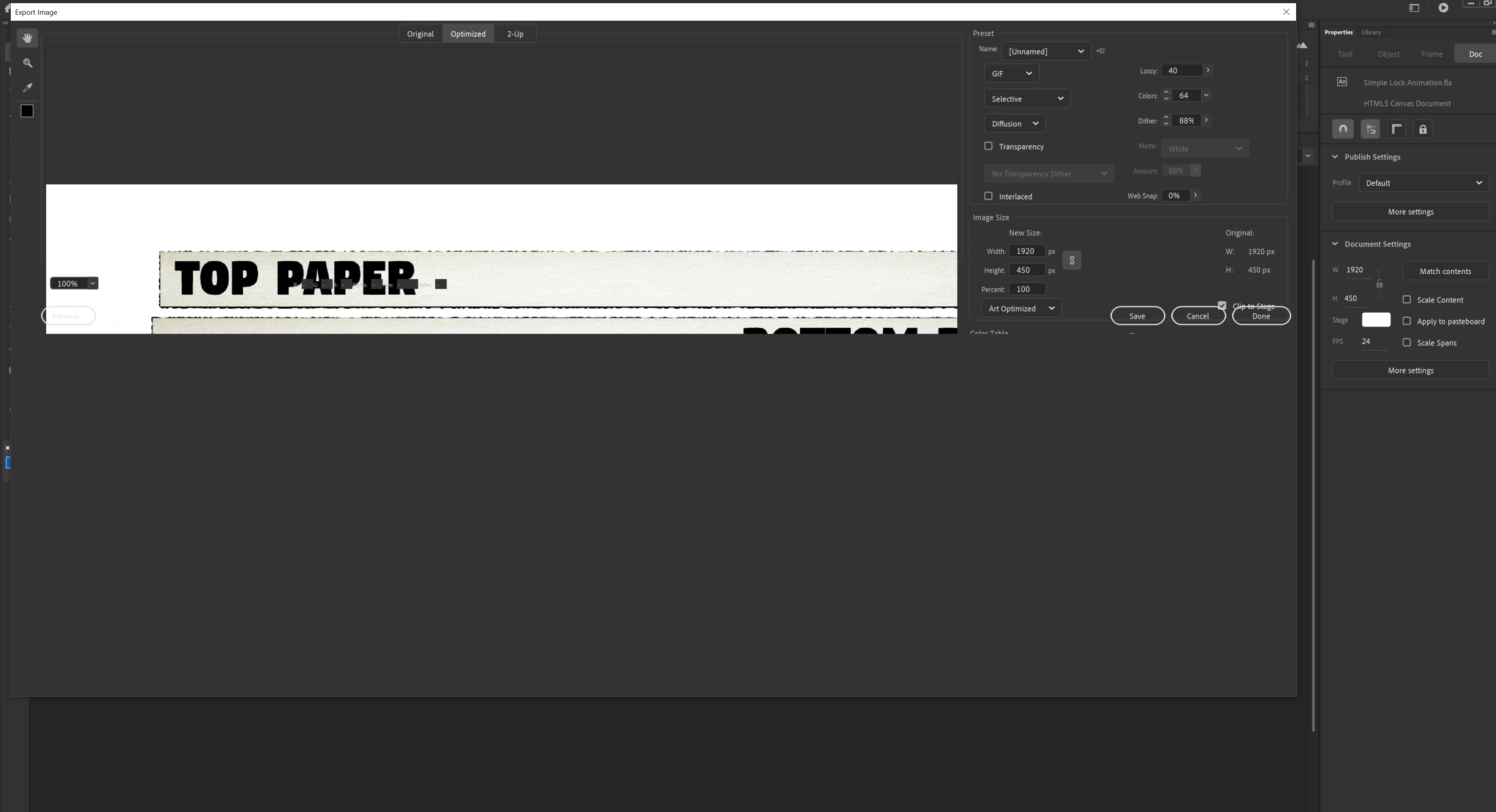
Gif Exporter Window Broken

  • December 24, 2019
  • 4 replies
  • 1906 views

Hello all!


I am having some significant issues trying to use the .gif exporter window, it doesn't fill out all the way and half the screen is missing. I have tried changing resolutions and a system reboot and I have no clue where to go next.


Any help would be very appreciated!


Thank you!
This topic has been closed for replies.
Correct answer Nick Gioia

Is your image on the stage completely? It will only make a gif out of the stage size. 

4 replies

Participant
October 8, 2020

I had this problem and I do know one way to permanently fix it. The window does not show due to how apps are sized on your screen. If you go to Display Settings in Windows, and then "Scale and Layout," you will see that most likely apps are set to be run sized at 125% or 150% followed by "(recommended)." Unfortunately, Adobe Animate doesn't seem to be designed to compensate for the increase. To fix it, you must access the Animate app with apps set to be viewed at 100% by your system. You only have to do this while exporting, although it doesn't look pretty if you're using a big monitor like me. 

Participant
April 22, 2021

This is still broken in 21.0.5 win 10 v1909, if you downgrade to 19.2.1 strangely the UI adapts to the hiDPI text scaling even at 150% so its something they had in the program previously and then Adobe broke it. I'd advise sending a bug report to Adobe , maybe if enough bug reports flow in they'd repair it (2 years late)

Known Participant
September 28, 2020

I solved this problem by chance.
With the animate version 20 on, the problem was solved by running the export menu of the animate version 19 several times and running the 20 version several times.
Removing it and reinstalling it didn't solve the problem, but the problem is solved in the same way as above, so I hope others try it too.

Participating Frequently
October 5, 2020

I am having the same issues. Is everyone using a laptop or pc? I'm on a laptop. My instructior advised moving to a pc, but I don't have access to one (online class, no lab PCs available at my location - stupid Covid!).

Participating Frequently
October 5, 2020

Also, I'm unable to install the 2019 version from Creative Cloud - only the '20 version is available.


Participant
May 24, 2020

Hi all, I am experiencing the same issue. Has anyone come across any solutions? Much appreciated 🙂

Known Participant
September 28, 2020

I solved this problem by chance.
With the animate version 20 on, the problem was solved by running the export menu of the animate version 19 several times and running the 20 version several times.
Removing it and reinstalling it didn't solve the problem, but the problem is solved in the same way as above, so I hope others try it too.

Known Participant
September 28, 2020

But it doesn't seem to be a permanent solution. Because if you turn off the computer and turn it on again, it will go back to its original state. Still, if you use the same method, you can see the window properly.

Nick GioiaCommunity ExpertCorrect answer
Community Expert
December 27, 2019

Is your image on the stage completely? It will only make a gif out of the stage size. 

snmw
Participant
February 14, 2020

I'm experiencing the same issue in Animate 20.0.2 on Windows 10. The bottom portion of the Export Image window is cut off. The preview area also seems to be incorrectly sized.


It has nothing to do with the size of what's on the stage. I get the same issue with an empty stage. I've also tried changing the screen resolution and the DPI settings for Animate. No help there.


I don't recall seeing this issue in Animate 19.x.

Known Participant
April 10, 2020

Have you solved this problem?