

Yura Timoshenko
Inspiring
June 28, 2022
Answered

Glitching Animate previews

  • June 28, 2022
  • 2 replies
  • 582 views

Greetings friends!

I want to express dissatisfation with persistent glitching. Specs are below for technical people and curious bystanders. In short, I have all latest updates, when I test my very basic HMTL5 canvas, (not even animated, for the love of God almighty) I cannot see changes in preview. It is a one frame small banner, 150x800 pixels, static. With 2 small pictures and 2 small texts. I just want to adjust object alighnment for export, to try and make objects align to the sides of canvas, to distribute evenly if possible. So every time I do test preview or publish to various locations and open HTML, regardless of changes, it just shows me the same preview. Only when I delete generated files, close and open Animate and publish again, I can see changes, not when I make any changes to canvas publish settings, such as Make responsive, and others in the same tab, they are not shown in preview until I delete all generated preview data again (

I have 
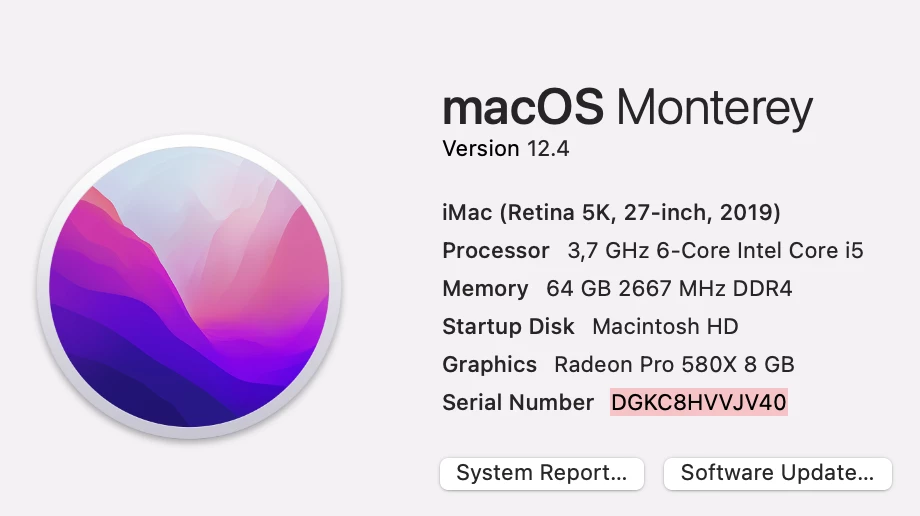
Adobe subscription with all software updated in real time. No other applications running, plenty of memory, clear case of glitching it seems. Has anyone else experiences something like that?

 

    This topic has been closed for replies.
    Correct answer JoãoCésar17023019

    Hi.


    Are you by any chance including the JavaScript in the HTML? If so, try disabling this option.


    If that's not the case, you could also be facing some browser cache issue. Try cleaning your cache or using another browser.


    If these tips don't work, try reinstalling Animate or installing another version.


    And if everything fails, let the Animate team know about this issue:

    https://www.adobe.com/products/wishform.html


    Regards,

    JC

    2 replies

    JoãoCésar17023019
    Community Expert
    JoãoCésar17023019Community ExpertCorrect answer
    Community Expert
    June 29, 2022

    Hi.


    Are you by any chance including the JavaScript in the HTML? If so, try disabling this option.


    If that's not the case, you could also be facing some browser cache issue. Try cleaning your cache or using another browser.


    If these tips don't work, try reinstalling Animate or installing another version.


    And if everything fails, let the Animate team know about this issue:

    https://www.adobe.com/products/wishform.html


    Regards,

    JC

    kglad
    Community Expert
    Community Expert
    June 28, 2022

    how are you testing?  from within animate (control>test movie>in browser) or some other way?

    Yura Timoshenko
    Inspiring
    June 29, 2022

    yes, the same results whether I do test movie or publish. So it seems like a problem with live updates or something, or exported preview files are not overwritten as they should

    With the bestestest wishes! )
    kglad
    Community Expert
    Community Expert
    June 29, 2022

    click file>publish settings and embed a screenshot of those settings.