

avid_body16B8
Legend
July 30, 2018
Answered

gotoAndPlay() does not work

  • July 30, 2018
  • 2 replies
  • 3282 views

I am not sure why this is not working.

Setup:

  1. one button on main stage -  instance name is nativeAmericanBtn
  2. one movieclip on main stage - instance name is instructions
  • frame 0 has no label and has action this.stop();
  • frame1 has label "start"
  • timeline  at 5 seconds has a 1 sec transition opacity from 100 to 0 
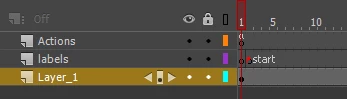
I guess I could have use fadeout in code instead or even a timeout function but playing a timeline seemed easy enough. Apparently no since it does not work.

When I use like 13 it works. when I use line 12 it does not work. So the scope is correct. Why then is it not playing the instruction timeline?

Everything else in that function is working.

var nativeSym = new lib.nativeSymbol();

this.nativeAmericanBtn.addEventListener("click", nativeAmericanInfo.bind(this));

function nativeAmericanInfo(){

    this.click = createjs.Sound.play("click", "none", 0, 0, 0, 0.5);

    this.blank.addChild(nativeSym);

    geronimoONOFF = 1;

    nativeSym.geronimoBtn.geronimoHL.visible = false;

    eastmanONOFF = 1;

    nativeSym.eastmanBtn.eastmanHL.visible = false;

    this.gotoAndPlay("pages");

    this.instructions.gotoAndPlay("start"); // this does not work

    //this.instructions.visible = false; // this works

}
This topic has been closed for replies.
Correct answer kglad

you can use jquery if you add a component or include it:

it's hard to display a cached version using animate test, but it's possible.

2 replies

Legend
July 30, 2018

I just tried a mini setup matching what you described, and it worked fine using this code in the main timeline:

this.bob.addEventListener("click", doBob.bind(this));

function doBob() {

    this.instructions.gotoAndPlay("start");

}

In your code, before the this.instructions.gotoAndPlay line, put console.log(this.instructions);

If the instructions clip (not "timeline") is fully instantiated at this point, the console should display all its properties, including its current frame and the labels array. If not, something is wrong.

avid_body16B8
Legend
July 30, 2018

Great input that I will use in new projects.

I did put several console logs in the instructions movie clip.

At first i put one at the start label and then one at 5 seconds and only the first one displayed in the console which was strange.

Then I added another console.log at 1 second and it did not show in the console which is strange because I have no stop anywhere on that timeline except on first frame and last frame.

Anyway I tested the file with 2 console logs - not showing the 5s ones then with 3 logs - still nothing

Then I tested it again to be sure and it worked.

So I am wondering - is there a posibility that the code was not replaced properly in the js file at publish time?

I have my browser set to clear the cache at every load, so it should not be that.

Legend
July 30, 2018

resdesign  wrote

I did put several console logs in the instructions movie clip.

That's not what I suggested. By putting a log in the click event handler, you can verify that it is trying to talk to something that actually exists.

kglad
Community Expert
Community Expert
July 30, 2018

if your screenshot shows the instructions timeline, put an alert on that 'start' frame and retest.

avid_body16B8
Legend
July 30, 2018

Good idea! Yes it is the instructions timeline. So, I put in a console.log at the "start" label and I get it in the console and I put another console.log at 5 seconds but I do not get that one. This tells me it is not playing the whole timeline.

So I have another stupid question: Does the main timeline need to be at least the same length than the one of the movie clip for this movie clip whole timeline to show? I would think not but again I am just an Edge Animate CC expert and just now trying Animce CC which puzzles me at times.