
SandyDebreuil
Known Participant
November 3, 2021
Question

Graphics with Nested Groups Mis-Align Over Time

  • November 3, 2021
  • 2 replies
  • 739 views

Hi All,

I haven't been able to find anything on this, hopefully someone can help?

When I create characters with discreet parts in order to animate them puppet style, I group the parts. So draw two eyes, group them, draw two ears, group them, align to head, group everything, etc. So I end up with a lot of groups, which is convenient for my workflow. I then save the characters in a 'Character File'.

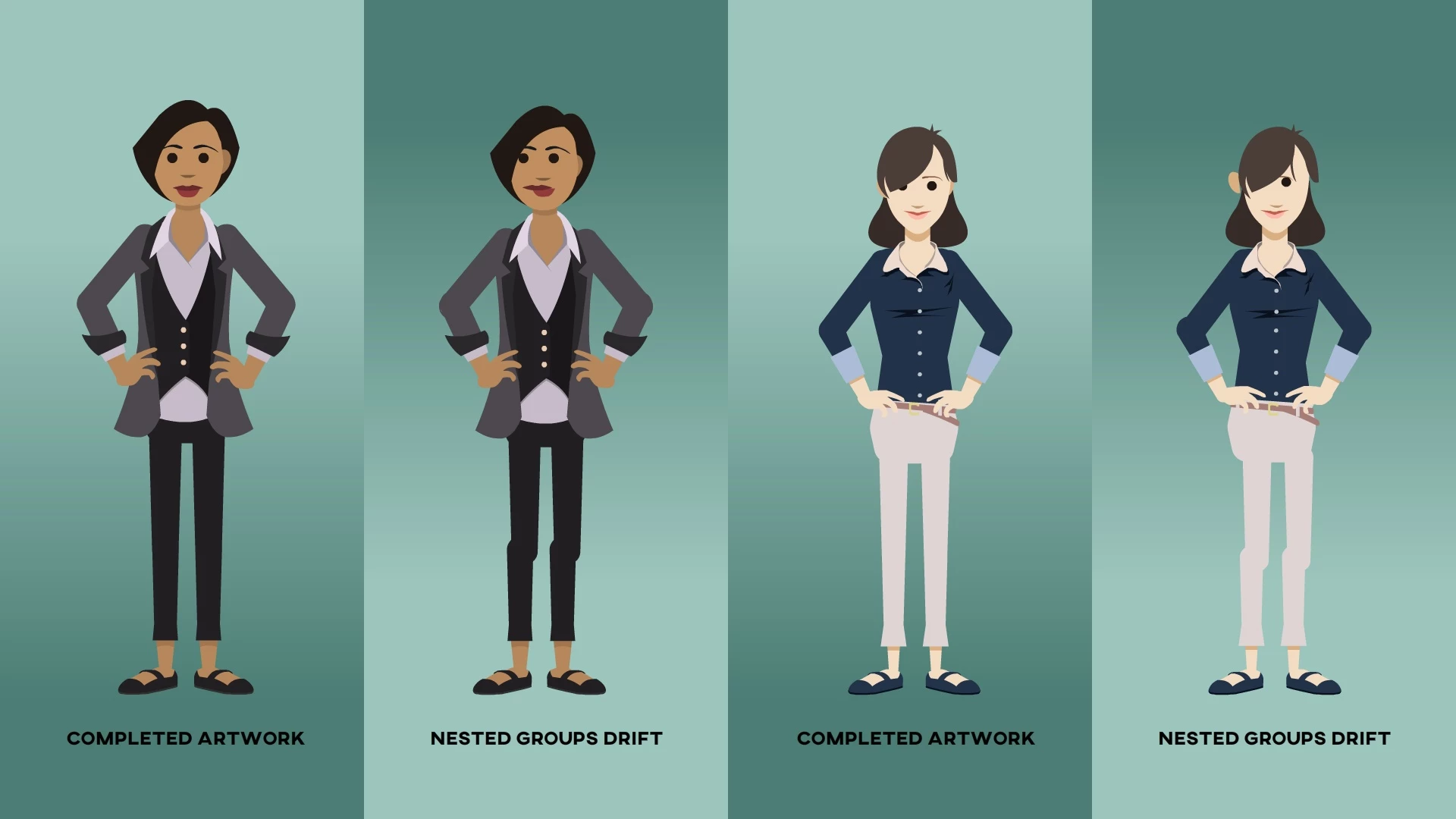
My issue is that when I come back to the file, grouped objects have 'drifted', sometimes more, sometimes less. It's not a huge deal to re-align them, but it is a pain in the butt to have to do this. Has anyone else had this experience? Any workarounds other than un-grouping everything every time?

Please see the graphic, it explains what's happening a lot better 😉

Thanks!
    This topic has been closed for replies.

    2 replies

    Community Expert
    November 5, 2021

    Make every objects a graphic symbols that should help them stay in there stop.  Then distribute to layers so each individual part is on a layer. 

    SandyDebreuil
    Known Participant
    November 5, 2021

    Thanks NIck, I think you're right and that should work. I was hoping to avoid so many layers and complexity, but I guess that's the way to go. 

    Thanks again!

    peterp12625434
    Participating Frequently
    December 19, 2024

    YES!  Hitting Ctrl Shift D to distribute to layers (keep them in a folder) seems to do it.  Ready for animation.


    For those using Animate to do design work only ie. for character illustrations, you can Distribute to layers, convert to fill any lose vectors you have, select the entire drawing, cut, copy and paste into a new layer in a new group.  Thats if you want the entire thing flattened and have no groups but still be able to make small edits.  I found this works best.  Thats doesnt take long at all.   -thanks boys~

    _keyframer
    Community Expert
    Community Expert
    November 4, 2021

    I've never experienced this before. Are these grouped assets converted to Symbols and animated before closing the file or is the drifting happen as just grouped objects, closing and then opening the file again?

    Animator and content creator for Animate CC
    SandyDebreuil
    Known Participant
    November 4, 2021

    They are not converted to Symbols or Movie Clips, just grouped objects. And it seems that every time you open and close the file, they drift by a few pixels. It also seems that the more nested they are, the more they drift, but not sure about that. It's been going on for a few years, on multiple computers. As I said, it's fairly easy to re-align them, but annoying to have to do it.

    Mario_CR
    Community Expert
    Community Expert
    November 5, 2021

    Try converting the groups into symbols. Or copy-paste your layers into a brand new document, that can fix some issues sometimes.